Real-Time Data for AI Agents: Why Snapshots Fail (2026)
Real-time data for AI agents, explained through failure stories: why stale snapshots break agent actions, and how live fetches and webhooks close the gap.
A builder recently described the near-miss that changed how they think about agent data. Their outreach agent drafted a contract amendment for a vendor contact who, according to the CRM, still worked there. He had left weeks earlier. A human caught it minutes before send.
Nothing crashed. No error fired. The agent read a stale record and acted on it with total confidence.
That is the case for real-time data for AI agents in one story. This guide covers why snapshots rot, how live data actually reaches an agent, which signals deserve a webhook, and when cached data is honestly good enough.
Key Takeaways#
- Agents fail on stale data silently. No error fires; the output is just confidently wrong.
- A model cannot tell an old fact from a fresh one. Freshness must come from the data layer.
- Live data reaches an agent three ways: a REST call at request time, an MCP tool, or a webhook push.
- Match freshness to the action: draft on cached data, send on a live record.
What Is Real-Time Data for an AI Agent?#
Real-time data for an AI agent is data fetched at the moment the agent needs it, so the record reflects the world as it stands rather than as it stood at the last database refresh. The opposite is a snapshot: collected once, aging from that day on.
The distinction is not speed. A cached record can come back in milliseconds and still describe a job someone left in March. Real-time means current at read time. Not every field needs it: a founding year never moves; titles, employers, and funding stages do, and those are the fields agents act on.
Why Do Agents Fail Quietly on Stale Data?#
Agents fail quietly on stale data because an old fact and a fresh one look identical inside a context window. The model has no marker for which value is current, so it reasons cleanly over wrong inputs and delivers the result with the same confidence either way.
One builder running a daily document-check task watched this happen on schedule. The agent kept reusing yesterday's numbers after the underlying docs had changed, and it sounded equally sure both days. Their fix was procedural: keep perishable data out of carried context, re-fetch in a clean pass, and timestamp every value.
A dashboard gets a human sanity check before anyone acts on it. An agent is the actor. Whatever staleness survives the data layer goes straight into a message, a decision, or a contract amendment addressed to someone long gone.
What Real-Time Data Is NOT#
Three things get mistaken for real-time data, and each one fails an agent in a different way. It is not the model's own knowledge, it is not a bigger cached dataset, and it is not your internal event stream. Naming the borders shows what the agent is missing.
Not the model's knowledge. Training data froze at a cutoff. The model knows B2B facts the way a printed directory does: accurately, as of the print date, and less accurately every month after.
Not a bulk dataset. Providers like Coresignal or People Data Labs license large datasets refreshed on a cycle. They are a solid fit for batch analytics and model training, but between refreshes every record drifts, and an agent reads that drift as truth.
Not your event stream. A Kafka pipeline moves events your own product generates. It says nothing about the outside world, and the outside world is where a prospect quietly changes jobs.
How Can You Connect AI Agents to Live Data Feeds?#
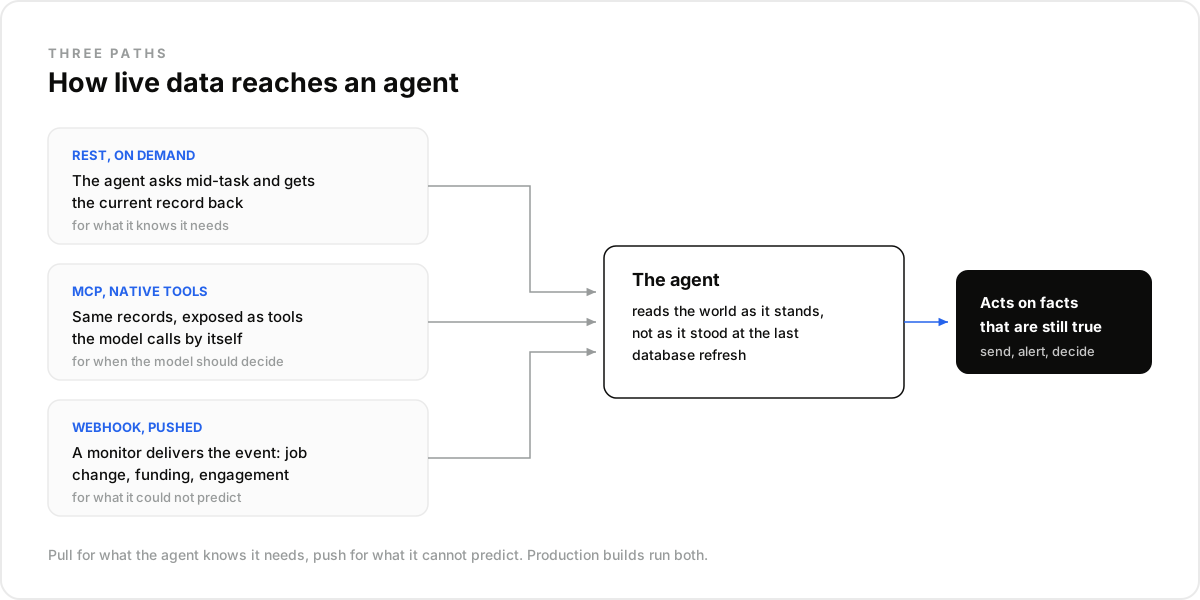
Live data reaches an agent through three paths: a REST call made at request time, an MCP tool the agent invokes natively, and a webhook that pushes an event the moment something changes. Most production builds combine on-demand calls with webhooks for the signals that cannot wait.
The REST path covers what the agent knows it needs: it queries a live endpoint mid-task and acts on what comes back. MCP wraps that access as native tools, the cleanest way to give an agent access to B2B data without glue code.
Webhooks cover what the agent cannot predict. A monitor is one request: a signal, a target, and your endpoint.
curl -X POST https://api.dataforb2b.ai/monitors \
  -H "api_key: YOUR_api_key" \
  -H "Content-Type: application/json" \
  -d '{
        "signal": "post_engagement",
        "watch": "https://social.com/in/jane/",
        "url": "https://your-server.com/webhooks/b2b-signals"
      }'
The signal catalog behind the same API also covers job changes, founder moves, and funding events, so the agent hears about a buying window instead of polling.
You can wire all three paths against live records today. Start on the free tier from the pricing page.
What Fixes the Wrong-Contact Problem?#
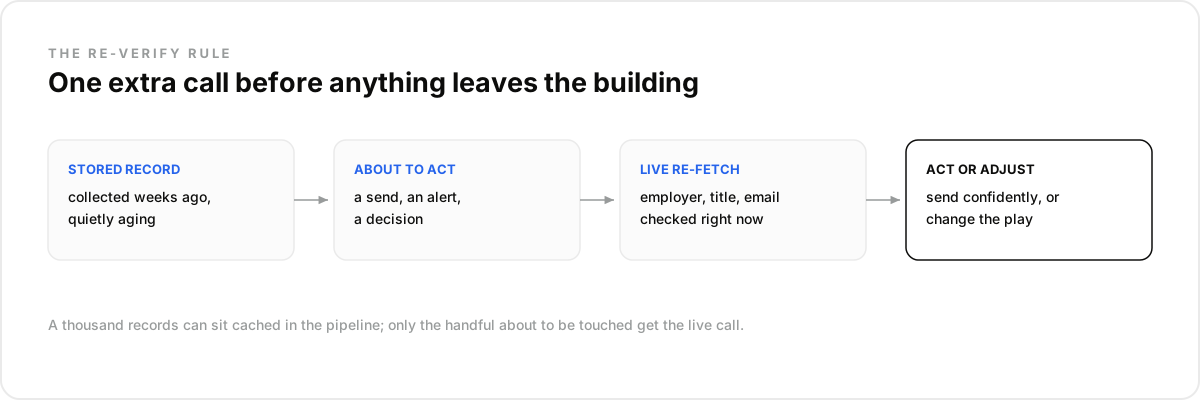
The fix is a re-verify rule: the agent fetches the live record right before any action that leaves the building. Not when the list was built, not on a weekly refresh, at send time. One extra call turns the wrong-contact story from a near-miss into a non-event.
In practice it is one enrichment request: the agent holds a profile it collected weeks ago; before drafting, it re-fetches the same identifier live and diffs what matters: employer, title, email. If the contact moved, the play changes instead of the message bouncing.
The cost logic holds because the rule is scoped to actions. A thousand records can sit cached in the pipeline; only the handful about to be touched get the live call.
Can Social Posts Be a Real-Time Signal?#
Yes, and they are one of the freshest sources an agent can read. A post asking "anyone know a tool for X?" is a buying signal with a timestamp measured in hours. Searching posts by keyword over the past day gives the agent intent that no database row carries.
The same search returns the people engaging with a competitor's announcement, each one a warm profile the agent can verify and act on while the thread is still live. A snapshot has no equivalent for this: the signal exists precisely because it is current.
Should Every Call Be a Live Fetch?#
No. The honest answer is that live fetches belong where the agent acts, and cached reads belong where it browses. A live read costs roughly double a cached one, so the discipline is to spend freshness on sends and decisions, not on lists nobody touches.
Best for: agents that act at request time, on sends, alerts, and decisions. Not for: a pipeline that batch-enriches a static list once a quarter. A cached provider is cheaper there, and honestly sufficient.
Whichever provider you pick, compare on the same five criteria:
- Freshness at read time, not claimed refresh frequency.
- Push signals, so the agent is told instead of left polling.
- Filter depth: can the agent express exactly who it needs?
- REST and MCP over the same records, so access fits your stack.
- A cost model that lets you choose cached or live per call.
That last point is the trade-off in miniature. A data layer such as DataForB2B lets the agent flip between cached and live per request, so freshness becomes a per-decision choice instead of one blanket setting applied to everything.
See how per-request freshness fits your build. Grab an API key on the pricing page.
The Mistake Most Teams Make With Freshness#
The mistake most teams make is treating freshness as a launch property. Data gets wired in once, the demo runs on records pulled that same week, and the agent ships. Months later it is quietly running on history, and nothing in the logs says so.
One founder who tested the usual lead databases before an outreach push found the aging directly in the exports: companies that had shut down, contacts two roles behind, public website emails dressed up as enrichment. They ended up building a live verification step into the agent itself before anything went out.
In our experience the fix is boring and it works: timestamp every stored fact, re-fetch anything perishable right before an action, and review freshness on a schedule. What surprised us is how rarely that last review exists at all.
How Do You Run This Setup in Claude or Any LLM Agent?#
You can run the whole freshness discipline without writing code. Connect the data layer to Claude over MCP and the re-verify rule, the monitors, and the live-versus-cache choice all become plain-language instructions the agent executes with live tools.
- Create a free account at app.dataforb2b.ai/signup and grab your API key.
- In Claude, open Settings, then Connectors, and add https://mcp.dataforb2b.ai/mcp. The same server plugs into Cursor, VS Code, ChatGPT, or any MCP-enabled agent.
- Paste the brief: "Re-verify these 20 contacts against live records, flag anyone who changed jobs, and set up a monitor on the rest."
- Turn the working chat into a scheduled routine so it runs weekly without you.
Once an agent runs on live data, the practical questions shift to where to pay for freshness and how to catch drift. These five come up most.
Frequently asked questions
- How can an agent tell that a record is stale?
- By itself, it cannot. Staleness is invisible in text, so the system has to carry it: timestamp every stored value, log the source of each fact, and re-fetch anything perishable before an action. The agent does not detect stale data; the architecture prevents it.
- Do webhooks replace on-demand API calls?
- No, they cover different needs. A webhook pushes events the agent cannot predict, like a job change. An on-demand call answers questions the agent asks mid-task. Production agents use both: webhooks to hear about the world, live calls to verify before acting.
- Is cached data ever the right choice for an agent?
- Yes, often. Building a list to review later, scoring accounts in bulk, drafting messages nobody will send yet: cached reads are cheaper and fine. The rule is to upgrade to a live fetch at the moment the agent commits to an action.
- How often should an agent re-verify a record?
- Tie verification to actions, not to a calendar. Re-fetch the record right before a send, an alert, or a decision, because that is when a wrong fact costs something. A schedule that refreshes everything weekly still leaves six stale days in between.
- Does MCP make data more real-time than REST?
- No. MCP and REST expose the same live records; the difference is integration, not freshness. MCP turns the data into native tools an agent calls directly, which removes glue code. Freshness comes from fetching at read time, whichever path carries the request.