How to Give AI Agents Access to B2B Data (2026)
How to give AI agents access to B2B data: on-demand REST, native MCP tools, and webhook push, plus the iteration loop that gets an agent to the best list.
How to give AI agents access to B2B data comes down to one choice: which access pattern fits the moment your agent needs company or contact information. Get it wrong and the agent stalls mid-task, or acts on records that went stale weeks ago.
Get it right and it pulls a verified decision-maker, checks headcount, and reacts to a funding round without a human in the loop.
Three patterns cover it: an on-demand REST call the agent makes mid-task, a native tool it calls through MCP, and a real-time push that wakes the agent when something changes. This guide covers each one, plus the iteration loop that gets an agent to the best list.
Key Takeaways#
- Three access patterns cover almost every case: on-demand REST, native MCP tools, and real-time push through monitors.
- Use REST when your code drives, MCP when the model should decide, and push when the trigger is an external event.
- Natural-language search converts a brief into typed filters; a count preview lets the agent refine before it spends.
- The best lists come from iteration: draft, resolve, count, tighten, then run.
What does it mean to give an agent access to B2B data?#
It means wiring the agent to a live source of company and contact records it can query while it runs, not a spreadsheet it loaded once at startup. The agent looks up a person, confirms a firm, or catches an event, then acts on the result inside the same task.
The hard part is choosing how the agent reaches it. A research agent that pauses to fetch one contact has different needs from a monitoring agent that must react the second a prospect changes jobs. Match the access method to the moment and everything downstream gets cheaper.
Which access pattern should you use?#
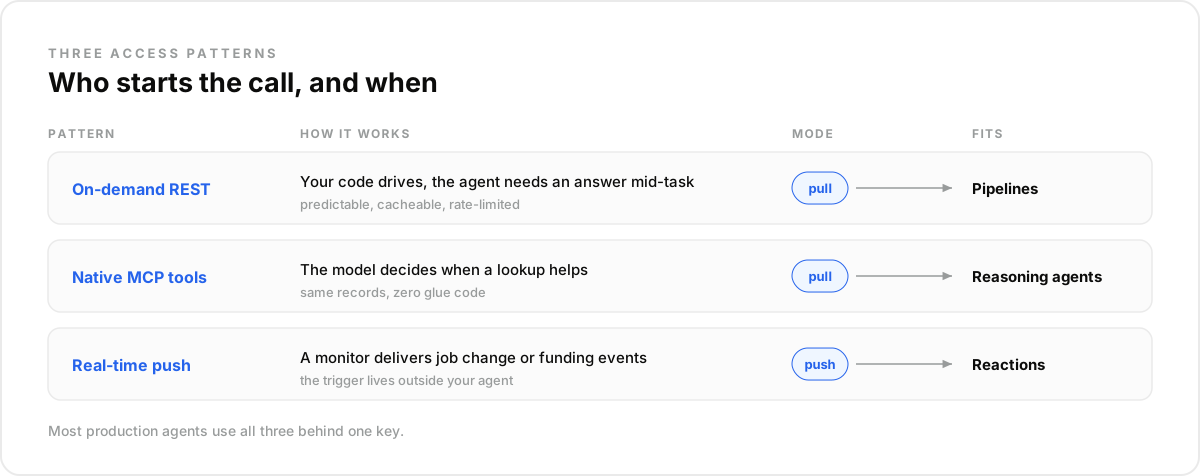
Pick by two questions: who starts the call, and when the data is needed. Code-driven and mid-task points to REST. Model-driven and unpredictable points to MCP tools. Event-driven and external points to a monitor that pushes the change to you. Most production agents end up using all three.
- On-demand REST when your code drives the flow and needs an answer mid-task. The agent hits an endpoint, gets JSON back, and keeps going.
- Native MCP tools when the model itself should decide whether to fetch data. The same records become tools the agent calls like any function.
- Real-time push when the trigger lives outside your agent, like a job change or a funding round: you register a watch once, and the event comes to you.
How do agents pull B2B data on demand with REST?#
The agent makes an HTTP request the instant it needs a record, then continues with the response. This is the default when your orchestration code, not the model, controls timing. It is predictable, easy to cache, and easy to rate-limit.
Three endpoints do most of the work. Search People (POST /search/people) queries 800M+ profiles with 40+ typed filters: title, seniority, location, current company size. Search Company covers 75M+ firms for firmographic lookups. Enrich Profile takes a person you already found and returns the live record with a verified work email.
A typical mid-task sequence:
- The agent calls Search People with the filters for its target segment.
- It picks the best matches and passes them to Enrich Profile for a reachable email.
- It calls Search Company to confirm the firm still matches on size and industry.
- It writes the enriched record to its own store and moves on.
Each call returns structured JSON, so the agent branches on the result without brittle parsing.
How do agents call B2B data as native MCP tools?#
With the Model Context Protocol, the same company and contact data becomes tools the model calls on its own, with no glue code around each request. The agent reads the tool descriptions, decides when a lookup helps, and invokes search or enrichment the way it would call any function.
In Claude, connect the MCP server, then ask in a normal chat: "Which of these 50 accounts raised a round this quarter?" The agent calls the company search tool, reads live results, and answers from current data instead of guessing. Wrap the same flow in a scheduled routine and every Monday brings the accounts that raised over the weekend.
One builder wiring enrichment into an agent pipeline summed up the appeal: a tool call is four lines of JSON, and the response chains into the next step, no parser.
Ready to run it? Create a free account at app.dataforb2b.ai/signup, add https://mcp.dataforb2b.ai/mcp under Settings, then Connectors, and wrap the Monday check into a scheduled routine so it runs without you. The same connector works in Cursor, VS Code, or any MCP-enabled agent.
How do you push real-time B2B signals to an agent?#
For events you cannot poll for cheaply, register a monitor and let the data come to you. One request tells the layer which signal to watch, whom to watch, and where to deliver the event. When it fires, your agent receives a webhook and reacts in seconds instead of on a nightly batch.
POST /monitors
{
  "signal": "post_engagement",
  "watch": "https://social.com/in/jane/",
  "url": "https://your-app.com/webhooks/agent"
}
The signal catalog behind GET /signals also covers job changes, founder moves, and funding events. A funding monitor can have an agent re-score the account and draft outreach the same hour the news lands. For the deeper pattern, see our guide to real-time data for AI agents.
How does natural-language search fit in?#
Natural-language search turns a plain-English brief into the exact typed filters the search endpoints accept. The agent sends "heads of data at Series B fintechs in Europe" and gets back structured conditions: funding stage as a normalized enum, countries as ISO codes, titles as current-title filters.
Two flavors exist. Text to Filters does the translation and hands back the filter set. Reasoning Search goes further: an agent-side search agent probes the database, asks a clarifying question when the brief is ambiguous, and builds the strongest query it can. The output is the same filter object every pattern accepts.
How does an agent iterate to the best list?#
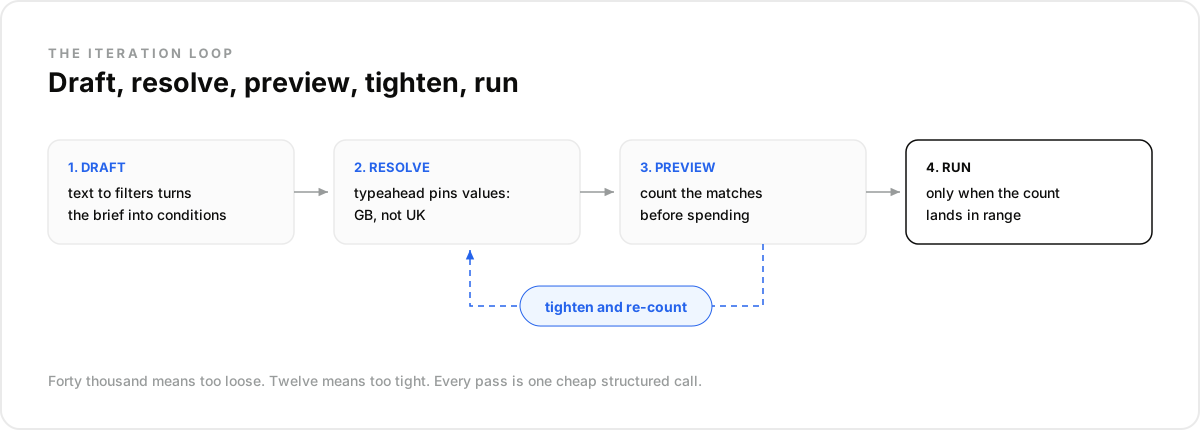
The best lists come from iteration, not from one perfect query. The loop is short: draft the filters, resolve the fuzzy values, preview the count, tighten, and only then run the search. Each step is a cheap structured call, so an agent runs in seconds what an analyst does in an afternoon.
- Draft. Text to Filters turns the brief into typed conditions the agent can inspect.
- Resolve. The typeahead endpoint pins fuzzy values to the exact stored ones: GB rather than UK, the precise industry label.
- Preview. POST /search/count estimates how many records match, without running the search. Forty thousand means the thesis is too loose. Twelve means it is too tight.
- Tighten. The agent adds a company-size range, narrows tenure, and counts again.
- Run. Only when the count lands in range does it execute Search People or Search Company and spend real credits on results.
This is what typed filters buy you. Every condition uses a checkable operator, so the agent can reason about the query itself, not just the results. The mistake most teams make is one-shotting the query and paging through junk. In our experience the count preview is the most valuable call in the loop, and what surprised us is how few builds use it at all.
How do you combine the patterns into one agent workflow?#
Real agents rarely use one pattern alone. The strongest setups chain them into a single loop: find, enrich, watch, react. Here is an outbound workflow a B2B data layer can power end to end, using each pattern where it is strongest.
- Find. The agent turns a plain-language brief into filters, previews the count, tightens, and runs Search People for the target list.
- Enrich. It calls Enrich Profile on the shortlist through an MCP tool, for verified work emails.
- Watch. It registers a monitor on every account, so a job change or funding round triggers a callback.
- React. When a webhook arrives, the agent re-scores the account, refreshes the contact with a live REST call, and drafts the message.
Embedding this loop is direct when the data layer ships all three access modes behind one key, which is how DataForB2B is built. See how teams wire it into their own product on the embedded B2B data API page, and prototype the loop on the free tier.
An agent with the right access pattern stops guessing and starts checking. Wire find, enrich, watch, and react against live B2B data, starting on the pricing page.
Frequently asked questions
- What is the safest way to give an agent access to B2B data?
- Scope it. Use a dedicated API key, expose read-only search and enrichment tools first, and log every call with a timestamp so any output traces back to a record. Prototype in a chat session over MCP before wiring automation, and gate write actions behind review.
- Should you wire REST or MCP first?
- MCP first if you want proof fast: connect the server, ask real questions in a chat, and validate the data on your own ICP before writing code. REST first if your orchestration already exists and the agent slots into it. Both read the same records.
- Where do webhooks fit in agent access?
- Webhooks cover the triggers your agent cannot predict: a decision-maker changing jobs, a funding round, fresh engagement on a watched post. You register a monitor once and events arrive as pushes. The agent stops polling and starts reacting.
- Can an agent search B2B data in natural language?
- Yes. Text to Filters converts a plain-language brief into typed filter conditions, and Reasoning Search builds and refines the whole query, asking a clarifying question when the brief is ambiguous. The output is the standard filter object, so it runs anywhere the structured filters run.
- How do you keep costs under control once agents have access?
- Preview before you spend: a count estimate costs almost nothing and catches oversized queries. Enrich shortlists rather than full result sets, cache list-building reads, and keep per-call credit usage visible in logs. Cost problems in agent systems are almost always unreviewed loops.