5 Unipile Alternatives 2026: Pricing, Channels and Limits
Unipile alternatives for 2026: published pricing for LinkupAPI, Nylas, Zernio, Edges and Swarmhit, what each one meters, and which unlimited claims hold up.
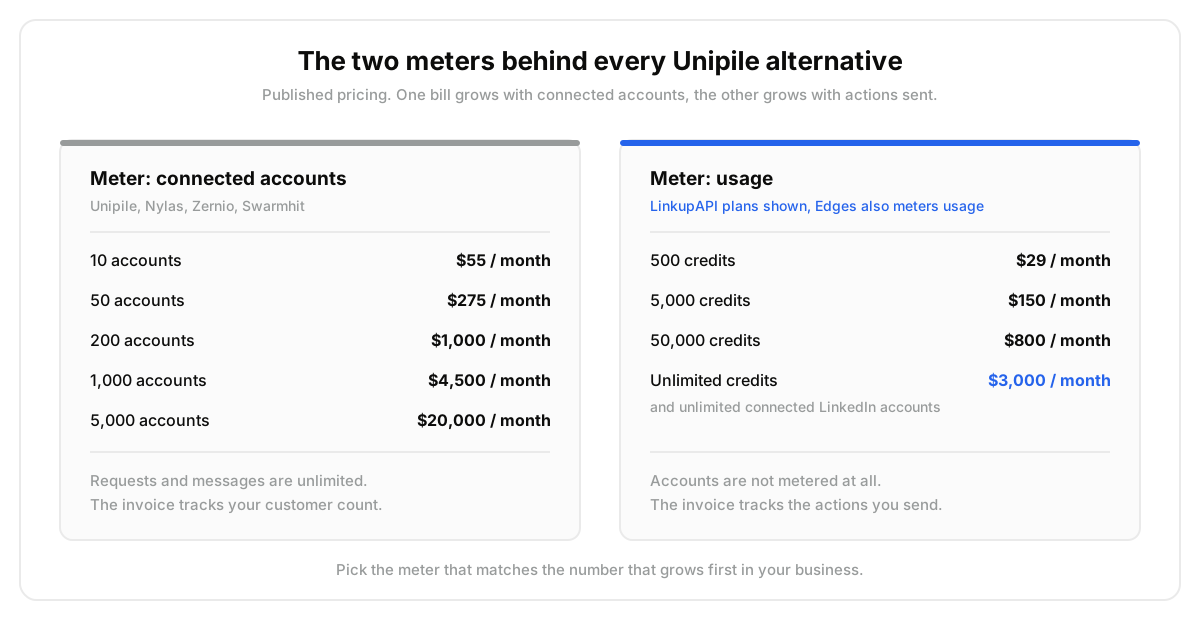
Unipile bills by the connected account. Not by the message, not by the API call.
That single design choice is why most searches for Unipile alternatives start. Ten accounts cost $55 a month. A thousand accounts, at the published $4.50 rate, cost $4,500. Usage in between is unlimited, which is excellent right up until the account count is the number that grows.
So the question is not which product is better. It is which meter matches the shape of your workload.
Five options below, side by side: LinkupAPI, Nylas, Zernio, Edges and Swarmhit. Published prices, the channels each one really covers, and what happens to the bill at 50 and at 500 accounts.
Key Takeaways#
- Three meters exist. Unipile, Nylas, Zernio and Swarmhit price the connected account or seat with no ceiling. LinkupAPI prices the account too, then caps the bill at $3,000. Edges prices usage plus identities.
- The crossover is account count. 1,000 seats on a per-account meter is $4,500 a month. Under a capped plan the same 1,000 seats cost $3,000, and so do 10,000.
- Unlimited is mostly a word. One published plan removes the account meter. Swarmhit sells unlimited senders at $2,499, on its managed platform rather than its API tier, and Edges bills every sending account as an identity.
- Channel coverage splits hard. Only LinkupAPI and Unipile cover LinkedIn plus email in one key. Nylas is email and calendar, Edges and Swarmhit are LinkedIn only.
How Do the 5 Unipile Alternatives Compare?#
Everything below is published pricing, normalised to dollars, with Unipile as the baseline row. The two scale columns are the ones that decide the question, because they show what each meter does to the same business at 50 and at 500 connected accounts.
| Tool | Channels | You pay for | Entry price | At 50 accounts | At 500 accounts | Unlimited accounts | Best for |
|---|---|---|---|---|---|---|---|
| Unipile (baseline) | LinkedIn, Instagram, WhatsApp, Telegram, email, calendar | Connected accounts | $55/mo up to 107 day trial, no card | $275/mo$5.50 an account | $2,250/mo$4.50 an account | NoBilled per account at every tier | One product, many channels, few accounts |
| 1. LinkupAPI | LinkedIn, email, WhatsApp | Connected accounts, capped | $55/mo up to 10No free tier | $275/mo$5.50 an account | $2,250/mo$4.50 an account | Yes$3,000/mo flat from about 640 accounts | Multi tenant products and AI outreach agents |
| 2. Nylas | Email, calendar | Connected accounts | $0 free planthen $15/mo for 10 | EnterprisePro stops at 25 accounts | EnterpriseQuoted, volume bands | NoPro caps at 25 accounts | Email and calendar at compliance grade |
| 3. Zernio | 16 social networks, 7 ad networks | Connected accounts | $6 each after 2 free2 accounts free forever | $168/moGraduated bands | $718/mo$1 an account past 100 | No$1 each past 100, forever | Publishing across many networks |
| 4. Edges | Credits plus identities | $275/mo, 10k credits100 credits free, no card | Quoted50 billed identities | Quoted500 billed identities | NoEvery sending account is a billed identity | LinkedIn data depth, enrichment heavy | |
| 5. Swarmhit | Sender seats | $39/mo per sender7 day trial | $999/moAgency plan, 50 senders | $2,499/moUnlimited plan | OnlyOn the $2,499 platform plan, not the API tier | Agencies that want the campaign layer managed |
Scroll sideways for every column
Two columns deserve a warning label. The scale columns assume accounts alone grow, so a usage meter still bills you for what you send. And the unlimited column is where marketing copy and pricing pages disagree most often in this category.
What surprised us while pulling these pages together was how little separates them on protocol. Unipile, Nylas, Zernio, Swarmhit and LinkupAPI all publish an MCP server. Edges does not. A year ago that column would have decided the table on its own.
What Does Unipile Cost in 2026?#
Unipile runs one pay as you go plan, priced per connected account. The floor is $55 a month for up to ten accounts. Past that the rate drops in bands: $5.50 an account from 11 to 50, $5.00 to 200, $4.50 to 1,000, $4.00 to 5,000, and $3.50 beyond that.
Requests and messages are not metered at all. You get 100+ endpoints, real time webhooks, hosted authentication and proxy rotation on every account, with a 7 day trial that needs no card.
Channels are the widest in this list: LinkedIn, Instagram, WhatsApp and Telegram for messaging, Gmail, Outlook and IMAP for email, Google and Outlook for calendar.
Run the account math and the shape becomes obvious. Fifty accounts is $275 a month. Two hundred is $1,000. A thousand is $4,500. Five thousand is $20,000.
For a single tenant product that is cheap and easy to forecast. For anything multi tenant, the invoice tracks your customer count rather than your usage.
Why Do Teams Look for a Unipile Alternative?#
Three reasons come up again and again. The meter stops matching the business once every customer needs their own connected account. The channel set is either too wide or missing the one thing you need. And session drops on LinkedIn create support work that nobody priced in.
Take an outbound agency running one sender seat per client, 1,200 of them. On a per-account meter at $4.00 an account that is roughly $4,800 a month before a single invitation goes out.
Under a capped plan the same 1,200 seats cost $3,000, and the bill stays there as the agency signs new clients. The mistake most teams make is comparing headline prices instead of comparing meters.
The second reason is scope. A calendar scheduling product does not need Instagram. A LinkedIn sourcing agent does not need IMAP. Paying an account rate for six channels to use one is a quiet tax.
The third is operational. Public reviews through 2026 keep naming the same pair of issues: LinkedIn sessions that drop and need the account owner to re-authenticate, and request logs too thin to explain why. Every vendor here fights the same problem. Ask each one how they surface it.
Which Unipile Alternative Fits Which Job?#
Ranked by how often each one answers the reason people leave. Number one caps the meter while keeping LinkedIn and email in the same key. The rest win on a narrower axis: email depth, publishing breadth, LinkedIn data depth, or a managed sender fleet.
1. LinkupAPI, when the account count grows faster than the volume#
LinkupAPI covers LinkedIn, email and WhatsApp through one API with 50+ endpoints, plus an MCP server so an agent calls it directly instead of through a wrapper you maintain.
Pricing is the reason it leads here. It bills per connected account, with unlimited usage and no credits: $55 a month for up to 10 accounts, then $5.50 an account to 50, $5.00 to 200 and $4.50 to 640. From there the Unlimited plan covers every LinkedIn, email and WhatsApp account for $3,000 a month, flat.
Below 640 accounts the bill matches Unipile almost line for line. Above it, the Unlimited plan is the only one in this comparison that removes the account meter outright, rather than pricing it down or moving it behind a quote. Against the baseline, a thousand seats costs $4,500 a month and keeps climbing. Here it stays at $3,000, at 1,000 accounts or at 10,000.
Best for: multi tenant products, agencies, and AI agents that act on LinkedIn and email in the same sequence. Not for you if you need Instagram, Telegram or calendar, or if you want to test before paying, because there is no free tier. And below a few hundred accounts the bill is the same as Unipile, so pick on channels and tooling rather than price.
2. Nylas, when you only took Unipile for the email half#
Nylas is the mature email and calendar API. The free plan carries 5 connected email and calendar accounts. Essentials is $15 a month for 10, Pro is $49 for 25 accounts plus 35 calendar only ones, with 70 Notetaker bot hours.
Enterprise adds a HIPAA and HITECH BAA, a guaranteed uptime SLA and app level field filtering. That combination is rare in this category and it is the honest reason to pick Nylas over anything else here.
Best for: scheduling products, inbox features, anything selling into healthcare or finance. Not for you if LinkedIn is in scope at all, because it is simply not covered, or if you need more than 25 mailboxes without a sales call.
3. Zernio, when the job is publishing rather than one to one messaging#
Zernio is a REST API with a hosted MCP server covering 16 social networks, Instagram and TikTok and YouTube and X and Reddit among them, plus 7 ad networks including OpenAI Ads.
Pricing is graduated, which is friendlier than it first looks: the first 2 accounts are free, accounts 3 to 10 cost $6 each, 11 to 100 cost $3, and anything past 100 costs $1. Their own worked example puts 10 accounts at $48 a month and 20 at $78. There is no unlimited plan, so the meter never fully stops.
Best for: social management tools and brand agents that schedule, publish and read analytics across many networks. Not for you if the job is B2B outreach, because there is no email inbox and no sequencing layer.
4. Edges, when you need LinkedIn data as much as LinkedIn actions#
Edges fetches live rather than reselling a cached dataset: 750M profiles across 38 fields, 54M companies across 41, and 70+ actions spanning enrichment, search, messaging and signals. Cargo, Woodpecker and SmartReach are named customers.
It runs two meters. Credits cover data, identities cover outreach, and an identity is any real LinkedIn or Sales Navigator account your workflows send from. Read only access to a seat is free, which is genuinely useful, but there is no unlimited option and per identity pricing is not published. Testing is free with 100 credits and 1 identity. Bronze is $275 a month for 10k credits, about $27.49 per thousand, and the five tiers above it are quoted.
Best for: CRMs and sourcing agents where enrichment volume dwarfs message volume. Not for you if you need email or calendar, or if you were hoping to escape a per-account meter, because identities are that meter under a different name.
5. Swarmhit, when you would rather run senders than build them#
Swarmhit is a LinkedIn outreach platform with an API behind it. Pay as you go is $39 a month per sender with a 7 day trial, Agency is $999 for 50 senders, Unlimited is $2,499 for unlimited senders. An MCP server connects Claude and ChatGPT.
Actions go deeper than most: connection requests, direct messages, InMail, voice notes, comments, likes and profile views, against a contact database refreshed weekly.
Read the unlimited plan carefully though. It sits on the managed platform, not on the infrastructure tier you would build a product against, and that tier ships 2 test accounts with everything else quoted case by case. The Agency plan publishes 50 senders and no overage rate.
Best for: agencies and GTM teams that want the campaign layer handed to them rather than assembled. Less of a fit when you are shipping outreach inside your own product.
What a Messaging API Is Not#
A messaging API moves messages between an account and a person, and that is the whole job. Half the frustration in this category comes from expecting one product to also pick the targets, run the campaign and absorb the platform risk. Three boundaries are worth stating plainly before you shortlist anything.
- Not a data provider. These APIs move messages. They do not decide who to message. That list comes from a separate layer, whether that is Clay, Crustdata or a B2B data API like DataForB2B.
- Not a sequencer. lemlist, HeyReach and La Growth Machine ship a UI, a shared inbox and reporting. An API ships none of that. You build it.
- Not a way past platform limits. Every product here sits behind the same provider rate limits and account rules. Nobody is exempt, and a vendor implying otherwise is selling you their risk.
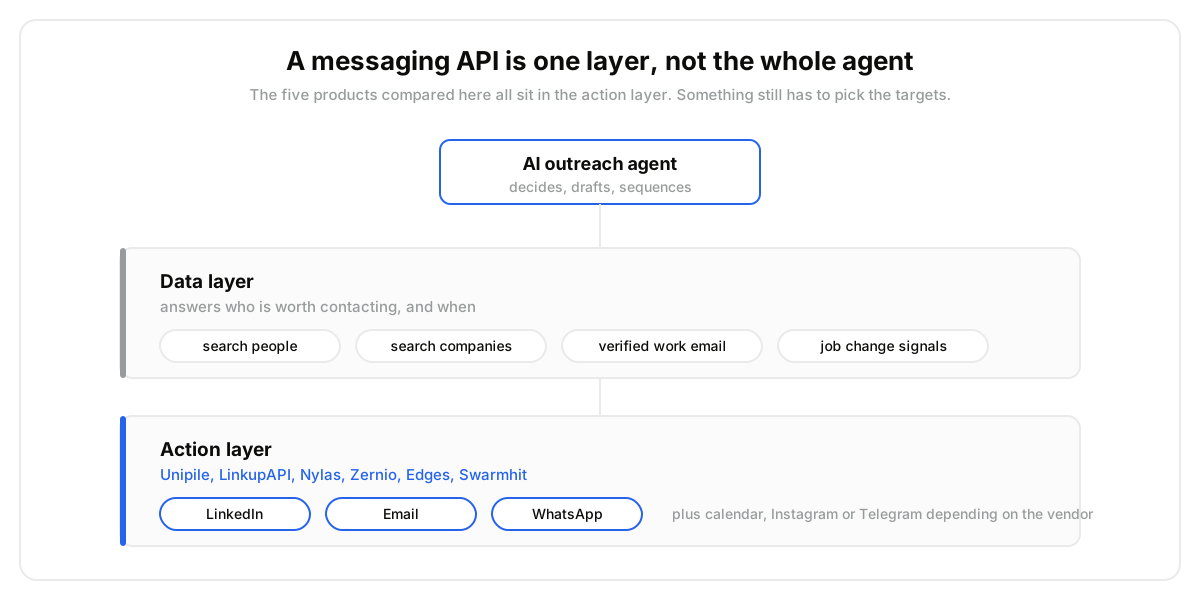
Most builds need both layers. If the gap is the data half rather than the messaging half, that layer prices separately from any of the five above, on the pricing page.
How Do You Choose Between Them?#
Five questions settle this faster than any feature matrix. Answer them in order and two candidates usually survive, which is exactly the number you want going into a live test. The first question does most of the work, because the meter is the decision that follows you for years.
- Which number grows first in your business, connected accounts or actions sent? That picks your meter.
- Which channels do you need in twelve months, not this week?
- When a session drops, who re-authenticates it, and can you see the failure in a log?
- If a plan says unlimited, unlimited what, and on which tier?
- At what point does published pricing stop and a sales call start?
Question five separates these vendors more than any feature does. Nylas and Zernio publish everything. Unipile and LinkupAPI publish full ladders. Edges publishes one rung of six, and Swarmhit publishes the platform but not the infrastructure tier.
How Do You Test Two of Them in a Week?#
Pick the two that survived the questions above, then run them in parallel on real traffic rather than reading docs for another month. A week of live sending tells you more about session stability and webhook reliability than any comparison page can, this one included.
- Connect three real accounts to each API. Not test accounts, real ones with history.
- Run an identical five day sequence through both, same targets, same copy, same cadence.
- Log every disconnect, every re-auth prompt and every webhook that arrives late or not at all.
- Price the same month twice: once at ten times your account count, once at ten times your volume.
When we tested this pattern across providers, step four changed the decision more often than steps one to three combined. The winner at current scale is regularly the loser at the scale you are planning for.
If your build also needs the layer that decides who gets the message, the same week is a good time to wire that up. Our walkthrough on building an AI SDR covers where each layer sits.
If the account meter is what pushed you into this comparison, run the week long test above before you migrate anything. And if the missing piece turns out to be the data rather than the sending, start on the free tier on the pricing page.
Frequently asked questions
- How much does Unipile cost?
- Unipile runs one pay as you go plan priced per connected account, starting at $55 a month for up to 10 accounts. Past that: $5.50 an account from 11 to 50, $5.00 to 200, $4.50 to 1,000, $4.00 to 5,000, $3.50 beyond. Requests and messages are unlimited. Euro rates are published alongside.
- What is the best Unipile alternative for AI agents?
- LinkupAPI is the closest fit when an agent needs LinkedIn, email and WhatsApp in one key. It exposes 50+ endpoints plus an MCP server. It bills per connected account at the same rates as Unipile ($55 for 10, then $5.50 down to $4.50), but caps the bill at $3,000 a month for unlimited accounts, which makes it cheaper from about 640 accounts.
- Which Unipile alternative really offers unlimited accounts?
- Only LinkupAPI publishes one, on its $3,000 plan. Swarmhit sells unlimited senders at $2,499, but on its managed platform rather than the API tier. Edges bills every sending account as an identity, Zernio charges $1 an account past 100, and Nylas caps Pro at 25.
- Is there a free Unipile alternative?
- Nylas has a free forever plan with 5 connected email and calendar accounts. Zernio gives 2 free social accounts. Edges gives 100 credits and 1 identity with no card. Unipile and Swarmhit run 7 day trials instead. LinkupAPI has no free tier.
- Does Unipile charge per message or per account?
- Per account. There is no cost per request or per message on any Unipile plan, only provider side limits. That makes it cheap for high volume on few accounts, and expensive for multi tenant products where every customer needs their own connected account.