How to Connect Claude to Firmographic Data (2026)
How to connect Claude to firmographic data: filter companies by size, growth rate, and HQ in one request, then enrich a dirty list of raw domains fast.
Ask an AI agent to find "mid-market SaaS companies growing fast in the US" and watch it stall. The words are clear to a person. To a database, they mean nothing without numbers behind them.
Firmographic data is what turns that sentence into a query: employee count, growth rate, headquarters, industry, company type. An agent that can reach into those fields stops guessing and starts filtering.
This guide covers what firmographic data actually includes, how to connect Claude to it, and where the line sits between a firmographic filter and the funding or intent signals people often lump in with it.
Key Takeaways#
- Firmographic data is structural fact about a company: size, location, industry, founding year. It does not include funding or intent signals, which are separate filter families.
- Connected through MCP, Claude turns a plain-language segment description into a filtered company list in one request.
- Growth fields (headcount change over 1, 6, and 12 months) are the most underused firmographic signal, and the hardest to fake.
What Is Firmographic Data?#
Firmographic data is the set of structural facts that describe a company rather than what it does or who works there: employee count, headquarters, industry, founding year, and company type. It is the company-level equivalent of demographic data for a person.
None of it is opinion. A company either has 50 to 200 employees or it does not. That rigidity is the point: firmographic fields are filterable in a way a free-text description never is.
Most GTM tools expose a slice of this behind a dashboard. An agent needs the same fields as callable parameters, not dropdown menus a human clicks through.
Which Fields Actually Count as Firmographic Data?#
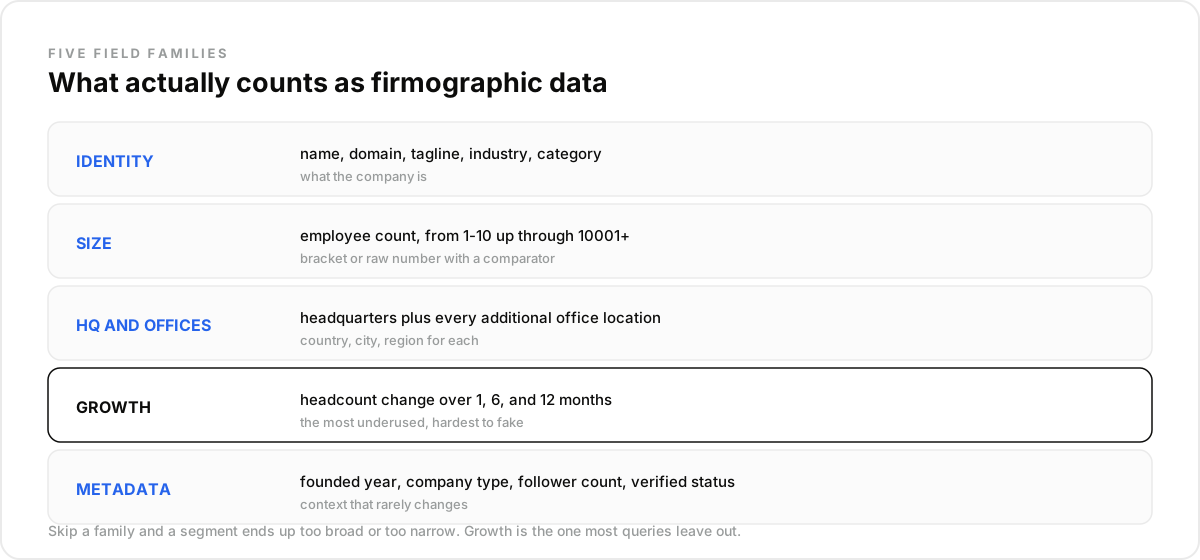
Firmographic data spans five families: basic identity, size, headquarters and offices, growth, and metadata. Skipping any of them is how a segment ends up too broad or too narrow.
- Basic identity: name, domain, tagline, description, industry, category.
- Size: employee count, usually in ranges (1-10 up through 10001+), filterable as a bracket or a raw number with a comparator.
- Headquarters and offices: country, city, and region for HQ, plus the same three fields for every additional office.
- Growth: employee growth over the last 1, 6, and 12 months, plus a raw count of recent hires.
- Metadata: founded year, company type (public, privately held, non-profit, government agency, and a handful of others), follower count, page verification status.
Two of those families rarely show up in a basic company lookup. Offices beyond headquarters and the growth trio are the fields that separate a real firmographic dataset from a name-and-logo directory.
Growth is the family most people forget. A company can look identical to a competitor on every other field and still be the one worth prioritizing, purely because headcount moved 18 percent in six months and the other one moved zero.
How Do You Connect Claude to This Data?#
You connect Claude to firmographic data through an MCP server that exposes company search as a native tool, so a plain-language segment description becomes a structured query without you writing the filter logic by hand.
- Create a free DataForB2B account and grab an API key from the pricing page.
- In Claude, open Settings, then Connectors, and add the MCP endpoint. It works the same way in Cursor, VS Code, ChatGPT, or any MCP-compatible agent.
- Describe the segment in one sentence: "mid-market SaaS companies in the US, 51 to 200 employees, headcount up over 10 percent in the last six months."
Claude maps that sentence onto real columns: employee_count in range, country_iso_code equals US, industry matching SaaS, employee_growth_6m above the threshold. No dashboard, no manual filter building.
What Does a Real Query Look Like?#
curl -X POST https://api.dataforb2b.ai/search/companies \
  -H "api_key: YOUR_api_key" \
  -H "Content-Type: application/json" \
  -d '{
        "filters": {
          "op": "and",
          "conditions": [
            { "column": "employee_count", "type": "between", "value": "51", "value2": "200" },
            { "column": "country_iso_code", "type": "=", "value": "US" },
            { "column": "employee_growth_6m", "type": ">", "value": "10" }
          ]
        }
      }'
This is the same request Claude builds behind the scenes when the segment is described in plain language. Seeing the raw shape once makes it obvious why an agent can compose it reliably: every field is typed, every operator is explicit, nothing is left to fuzzy matching.
Why Does Company-Level Enrichment Matter for a Dirty List?#
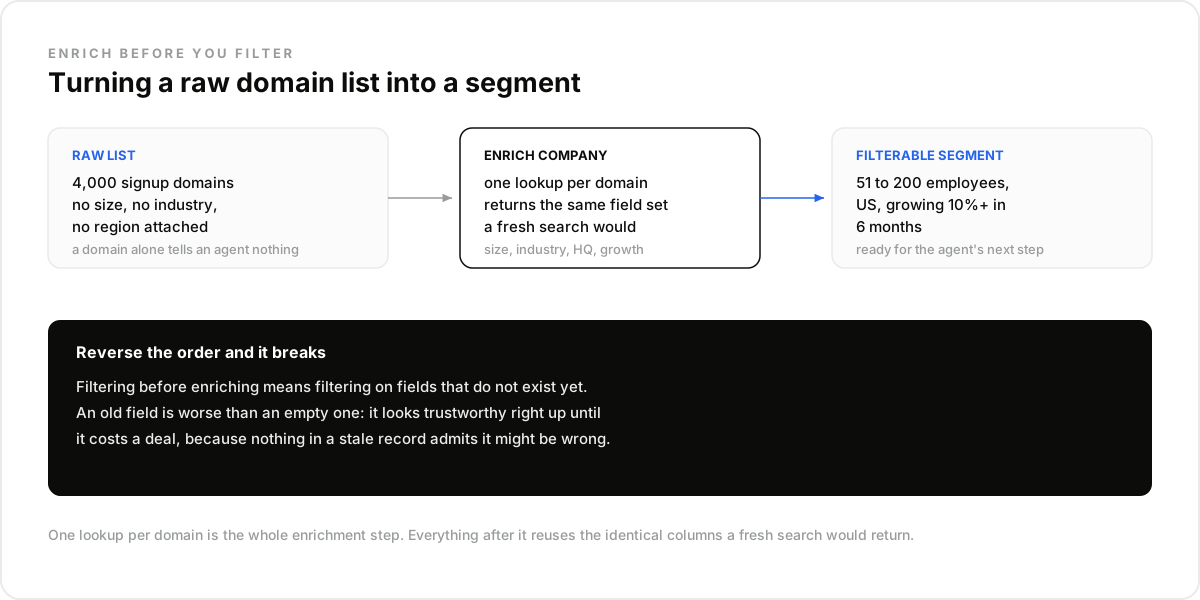
A dirty list of domains becomes a usable account list once each domain is resolved into full firmographic detail, which matters because most inbound lists arrive with almost nothing structured attached to them, or with fields that used to be accurate.
One operations lead posted about this exact failure mode after watching an AI agent work straight off CRM data nobody had refreshed in months: the same account entered twice under slightly different names, industry and size fields that were correct two years ago and never touched since. The agent scored all of it with the same confidence as a freshly resolved record, because nothing in a stale field admits it might be wrong.
The mistake most teams make here is trying to segment before resolving the data. A domain alone tells an agent nothing, and an old field is worse than an empty one, since it looks trustworthy right up until it costs a deal. Enrich first, then filter.
Enrichment here means one lookup per domain, resolved into the same field set covered above: size, industry, HQ, growth. The output slots straight into whatever filter logic the agent runs next, since it uses the identical columns a fresh search would return.
Firmographics vs Funding vs Intent: Where's the Line?#
Firmographic, funding, and intent data answer three different questions, and treating them as one blob is the fastest way to build a query that returns nothing useful.
Not funding data. Firmographics describes what a company structurally is. Funding data describes a financial event that happened to it. A company can be large, established, and have raised nothing in years; both facts are true and independent.
Not intent data. Firmographics is static-ish, updated on a schedule. Intent (someone at the company asking about a category of tool, or engaging with a competitor's content) is behavioral and time-sensitive. One tells you if a company fits; the other tells you if it is ready.
Not a replacement for a full GTM platform. Apollo and ZoomInfo bundle firmographic filtering into a dashboard with sequencing and dialers built in. This is the raw data layer underneath that kind of product, without the UI wrapped around it.
How Do the Three Verticals Use Firmographic Data Differently?#
Sales tooling / AI SDR. An outbound agent segments accounts by size and industry first, then layers growth on top, so the target list is both a fit and a company clearly in expansion mode.
Recruitment tooling. A sourcing agent uses company size and growth in reverse: a client account that just grew headcount 20 percent in a quarter is a company about to need more hires, worth prioritizing for outreach.
Investment / VC tech. A deal-sourcing agent screens on founding year plus growth rate to catch young companies scaling unusually fast, a pattern that shows up in the data well before it shows up in a pitch deck. Pair growth with company type to filter out anything already public, since that signal matters most while a company is still private.
How Do You Run This Workflow in Claude?#
You run it by turning the segment description into a saved routine, so the list stays current without a manual re-query every time someone asks for it.
- Create a free account at app.dataforb2b.ai/signup and grab your API key.
- In Claude, open Settings, then Connectors, and add the MCP server. The same connector works in Cursor, VS Code, ChatGPT, or any MCP-compatible agent.
- Paste a working prompt: "Build a list of US SaaS companies, 51 to 500 employees, with headcount growth over 15 percent in the last 6 months, and refresh it weekly."
- Turn the chat into a scheduled routine so the segment stays current without you re-asking.
See the full set of company fields on the company data API page, or start on the free tier from the pricing page.
Frequently asked questions
- What counts as firmographic data?
- Structural facts about a company: employee count, headquarters, industry, founding year, company type, and office locations. It excludes financial events like funding and behavioral signals like intent, which are separate filter families entirely.
- How is firmographic data different from technographic data?
- Firmographic data describes the company itself: size, location, industry. Technographic data describes the tools that company uses, like its CRM or hosting provider. The two are often paired but come from different sources.
- Can Claude filter companies by headcount growth?
- Yes. Growth is tracked over 1, 6, and 12 month windows alongside a raw recent-hires count, so an agent can filter for companies actively scaling, not just companies that are currently large.
- Do I need to know SQL to query this from Claude?
- No. The MCP connector translates a plain-language description into the underlying filter structure. You describe the segment in a sentence; the tool call handles the field names and operators.
- How fresh is the company data Claude pulls?
- Live queries return current records at request time rather than a static snapshot. That matters most for the growth fields, which are only useful if they reflect this quarter and not last year's.