How to Connect Claude to Decision Maker Data (2026)
How to connect Claude to decision maker data: resolve a company into the right person by title and tenure, then enrich for a verified work email address.
An agent finds the right company in seconds. Then it stalls on the one question that actually matters: who there can say yes?
A company is not a contact. Knowing that Acme Robotics fits the target profile does not tell an agent whether to email the VP of Engineering, the Head of Procurement, or someone whose title changed six weeks ago and never got updated anywhere public.
This guide covers how to connect Claude to decision maker data specifically: resolving a company into a person, matching title to seniority correctly, and getting a verified way to reach them once the name is right.
Key Takeaways#
- Decision maker data is a two-step resolution: company to person, then person to a verified way to reach them. Skipping either step produces a name with no path to outreach.
- Title matching is not a single keyword. Seniority, department, and tenure all shape whether a title actually signals decision authority.
- A resolved name without a verified email is not yet useful. Enrichment is the step that turns a lead into someone reachable.
What Does It Mean to Connect Claude to Decision Maker Data?#
Connecting Claude to decision maker data means giving it live tool access to a people database it can filter by title, seniority, and company, so it resolves an account into a specific person instead of guessing from a company name alone.
The model itself does not know who currently holds a role at a given company. That information changes weekly. A live connector is what makes the answer current instead of stale the moment it is written down.
Practically, this is an MCP server exposed as a callable tool. Claude asks for "the most senior engineering leader at this company" and gets back a real, current record.
How Does Claude Know Who the Decision Maker Is?#
Claude identifies a decision maker by filtering people on current company plus a title or seniority pattern, not by reading a company's About page or guessing from a job title alone.
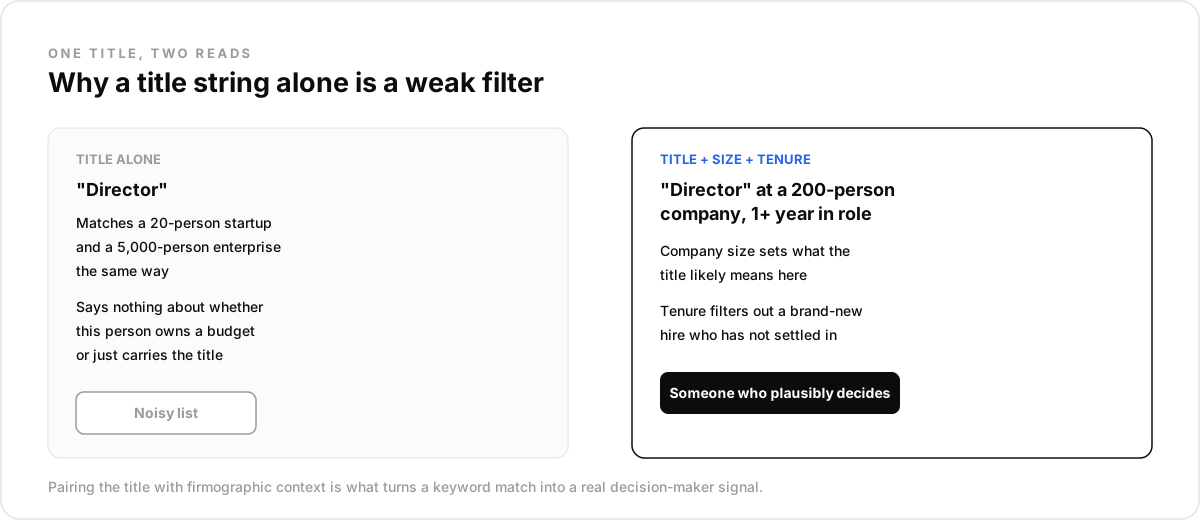
A title string alone is a weak signal. "Director" means something different at a 20-person startup than at a 5,000-person enterprise. Pairing the title filter with company size and years in the current role narrows a noisy list down to someone who plausibly owns the budget.
One founder selling software into medical and dental practices described the version of this that plays out face to face. Walking into more than 150 offices, the front desk lit up every time at the pitch and pointed straight to "the doctor." Emailing the doctor went nowhere: not a no, just silence, over and over. The resolved contact was a title, not a decision maker with a reason to reply.
What Does the Resolution Path Actually Look Like?#
curl -X POST https://api.dataforb2b.ai/search/people \
  -H "api_key: YOUR_api_key" \
  -H "Content-Type: application/json" \
  -d '{
        "filters": {
          "op": "and",
          "conditions": [
            { "column": "current_company", "type": "=", "value": "Ramp" },
            { "column": "current_title", "type": "like", "value": "VP Engineering" },
            { "column": "years_in_current_position", "type": ">=", "value": "1" }
          ]
        }
      }'
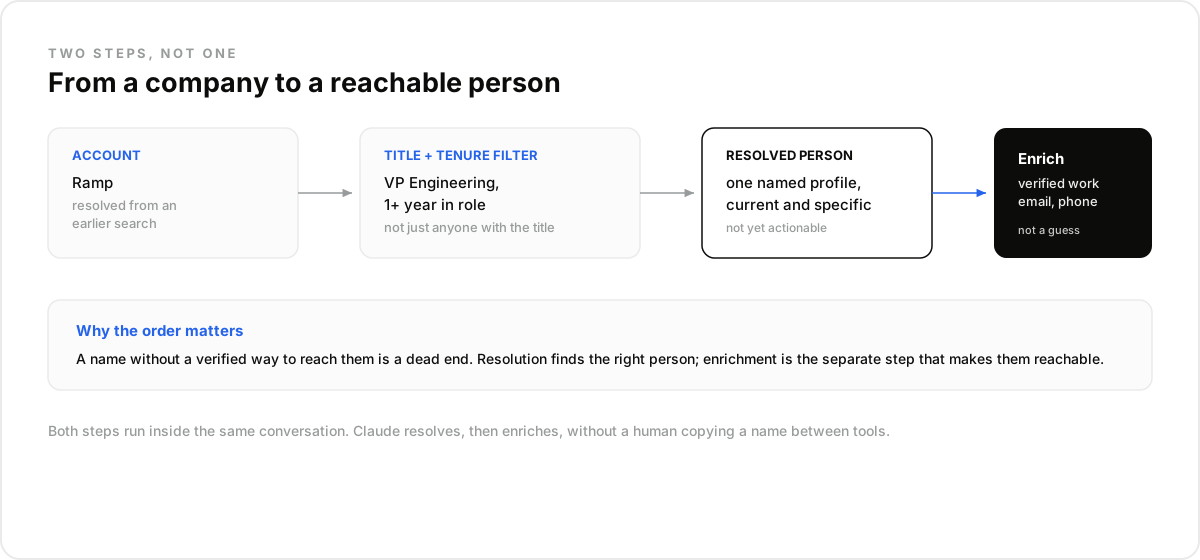
That request resolves a specific company into a specific title, filtered so a brand-new hire with no tenure yet does not outrank someone who has actually been in the seat long enough to own decisions. Swap in current_company_id once an account is already resolved from an earlier search, and the two steps chain without re-typing the company name.
Why Isn't a Name Enough on Its Own?#
A name and title without a verified way to reach them is a dead end. Resolution finds the right person; enrichment is the separate step that makes them reachable.
A demand-gen lead we heard from put it plainly: "I don't care how accurate the title match is if the email bounces." Their team had started scoring leads purely on title-fit, and outreach rates stayed flat until they added a live email verification step before anything got sent.
The mistake most teams make is stopping at the resolved profile. A profile is a hypothesis. Enrichment with a work email confirms it is worth acting on.
Enrichment here is a separate request keyed on the resolved profile: a work email when one exists, a phone number if the workflow needs it. Both are billed only when requested, so a resolution step that returns no strong match never triggers an enrichment cost.
What Decision Maker Data Is Not#
Decision maker data is not an org chart, and it is not the same as a seat-based sourcing tool.
Not an org chart. There is no reporting-line map here, no "who does this person answer to." What exists is a filtered snapshot of people at a company, ranked by title and tenure signals, not a verified hierarchy.
Not a seat-based sourcing tool. Traditional seat-based sourcing tools put a person in a UI clicking through search results one at a time. This is the same underlying resolution logic, exposed as an API call an agent runs itself, with no seat and no UI in between.
Not a substitute for firmographic data. Resolving a decision maker still depends on the company being correctly identified first. Bad company data upstream means the title filter runs against the wrong account entirely.
Best For, and Not For#
This fits an agent that needs a fresh decision maker resolved at request time, right before an action, not a team building a static org chart once and referencing it for a year.
If the target account changes weekly and the agent needs the current titleholder every time, live resolution earns its cost. If the same twenty accounts get contacted quarterly, a cached list refreshed occasionally is honestly cheaper and good enough.
The trade-off is speed against staleness. A live resolution costs a little more per query than reading from a spreadsheet someone built last quarter. What it buys back is not having to explain why an agent just emailed someone who left the company two reorgs ago.
How Do the Three Verticals Use This Differently?#
Sales tooling / AI SDR. An outbound agent resolves the decision maker at a newly funded or newly hiring account, then enriches for a verified work email before the first message ever gets drafted.
Recruitment tooling. A sourcing agent flips the direction: instead of finding a buyer, it resolves the hiring manager at a target company, the person who actually owns a specific req, not just anyone in HR.
Investment / VC tech. A deal-sourcing agent resolves the founder or CEO directly, often at a company too early to have a public leadership page at all, which is exactly the gap a live people search closes.
The three verticals share the same underlying resolution logic. What changes is the title pattern and the direction of the query: sales resolves toward a buyer, recruiting resolves toward a hiring manager, investment resolves toward a founder. Same tool, three different questions.
How Do You Run This Workflow in Claude?#
You run it as a two-step chain: resolve the person, then enrich for a way to reach them, both inside the same conversation.
- Create a free DataForB2B account at app.dataforb2b.ai/signup and grab your API key.
- In Claude, open Settings, then Connectors, and add the MCP server. The same connector works in Cursor, VS Code, ChatGPT, or any MCP-compatible agent.
- Paste a working prompt: "At Ramp, find the most senior person in Engineering with at least a year in their current role, then get me a verified work email."
- Turn it into a scheduled routine for a target account list, so the resolved contact stays current instead of going stale after the next reorg.
Read the full breakdown of finding decision makers at scale, or start on the free tier from the pricing page.
Frequently asked questions
- How does Claude know who the decision maker is at a company?
- By filtering people on current company plus title, seniority, and tenure signals, not by reading a webpage. The combination of those fields narrows a noisy title list down to someone who plausibly owns the decision.
- Can Claude find a verified email, not just a name?
- Yes. Resolution and enrichment are separate steps. The first finds the person; the second confirms a work email exists and returns it, so the name is not just a guess with no way to act on it.
- What counts as a decision maker title match?
- A title pattern combined with seniority and tenure, not a single keyword. "Director" alone is weak; "Director" plus company size plus a year or more in the role is a much stronger signal of real decision authority.
- Does this work for companies with no public org chart?
- Yes, and that is often where it matters most. Early-stage companies rarely have a leadership page. Resolving a founder or early hire from filtered people data works whether or not the company has published anything about its team.
- How is this different from a manual search?
- A manual search finds one person once. A connected agent resolves the same pattern on demand, across as many accounts as needed, and can chain straight into enrichment without a human copying a name into a second tool.