How to Find Decision Makers at a Company (and at Scale)
How to find decision makers at a company: typed people searches by function and seniority, a mapped committee of two or three, then the whole account list.
The manual version of this problem is grim, and sales forums describe it honestly: check the company's registry filing, scan the company page, or ring the switchboard several times asking different questions until someone lets a name slip.
That whole ritual is one typed query now.
This is how to find decision makers at a company the account-first way: pin the account, search people by function and seniority, map the small committee that actually decides, and then run the same play across your entire account list in one pass.
Key Takeaways#
- Account-first beats name-first: pin the company, then query its people by function and seniority.
- Target a committee of two or three, not one name. A single thread snaps; a mapped committee holds.
- Enrich only the mapped committee: verified emails for the people you will actually contact.
- The same filter template runs across a whole account list, one committee per account.
What Is the Fastest Way to Find Decision Makers at a Company?#
A typed people search scoped to the account: filter on the current company, then on the function and seniority markers that fit your deal. It returns the plausible buying group in seconds, from structured records, replacing the registry lookups and switchboard calls entirely.
Speed is not even the main gain. The search is repeatable and auditable: the same template runs on the next account, and every name comes with the record that justified it, current role included.
What This Method Is NOT#
It is not the phone-around, not scraping the company website, and not trusting the org chart. The first two waste hours; the third one quietly targets the wrong person, because a box on a chart says who holds a title, not who signs.
Not the switchboard ritual. Calling until a name slips out is charming, unscalable, and increasingly filtered anyway.
Not site scraping. Team pages list founders and marketing picks, rarely the operational buyer, and they age badly.
Not org-chart worship. Practitioners who run outbound for a living put it bluntly: org charts lie constantly. Titles describe hierarchy; deals follow budget and pain.
How Do You Turn an Account Into a Decision-Maker Search?#
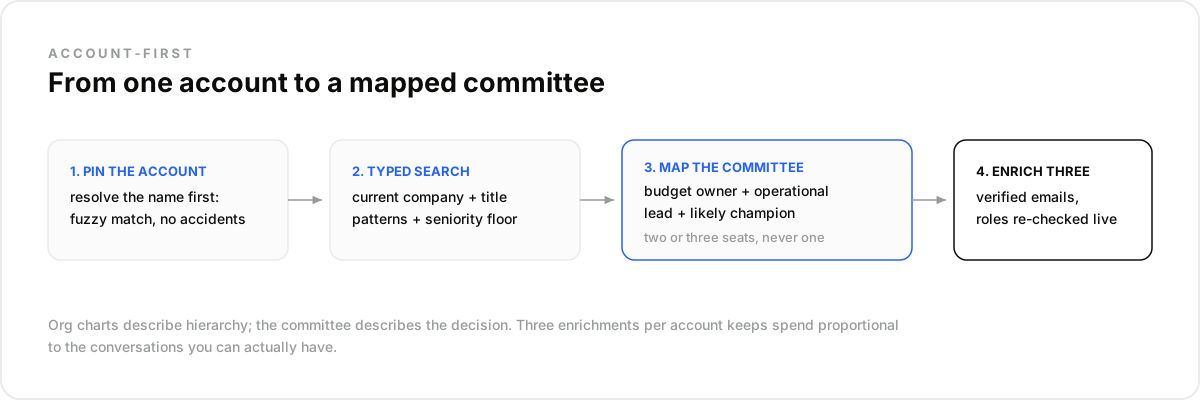
Express the buyer as filters on the account's people: the current company pins the scope, title patterns pin the function, and experience pins the seniority floor. For a data product selling into engineering leadership at Stripe, the query is three conditions:
import requests

response = requests.post(
    "https://api.dataforb2b.ai/search/people",
    headers={"api_key": "YOUR_api_key", "Content-Type": "application/json"},
    json={
        "filters": {
            "op": "and",
            "conditions": [
                {"column": "current_company", "type": "=", "value": "Stripe"},
                {"column": "current_title", "type": "in",
                 "value": ["VP Engineering", "Head of Data", "Director of Engineering"]},
                {"column": "years_of_experience", "type": ">=", "value": 8}
            ]
        },
        "count": 25
    }
)

buying_group = response.json()["results"]
Resolve the company name first if it is ambiguous; fuzzy matching on identification means "Acme Industrial" and "Acme Water" stop being the same search accident. Then read the results as candidates for a committee, not a leaderboard with one winner. The count is a sanity check too: two hundred matches means the title list is too loose for this account.
How Do You Map the Committee, Not Just One Name?#
Keep two or three people per account, in different seats: the economic buyer who owns the budget, the operational lead who owns the pain, and where relevant the senior practitioner who will champion or veto. Outbound veterans converge on the same practice: talk to two or three people before any sequence starts.
Concretely, for a data product at a 150-person fintech: the VP Engineering owns the budget, the Head of Data owns the pain, and a staff engineer will champion or quietly veto. Three seats, three different conversations, one account, and no single inbox deciding your quarter.
The committee shape is insurance. A single contact who ignores you, or leaves next month, ends the account; a mapped trio keeps two doors open. It also mirrors how B2B decisions actually happen, which is why multi-threaded outreach converts where single-threaded outreach stalls. And how three seats describe the same problem is itself qualification data.
Enrich exactly those two or three: the records confirm the current role, and verified work emails come back where they exist. Three enrichments per account keeps the spend proportional to the conversations you can actually have.
How Do You Run It Across a Whole Account List?#
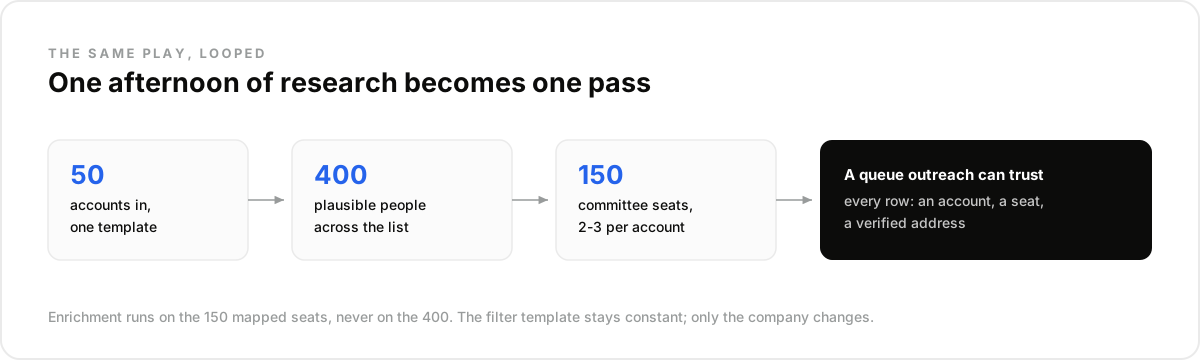
The same template, looped. Fifty accounts in, one committee per account out: the filter set stays constant, only the company condition changes, and enrichment runs on the mapped committees rather than on every result. An afternoon of manual research becomes one batch pass.
The numbers stay disciplined at scale. Fifty accounts might surface four hundred plausible people; committee mapping keeps around one hundred fifty; enrichment verifies those, and outreach inherits a queue where every row carries an account, a seat, and a reachable address.
Best for: account lists from twenty to a few hundred, where research time is the bottleneck. Not for: five named enterprise accounts; there, deep manual research and warm paths still beat any query.
This is also where the play stops being a rep trick and becomes infrastructure: the loop is a handful of calls against a people search API, which is exactly what an agent or a routine can own.
How Do You Keep the Map From Going Stale?#
Re-verify at contact time and watch the committee afterward. People move constantly, and a decision-maker map is a snapshot of seats that rotate. The re-check before outreach catches the VP who left last month; re-running the same people search on a schedule catches the moves that follow.
Moves cut both ways, and both are plays: your champion landing at a new account opens a door, a new arrival in the buying seat resets the vendor slate. Our guide to job change signals covers that routing in depth.
How Do You Run This in Claude or Any LLM Agent?#
The whole account-first play runs conversationally before anyone writes a line of code. Connect the data tools once, paste your account list into the chat, and the routine maps the committees, enriches them, and re-runs the same pass for every list you feed it afterward.
- Create an account at app.dataforb2b.ai/signup (free trial, 100 credits) and grab your API key.
- In Claude, open Settings, then Connectors, and add https://mcp.dataforb2b.ai/mcp. The same server plugs into Cursor, VS Code, ChatGPT, or any MCP-enabled agent.
- Paste the brief: "Here are 50 accounts. For each, find the buying committee for a data product, two or three people across budget and engineering, and get verified emails."
- Turn the working chat into a scheduled routine so every new account list gets the same pass without you.
The Mistake Most Teams Make#
The mistake most teams make is single-threading: one name per account, usually the biggest title the search returned. The account then lives or dies on one inbox, and the biggest title is often the wrong seat anyway, an executive too far from the pain to care.
In our experience the fix is structural, not motivational: make the committee the unit of work, so no account ever enters outreach with fewer than two mapped seats. What surprised us is how much reply quality improves when the second contact exists, before anyone even uses it.
The switchboard era ended; the query era is three conditions long. DataForB2B runs the search, the committee mapping, and the verified emails behind one key. Map your first account today, starting at the pricing page.
Frequently asked questions
- How do you identify the decision maker in a company?
- Search the account's people by function and seniority, then read for the budget seat: the most senior title in the function that owns your problem, typically VP or head level at mid-size companies. Confirm on the enriched record, and treat the answer as a committee, not one person.
- Which job titles are usually decision makers?
- It scales with company size. At startups, founders and C-level decide everything; at mid-size, VPs and heads of function own budgets; at enterprise, directors decide and executives ratify. Filter titles per size band instead of using one list everywhere, and let seniority floors do the rest.
- Is the org chart a reliable guide?
- No, and experienced sellers are blunt about it: org charts lie constantly. Charts describe reporting lines, not budget or influence, and they age fast. Signals beat boxes: function, seniority, tenure, and what the person actually works on, all of which are queryable fields.
- How many people should you target per account?
- Two or three, in different seats: budget owner, operational lead, and a senior practitioner where relevant. One contact is a single point of failure; five is a spam pattern. The two-or-three committee mirrors how decisions are made and keeps multi-threading credible.
- How do you reach decision makers without calling the switchboard?
- Enrich the mapped committee for verified work emails right before contact, so the address matches the person's current seat. Emails come back verified or empty, never guessed, and the outreach references the account context instead of the fact that you found a name.