How to Find B2B Leads With Claude (2026 Guide)
How to find B2B leads with Claude: connect a data layer over MCP, pull high-intent and search leads, and get verified emails in a single conversation.
The GTM forums keep arriving at the same complaint: automating outbound still takes twenty-five tools from twenty different companies. Source, enrich, sequence, engage, each with its own tab, its own bill, its own CSV export.
Then someone connects a data layer to Claude and the stack collapses into a conversation.
This is how to find B2B leads with Claude in practice: what it needs before it can prospect, the two types of leads it can pull, the exact session shapes, and how the whole thing becomes a daily routine.
Key Takeaways#
- Claude has no lead database. Connected to a B2B data layer over MCP, it queries 850M+ profiles directly.
- Two lead types, two motions: high-intent leads from posts and engagement, search leads from typed filters.
- Company-first or people-first depends on your ICP: account-driven briefs start with companies, role-driven briefs start with people.
- Every contact comes from a tool call, so nothing is hallucinated and every field traces to a record.
Can Claude Actually Find B2B Leads?#
Yes, with one condition: Claude needs a data connector, because it ships with no lead database of its own. Ask vanilla Claude for a lead list and it will produce plausible-looking names it cannot verify. Connect a B2B data layer over MCP and every lead comes from a real query.
That condition is the whole trick. The model already knows how to interrogate an ICP, tighten a filter, and rank a list. What it lacked was tools, and MCP is how it gets them: search, enrichment, and post data become functions Claude calls mid-conversation.
What Claude Is NOT for Lead Gen#
Three misconceptions produce most of the disappointment. Claude is not a lead database, not a scraper, and not a sender. Knowing what stays outside the conversation keeps the build honest and keeps each piece doing the job it is actually good at.
Not a database. The model's memory is training data, frozen and unverifiable. Leads have to come from a connected source, or they are fiction with formatting.
Not a scraper. Claude queries structured records through tools. If your plan is copying profiles out of a browser, you are building a different, more fragile thing.
Not a sender. Keep your sending tool. Claude finds, qualifies, enriches, and drafts; deliverability infrastructure stays where it is.
Which Types of Leads Can Claude Find?#
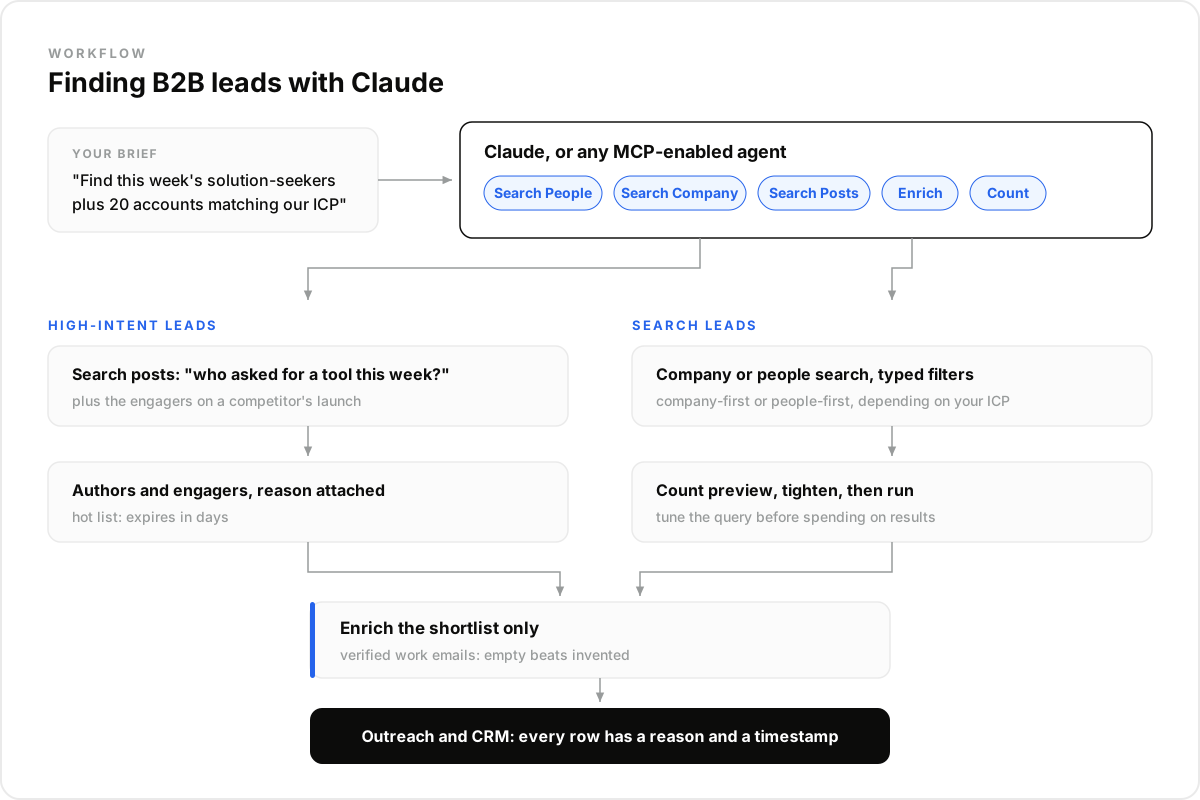
Two types, and they deserve different sessions. High-intent leads are people whose behavior just signaled the problem: asking for a tool in a post, engaging with a competitor's launch. Search leads are people who match your ICP as typed filters: role, company size, funding stage, geography.
High-intent is small and hot: a handful a day, each with a reason attached and a clock running. Search is broad and steady: the durable pool your ICP defines, refreshed as companies grow and people move.
Within search leads, the order depends on your ICP. Account-driven ICPs go company-first: find fintechs that raised, then find the head of data at each. Role-driven ICPs go people-first: RevOps leaders at 50 to 200-person SaaS companies, whatever the account list looks like. Claude handles both; the brief decides.
If funding rounds are your main trigger, the Crunchbase API review breaks down where funding databases shine and where they slow an agent down.
How Do You Run a Search-Lead Session?#
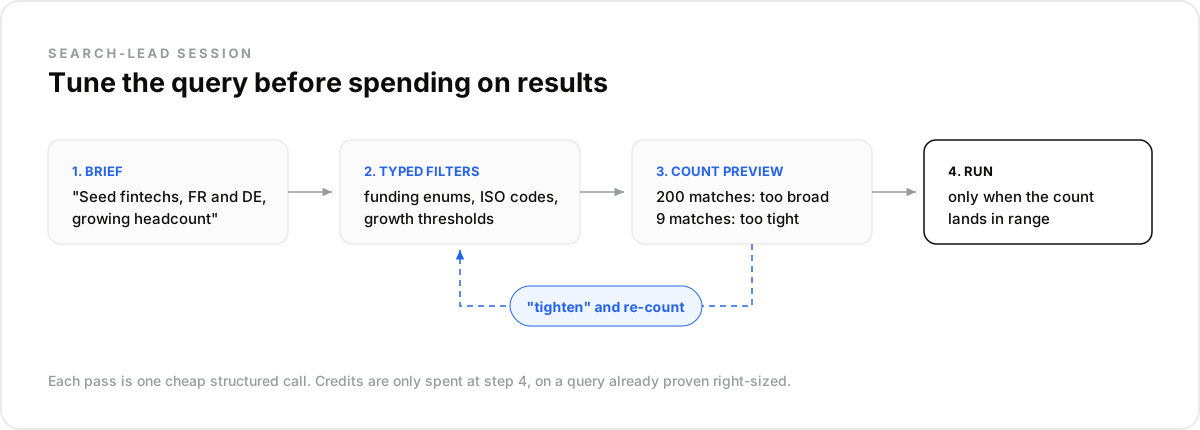
You describe the ICP in plain language and steer while Claude drives the tools. It drafts typed filters from your brief, previews how many records match, tightens on your instruction, and only then pulls results. The session reads like delegating to an analyst who happens to be instant.
A company-first session, in real prompts: "Find seed and Series A fintechs in France and Germany growing headcount." Claude runs the company search with normalized funding enums and ISO country codes, and reports the count. "Two hundred is too many, require 20%+ six-month growth." New count. "Good. Now find the head of data or VP engineering at each, and shortlist thirty."
The count preview is what keeps the session cheap: you tune the query before spending on results, the same discipline an AI SDR build uses in code.
How Do You Pull High-Intent Leads?#
You ask Claude to read the market's posts. "Who asked for a data enrichment tool on Reddit or LinkedIn this week?" runs a post search by keyword; every author is a lead in an open buying window. "Pull the people who engaged with [competitor]'s launch post" attaches reactors and commenters as profiles.
These are the warmest lists outbound ever sees, and they expire in days, which is exactly why a conversational agent fits: no pipeline to build, just a question you ask every morning, or a routine that asks it for you.
One GTM engineer described running an agency's entire client fulfillment this way, terminal instead of tab, and not opening their old orchestration tool since. The pattern behind that story is the one this article is teaching.
How Do You Get Verified Emails Without Hallucinations?#
By making enrichment a tool call, never a generation. When you ask for contact details, Claude calls the enrichment endpoint on the exact profile, and the response carries a verified work email. If no verified email exists, the field comes back empty instead of invented.
That boundary is the anti-hallucination architecture in one rule: facts about people come from tools, prose comes from the model. Every row in the final list traces to a record with a timestamp, which is also what makes the list defensible when a rep asks where it came from.
Enrich the shortlist only, at the moment you commit to outreach. Twenty enrichments for twenty sends keeps cost proportional and freshness maximal.
What the Claude Stack Replaces#
Teams running this setup describe replacing their prospecting, enrichment, and list-building tools while keeping exactly two things: the CRM as system of record and the sender for deliverability. Everything between those two, the twenty-tool middle, becomes one conversation with data tools attached.
Best for: lean teams and agencies where one operator runs the whole motion, and builders prototyping before they productize. Not for: replacing a mature RevOps stack overnight; migrate one workflow at a time and let results argue.
The trade-off is honest: you give up dashboards and drag-and-drop for a conversation and a data layer like DataForB2B underneath it, exposed through one sales MCP server. Operators who think in briefs gain speed; teams who need the UI should keep the UI.
How Do You Make It Run Daily?#
Setup is two minutes, and then the sessions above become routines. Create the account, add the connector, run your first brief in a chat, and schedule the ones worth repeating. The morning list builds itself; you review it with coffee instead of assembling it.
- Create an account at app.dataforb2b.ai/signup (free trial, 100 credits) and grab your API key.
- In Claude, open Settings, then Connectors, and add https://mcp.dataforb2b.ai/mcp. The same server plugs into Cursor, VS Code, ChatGPT, or any MCP-enabled agent.
- Paste the brief: "Find this week's solution-seeker posts in our category, plus 20 new accounts matching our ICP, and enrich the 10 best people."
- Turn the working chat into a scheduled routine so it runs every morning without you.
The Mistake Most Teams Make#
The mistake most teams make is using Claude as a copywriter first: "write me a cold email" before there is anyone real to write to. The writing was never the bottleneck. The list was, and a model without data tools cannot fix a list.
In our experience the order that works is data first, words last: connect the tools, build the lead motion, and only then let anyone draft. What surprised us is how often the draft improves automatically, because a message grounded in a real signal barely needs personalizing.
The questions that come up as soon as someone tries this for real: what Claude can and cannot reach, how it compares to the orchestration tools, and what the running costs look like. Five answers, short enough to settle the Slack debate.
The stack was never the point; the list was. Connect the data layer and run your first brief today, starting at the pricing page.
Frequently asked questions
- Can Claude really find B2B leads by itself?
- Not by itself. Claude has no lead database; unassisted, it generates plausible fiction. Connected to a B2B data layer over MCP, it queries real records: 850M+ profiles, companies with funding and growth fields, posts with engagers. The connector is the difference between fiction and pipeline.
- Does Claude have access to a lead database?
- No, and no LLM does. Lead data lives in external sources the model reaches through tools. That is by design: a tool query returns current, verifiable records, where model memory returns whatever was true at training time, unverifiable and aging.
- Is Claude better than Clay for lead generation?
- Different shapes. Clay is a visual orchestration product with a table UI and per-seat pricing; Claude with a data connector is a conversation that runs the same find-enrich-qualify loop. Operators comfortable steering in plain language report replacing the table; teams who need the UI keep it.
- How do you stop Claude from inventing contacts?
- Route every fact through a tool call. Contacts come from search, emails from enrichment with verification, and empty results stay empty. If a workflow lets the model fill gaps from memory, fix the workflow: grounding rules belong in the setup, not in hope.
- What does running this cost?
- A Claude subscription plus a data plan: unlimited search and enrichment within a monthly record quota, work emails included, with personal emails at $0.03 and mobile numbers at $0.15 a contact credit, only when found. The discipline that keeps it cheap: preview counts before pulling results, and enrich only the shortlist you will actually contact. A free trial covers the evaluation.