How to Use Claude for Recruiting (The Complete Workflow)
How to use Claude for recruiting, end to end: connect a candidate data layer over MCP, then source, screen, time, and enrich candidates in plain language.
Recruiters keep making the same discovery: they open Claude to polish a job description and realize it could run the whole search. Then they hit the wall, asked to "find five backend engineers in Berlin", a bare model invents names. It can reason about recruiting, but it cannot see the market.
The fix is not a better prompt. It is a candidate data layer Claude can query. Once that is connected, every stage of recruiting, sourcing, screening, timing, outreach prep, happens in the same conversation, and every candidate traces to a live record.
This is the complete map: what Claude can and cannot do across recruiting, how each stage connects, and where to go deep on each one.
Key Takeaways#
- Alone, Claude has no candidate pool; connected over MCP to a data layer, it searches 850M+ live profiles with typed filters.
- The whole workflow is one conversation: describe the role, refine in plain language, enrich only the shortlist.
- Each stage (sourcing, screening, timing, outreach) maps to a specific capability, linked below.
- No browser bots, no per-seat license: every profile comes from an authenticated structured query.
Can Claude Actually Recruit, or Just Write About It?#
Both, but only one matters without a connector. Out of the box Claude writes job descriptions, rewrites outreach, and turns a messy brief into a clean filter list, useful, but all downstream of candidates you already have.
Connected over MCP to a candidate data layer, it crosses the line from writing to doing: it queries 850M+ professional profiles through typed filters, previews the count before pulling, and enriches the people you keep. The failed experiments all skip this step and test the model's imagination instead of the market.
The Recruiting Workflow, Stage by Stage#
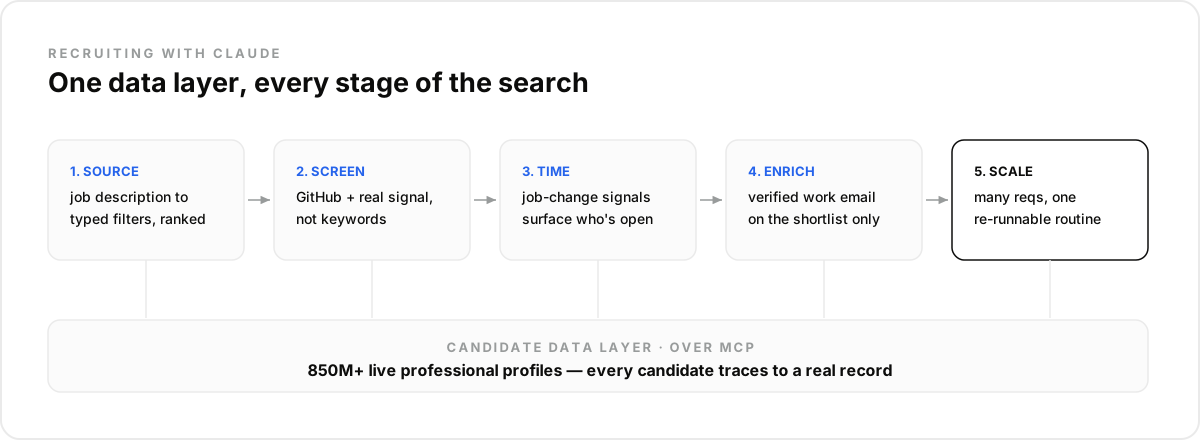
Each stage below is one capability Claude gains from the data layer. You can run them in order for a single req, or wire them into a standing routine.
1. Sourcing: job description to shortlist. Paste the role, and Claude drafts the filters, checks the count, and returns a ranked page of profiles. Steering stays in plain language: "drop the agencies", "require the certification". This is the core loop; the step-by-step is in how to source candidates with Claude.
2. Screening: ranking on real signal. For technical roles, keyword matching is noise. Live enrichment adds GitHub activity so Claude ranks on shipped work, not on how a profile is worded. See connecting Claude to GitHub candidate data.
3. Timing: who is open to move. A candidate who just changed roles is cold; one at long tenure without a promotion is warm. Job-change signals surface the window, covered in how to track job changes with Claude.
4. Outreach prep: verified contact. On the shortlist only, Claude pulls a verified work email where one exists, returned empty where it does not, never guessed. The message itself stays yours to write.
5. Scaling: many reqs, one system. One recruiter running Claude against the data layer covers what used to take a desk of sourcers; the agency version is in how to scale a recruiting agency with Claude.
How Do You Connect Claude to Candidate Data?#
One MCP connector. Create an account on the data layer, copy the server URL, and add it in Claude's Settings under Connectors. From that point the search and enrichment tools appear in every conversation, and a scheduled routine can use them unattended.
In practice you never see the plumbing, you describe the role and Claude maps it to filters:
You: Senior backend engineers in Berlin, 5+ years, Python or Go,
     not currently at an agency.
Claude: 214 matches. Pulling the top 50 ranked by tenure and stack fit…
Teams building their own recruiting product call the same endpoints over REST and webhooks instead of through the chat, the candidate sourcing API is the same data layer, consumed by your agent rather than by Claude.
Desktop, Code, or the Recruiter Skill?#
All three work, because each supports MCP. Claude Desktop suits a recruiter running searches by hand; Claude Code suits a builder wiring searches into scripts. On claude.ai, the recruiter skill ships the workflow and prompts preconfigured, so the first search is a fill-in-the-blank rather than a blank page.
What Should Stay Human?#
Fit judgment, outreach tone, and every accept-or-reject call. The agent owns coverage and speed, turning a brief into a shortlist and keeping it fresh, but a recruiter reviews who surfaced and who did not. No automated step should ever silently exclude a candidate.
Getting Started#
The connection takes about two minutes, and the free trial includes 100 credits to run a first real search before committing. Start with one open req: paste the description, watch the count, pull the shortlist, and enrich the top ten. The second req is faster, and the tenth is a routine.
Frequently asked questions
- Can Claude recruit on its own?
- No. On its own Claude has no candidate pool, and any names it produces are unverifiable. Connected over MCP to a candidate data layer, it searches 850M+ live professional profiles with typed filters and enriches the shortlist, so every candidate traces to a current record instead of a guess.
- How is this different from a browser scraper or extension?
- A scraper drives a logged-in session through a site and tends to break or get the account flagged. Claude queries a structured profile pool directly through an authenticated API over MCP, so there is no browser automation, no per-seat license, and no ban risk, the request is a normal API call, not a click.
- What candidate data can Claude actually see?
- What the search filters and the enrichment call return: role, company, tenure, skills, education and location on the search side, plus a verified work email and, for technical roles, GitHub activity on the enrichment side. Emails come back empty where none exists, never guessed. For the full field list, see the product docs rather than the chat.
- Do I need to write code to use Claude for recruiting?
- No. You connect one MCP server in Claude's settings and then work in plain English, describe the role and Claude builds the filters. Teams building their own recruiting product can call the same endpoints over REST, but a recruiter never has to.
- Which Claude surfaces work for recruiting?
- Claude Desktop, Claude Code, and claude.ai all support MCP connectors, so the same candidate tools appear in each. On claude.ai you can also load a ready-made recruiter skill so the workflow and prompts come preconfigured.