Job Change Signals for AI Agents: Catching Buying Windows
Job change signals for AI agents, done at person level: why movers actively shop for new solutions, which moves deserve outreach, and how agents react fast.
Sales practitioners who track job changes at scale keep repeating one correction to the hype: the move itself is not the signal. A champion landing at a target account is a door opening. A skeptic landing at the same account is a door closing, and the alert looks identical.
Job change signals for AI agents only work when the agent knows who moved, not just that someone did.
This guide covers that person-level version of the play: why movers buy, which moves deserve outreach, why your CRM will never see them, and the workflow an agent runs when a move turns up.
Key Takeaways#
- A new-in-role decision-maker is actively shopping: new mandate, fresh budget, no attachment to the old stack.
- The signal is person-level: a champion's move opens an account, a detractor's move flags a risk.
- CRMs only learn about moves when a rep happens to edit a record. Agents catch them on the next scheduled check.
- Speed matters: the window is the first months in seat, before habits and vendors settle.
Why Is a Job Change the Sharpest Buying Signal?#
Because someone who just moved is actively looking for new solutions. A new leader arrives with a mandate to change things, budget that is easiest to claim early, and zero loyalty to the tools the predecessor chose. For a few months, evaluating vendors is literally part of the job.
Every other signal is indirect by comparison. Funding says the company has money; hiring says it is growing. A job change says a specific decision-maker is rebuilding a stack right now, and it names the person.
It also compounds: movers bring the tools they trusted at the last company. Which is exactly why who moved matters more than the move.
Does Every Move Deserve Outreach?#
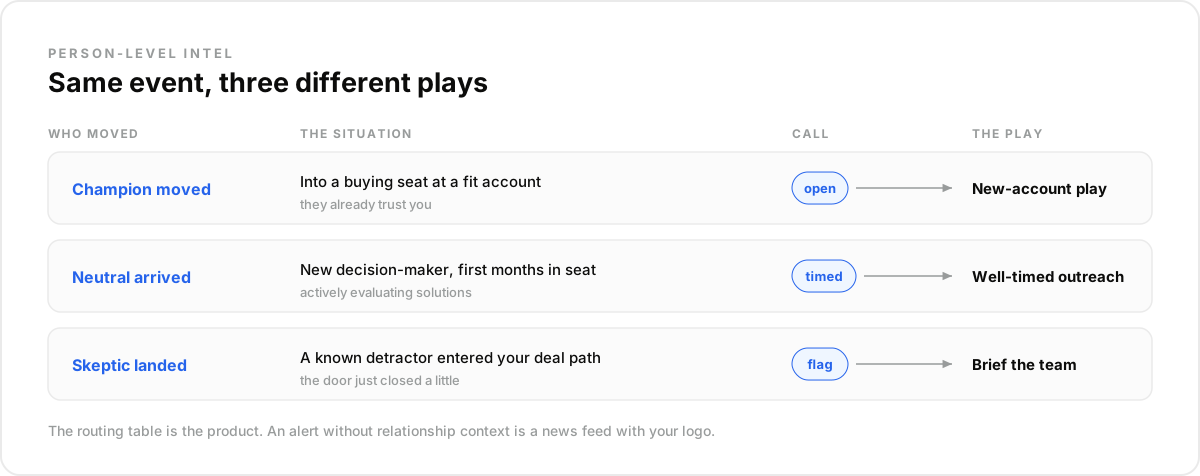
No, and this is the nuance the alert tools skip. Practitioners who run these plays put it plainly: champions moving to hard targets is a gift, but detractors moving to hard targets makes things worse. The same event type, opposite pipeline meaning, and only person-level history tells them apart.
Three cases cover the routing. A champion moved: open a play, they already trust you. Someone neutral moved into a buying seat at a fit account: a normal, well-timed outreach. A known skeptic moved into your deal path: flag the account, brief the team, do not send the cheery congrats email.
That routing table is the actual product of the play. An agent without relationship context is just a news feed with your logo on it. In our experience the teams that win these windows pre-build the routing before the first move turns up, and what surprised us is how often the detractor branch saves more pipeline than the champion branch creates.
Why Does Your CRM Never See the Move?#
Because a CRM only learns what someone types into it. The question comes up in every sales forum: does the CRM notice job changes automatically? It does not. The contact stays frozen at the last edit, and the record quietly describes a person who no longer exists in that seat.
The decay is structural, not a discipline problem. Reps update the records they are actively working; the other several thousand contacts age in place quietly. The accounts where a champion quietly left, or arrived, are exactly the ones nobody was watching that quarter.
That gap is the agent's job: watch the market layer, and write the change back into the system of record when it shows up, instead of hoping a human notices.
How Does an Agent Catch the Move First?#
Two mechanics, layered. A scheduled check on the people who matter (your champions list, buying-committee contacts, past users) re-enriches each profile and compares the current employer and title with the last run. Profiles are refreshed every 30 days, so a weekly or monthly pass catches the move while the window is still open.
The second layer is a daily sweep for the moves you were not watching: new decision-makers landing at fit accounts. A people search filtered on target titles plus short tenure in the current position surfaces whoever just arrived in a buying seat this quarter.
Builders asking whether this data comes as an API, because a team of fifty reps wants it feeding an internal agent, are asking the right question. Re-check the watched few, search the unwatched many, one key for both.
What Makes a Mover Ready to Buy?#
The first months in seat are a structural buying window: the mover is expected to show change, budget requests get benefit of the doubt, and the vendor slate is genuinely open. After that, decisions harden into commitments and the window closes for a year or more.
The mover is also reachable in a way cold prospects never are. They are new, they are still mapping the territory, and a relevant message about a problem they own lands as useful rather than interruptive, provided it arrives inside the window.
This is why latency is the metric that matters. A move discovered within weeks is a play; the same move discovered at quarter-end is trivia.
The window logic runs across verticals, which is why every persona ends up building some version of this agent:
- A sales agent opens a new-account play as soon as a champion turns up in a buying seat.
- A recruiting agent flags the engineer whose move means the shortlist just changed.
- A deal-sourcing agent treats a respected operator leaving with no destination as the earliest trace of a company.
The Reaction Workflow, Step by Step#
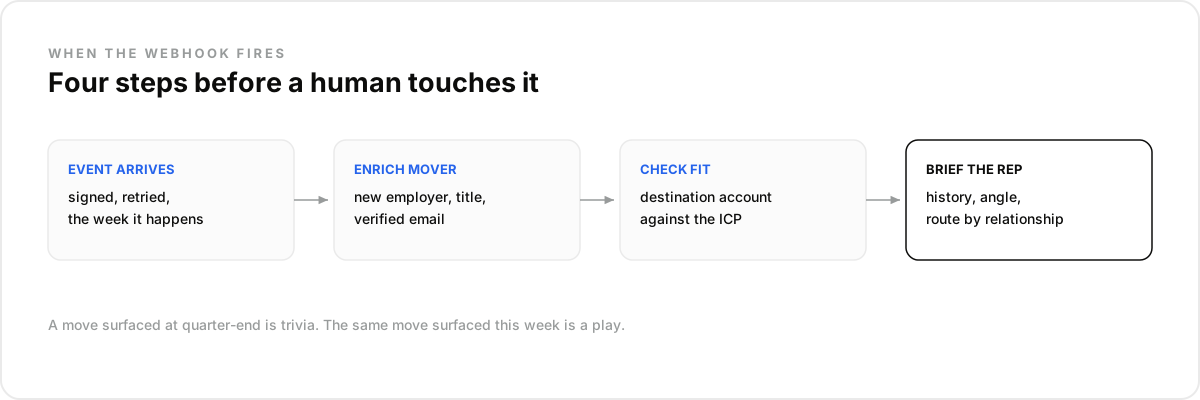
When a move turns up, the agent runs four steps before any human touches it. Enrich the mover for the new employer, title, and a verified work email. Check the destination account against the ICP. Route by relationship: champion, neutral, or risk. Then draft the context brief a rep actually needs.
The brief is the deliverable: who moved, from where, the relationship history, why the destination fits, and a suggested angle grounded in that specific situation. A rep opens it and acts in minutes, inside the window, with the fresh record already verified.
Wire the loop against real signals with the free trial from the pricing page.
What a Job-Change Play Is NOT#
It is not a congrats-email trigger, not a LinkedIn notification feed, and not CRM hygiene. Each of those misses the point in its own way, and two of them actively burn the signal on noise the prospect has learned to ignore completely.
Not congrats spam. Every mover's inbox fills with templated congratulations the same week. Joining that pile marks you as automation, and it wastes the one moment the person was reachable.
Not a notification feed. Platform notifications cover whoever you happen to follow, unfiltered and unrouted. The play needs your relationship data attached, which a feed cannot carry.
Not just record cleanup. Updating the CRM is a side effect. The mistake most teams make is treating the move as data maintenance instead of the highest-intent moment in the account's year.
How Do You Run the Watch in Claude or Any LLM Agent?#
The champions watch takes one conversation to stand up. Connect the data layer to Claude over MCP, hand it the list, and the scheduled check, the enrichment pass, and the routing brief all run from plain language.
- Create an account at app.dataforb2b.ai/signup (free trial, 100 credits) and grab your API key.
- In Claude, open Settings, then Connectors, and add https://mcp.dataforb2b.ai/mcp. The same server plugs into Cursor, VS Code, ChatGPT, or any MCP-enabled agent.
- Paste the brief: "Watch these 40 champions. When one changes jobs, enrich them, check the new company against our ICP, and brief me."
- Turn the working chat into a scheduled routine so it reruns on a schedule, with a weekly digest without you.
The move is the moment; the relationship decides the play. DataForB2B keeps the profiles refreshed, surfaces the move, and enriches the mover in one stack, starting on the pricing page.
Frequently asked questions
- Why is a job change the strongest B2B buying signal?
- Because it names a person who is actively rebuilding a stack: new mandate, fresh budget, no loyalty to inherited tools, and a career incentive to show change fast. Other signals describe companies; a job change describes a decision-maker inside a live buying window.
- Is a champion's move always an opportunity?
- Almost always, but the general rule is person-level: the same move that opens a door for a champion closes one for a detractor. Route moves by relationship history, champion, neutral, or skeptic, and treat the routing as the core of the play, not an afterthought.
- How fast do you need to act on a move?
- Within days or weeks, not quarters. The mover's evaluation window is the early period in seat, when vendor choices are genuinely open and budget is easiest to claim. Detection latency is the real KPI: a move surfaced at quarter-end has already lost most of its value.
- Can a CRM track job changes on its own?
- No. A CRM records what reps type, so a move only appears if someone happens to notice and edit the record. Systematic detection needs an outside data layer with refreshed profiles, with the agent writing confirmed changes back into the CRM as it finds them.
- How does an agent receive job-change data?
- By querying on a schedule, two ways combined: re-enriching a watched list and comparing current employer and title with the last run, and a people search filtered on target titles with short current-role tenure for movers you were not watching. Profiles are refreshed every 30 days, and both run behind one API key.