How to Automate Competitor Monitoring With AI Agents (2026)
How to automate competitor monitoring with AI agents: five signals worth watching, a concrete workflow for each, and the loop that turns intel into pipeline.
Most competitor monitoring produces reports. Someone scrapes the rival's website, summarizes their changelog, and files a deck nobody opens twice. The teams doing it well automated something else entirely: the signals that move pipeline.
An agent can watch five of those signals at once, continuously, and hand you actions instead of summaries.
This guide covers how to automate competitor monitoring with AI agents, signal by signal, with the concrete workflow to stand up for each one and the loop that turns a rival's momentum into your lead list.
Key Takeaways#
- Five signals cover a competitor: their content's audience, hiring, headcount, funding, and people moves.
- The audience is the underrated one: every engager on a competitor's post is a warm lead for you.
- Each signal has a one-call workflow an agent can run on a schedule.
- Monitoring earns its keep when intel routes to an action, not a slide.
What Can an AI Agent Monitor About a Competitor?#
An agent can monitor five observable surfaces: the posts a competitor publishes and who engages with them, the roles they are hiring for, how their headcount moves by function, their funding events, and the people joining or leaving. Together those describe strategy better than any scraped homepage.
The order is deliberate: audience converts this quarter, hiring and headcount explain next quarter, funding and moves reset the whole board. Each surface is queryable as structured data, which is what makes the automation real. No selectors to maintain, no HTML to parse: an agent asks a typed question and gets typed records back, on whatever cadence the signal deserves.
What Competitor Monitoring Is NOT#
It is not website scraping, not a news alert subscription, and not the quarterly battlecard ritual. Each produces the feeling of vigilance without the pipeline, and each breaks in its own way. Naming them upfront saves the two sprints most teams spend rediscovering it.
Not scraping their site. Homepages change for cosmetic reasons weekly and strategic reasons rarely. Scrapers built on them are maintenance with occasional output.
Not news alerts. By the time coverage exists, every competitor of your competitor has the same alert. You are informed, not early.
Not the quarterly deck. A battlecard summarizes the past. The signals below fire while the move is happening, which is when a response is still worth something.
Which Five Signals Should the Agent Watch?#
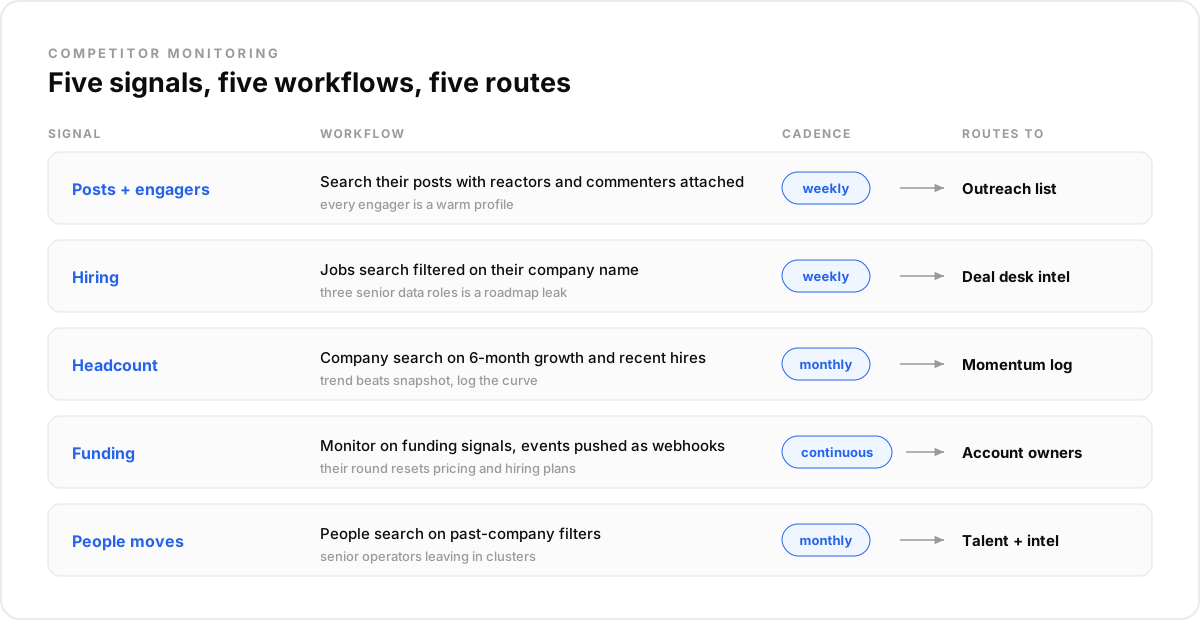
Five signals, each with its own workflow and cadence. Ordered by how directly they convert to pipeline: the audience first, because it is made of people you can contact, then hiring, headcount, funding, and moves, which describe where the competitor is going and when to strike.
1. Their posts, and who engages#
Weekly workflow: search the competitor's name and category keywords across LinkedIn, Twitter, and Reddit, with engagers attached. Every reactor and commenter on their launch post told the market they care about your problem space. Route them to enrichment and outreach, not to a report.
2. Their hiring#
Weekly workflow: a jobs search filtered on their company name. Three senior data-engineering roles is a roadmap leak; a burst of AE openings in Germany is an expansion announcement nobody wrote. Hiring is the competitor telling you their plan in structured form:
import requests

response = requests.post(
    "https://api.dataforb2b.ai/search/jobs",
    headers={"api_key": "YOUR_api_key", "Content-Type": "application/json"},
    json={
        "keyword": "engineer",
        "company": "HubSpot",
        "date_posted": "past_month",
        "count": 25
    }
)

their_roadmap = response.json()["results"]
3. Their headcount, by function#
Monthly workflow: a company search on growth fields, six-month headcount change and recent hires. Sales growing while product shrinks is a story; so is the reverse. Trend beats snapshot, so the agent logs the curve.
4. Their funding#
Daily workflow: a company search on funding fields for the watched list, diffed against the last run. A rival's round resets their pricing power and their hiring plans; hearing about it within a day of it landing in the data beats the press cycle.
5. Their people moves#
Monthly workflow: a people search on past-company filters. Senior operators leaving in clusters is the earliest form of competitor weakness, and each departed rep or engineer is also, quietly, a warm profile for your own hiring or intel conversations.
How Do You Turn Monitoring Into Pipeline?#
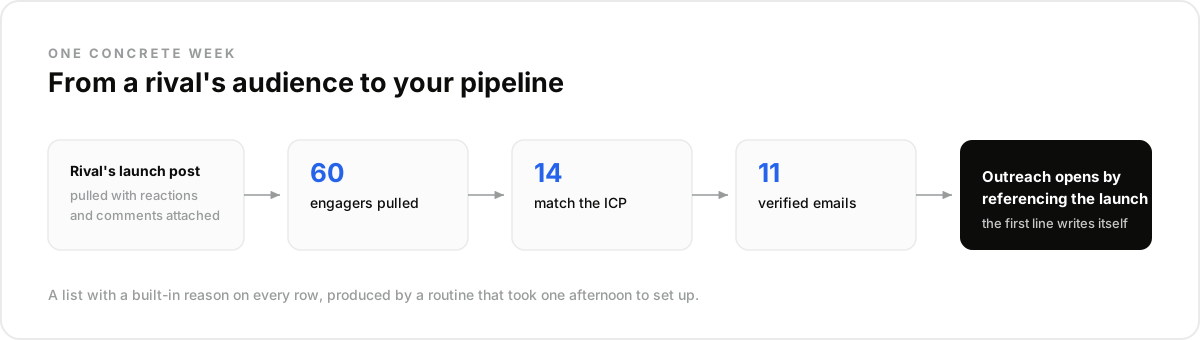
By treating the competitor's audience as the deliverable. Reports describe the rival; the engager list describes your buyers. The weekly loop: pull the posts with engagers, filter to ICP fit, enrich the keepers for verified emails, and hand outreach a list where every row has a reason attached.
The reason writes the message. "You reacted to X's launch" is context both sides understand, which is why competitor-audience outreach outperforms cold lists that technically match the same ICP. The engagement is the personalization; nothing needs inventing.
A concrete week looks like this: the agent pulls sixty engagers off a rival's launch thread, fourteen match the ICP, enrichment verifies eleven emails, and outreach opens by referencing the launch. A list with a built-in first line, produced by a routine that took one afternoon to set up.
This loop is the same signal discipline as a signal-based prospecting list, pointed at one specific source of heat. Route the rows into that list and the two systems share a queue.
Can You Just Build It With Scrapers?#
You can, and the practitioners who did describe the outcome consistently: a pile of scrapers and automation glue that works until it does not, with maintenance eating the hours the monitoring was meant to save. One GTM lead called cobbling crawlers and workflow tools together for signals the part that "sucks", verbatim.
Best for DIY: one bespoke signal no data layer covers, owned by someone who enjoys the plumbing. Best for a data layer: the five signals above, which are ordinary typed queries against records refreshed every 30 days, no selectors involved.
A data layer like DataForB2B serves all five behind one key, over REST for pipelines and MCP for agents, through the buying signals API. The agent asks; nothing gets scraped, and nothing breaks when a website redesigns.
How Do You Run This in Claude or Any LLM Agent?#
The whole stack runs as one scheduled conversation before it deserves any code. Connect the data tools, name your competitors once, and let a routine walk the five signals on their cadences, posting the digest and the enriched engager list wherever your team reads.
- Create an account at app.dataforb2b.ai/signup (free trial, 100 credits) and grab your API key.
- In Claude, open Settings, then Connectors, and add https://mcp.dataforb2b.ai/mcp. The same server plugs into Cursor, VS Code, ChatGPT, or any MCP-enabled agent.
- Paste the brief: "Monitor [competitor]: posts from the past week with engagers, open roles, and headcount change. Enrich the 10 best-fit engagers with verified emails."
- Turn the working chat into a scheduled routine so it runs weekly without you.
The Mistake Most Teams Make#
The mistake most teams make is monitoring for the deck: collecting intel whose only destination is a summary. Signals decay like produce, and a hiring burst summarized three weeks later is trivia. The failure is not missing information; it is intel with no route to an action.
In our experience the fix is deciding the route before wiring the signal: engagers go to outreach, hiring intel goes to the deal desk, funding events ping the owner of the affected accounts. What surprised us is how much monitoring shrinks once every signal needs a customer, and how much more of it gets used.
Your competitor's momentum is a lead source with your name on it. Point an agent at their audience this week, starting at the pricing page.
Frequently asked questions
- What can an AI agent monitor about a competitor?
- Five structured surfaces: their posts and every person engaging with them, their open roles, their headcount trend by function, their funding events, and senior people joining or leaving. All five are queryable as typed data, no scraping involved, which is what makes reliable automation possible.
- Do you need to scrape competitor websites?
- No, and it is usually the weakest signal anyway. Websites change cosmetically far more often than strategically, and scrapers break on every redesign. Hiring, headcount, funding, and audience engagement carry more strategy per query, and they arrive as structured records instead of HTML.
- How do you turn competitor engagement into leads?
- Pull the competitor's recent posts with engagers attached, filter the reactors and commenters to your ICP, enrich the keepers for verified work emails, and reference the engagement as context. The interest is already expressed; your outreach just arrives while it is fresh.
- How often should competitor monitoring run?
- Match cadence to signal speed: posts and engagers weekly, hiring weekly, headcount monthly, funding daily, people moves monthly. A single scheduled routine can walk all five, and anything more frequent produces noise faster than insight.
- Which competitor signal matters most?
- For pipeline, the audience: engagers convert because they self-selected into your problem space. For strategy, hiring: roles leak the roadmap weeks before anything ships. Most teams run both first and add headcount, funding, and moves once the routing works.