How to Build a Signal-Based Prospecting List That Stays Fresh
How to build a signal-based prospecting list that rebuilds itself daily: five signal feeds, expiry rules, a hard cap, and enrichment at contact time.
Every prospecting list is a photograph. The five thousand rows exported in January describe a market that stopped existing in February: people moved, companies raised, priorities changed, and the file kept none of it.
The teams that fixed this stopped treating the list as a file at all.
Here is how to build a signal-based prospecting list: a list that rebuilds itself daily, where every row carries a person, a reason, and a timestamp, and where entries expire the way the signals behind them do.
Key Takeaways#
- A signal-based list is a daily process, not a file: signals flow in, expired rows flow out.
- Five signal feeds cover most markets: intent posts, competitor engagers, hiring, funding, and job changes.
- Every row answers three questions: who, why them, why now. No reason, no row.
- Enrichment happens at contact time, so the list never carries stale emails.
Why Do Static Prospect Lists Rot?#
Static lists rot because B2B facts move constantly and a file cannot. Titles change, champions leave, funding lands, pain points get solved or explode. Within a quarter, a meaningful slice of any export is describing people and companies as they were, not as they are.
The rot is invisible until it costs something: a bounce, a wrong-title opener, a pitch to a company that solved the problem in March. The file looks exactly as full as the day it was pulled, which is the trap.
Practitioners cleaning scraped exports describe the same ritual every time: dedupe, drop the dead domains, chase missing emails, and repeat it all next quarter because the file started rotting the day it was saved.
What Is a Signal-Based Prospecting List?#
A signal-based prospecting list is a living queue where entries are admitted by observable events, carry the reason and its timestamp as fields, and expire when the reason ages out. It is built by a daily process, not a quarterly export, and it is short on purpose.
The schema is the discipline. Each row holds the person, the account, the signal type, the evidence, and the date. A row that cannot fill the reason column does not enter, which is the single rule that separates this from a filtered database dump.
What a Signal-Based List Is NOT#
It is not a bigger export, not a scored CRM view, and not a third-party intent subscription. All three produce rows without reasons a prospect would recognize, and rows without reasons produce the outreach everyone deletes. The borders matter because each one is sold as the same thing.
Not a bigger export. Ten thousand filtered rows is a static list with better filters. The problem is not the filter quality; it is the photograph.
Not lead scoring. A score summarizes fit. It does not name an event, so the outreach still opens with nothing.
Not bought intent scores. Third-party account-level intent tells you a domain read some articles. It names no person, no moment, and nothing you could honestly reference.
Which Five Signals Feed the List?#
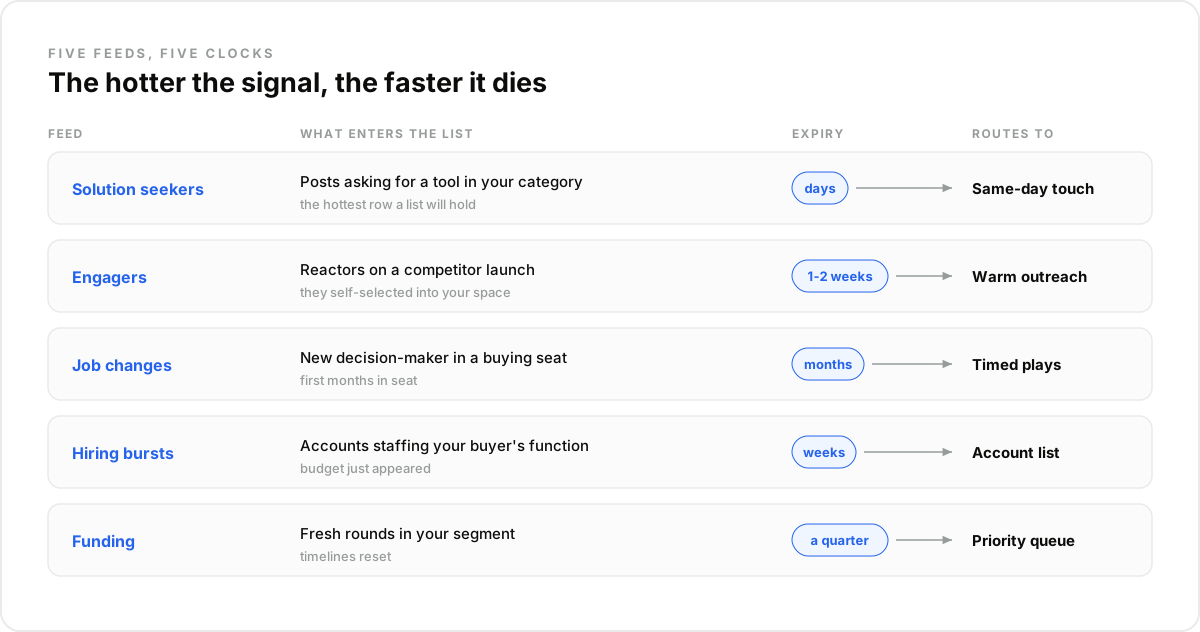
Five feeds cover most B2B markets, ordered by heat: people asking for a solution, engagers on competitor content, decision-maker job changes, hiring bursts, and funding events. Each one enters the list as a row with a person or account, the evidence, and a freshness clock. The order matters for expiry too: the hotter the signal, the faster it dies.
1. Solution-seeker posts#
Someone posting "anyone know a tool for X?" is the hottest row a list will ever hold. A daily post search by category keywords across LinkedIn, Twitter, and Reddit catches them while the thread is live. Expiry: days.
2. Competitor-post engagers#
Reactors and commenters on a rival's launch told the market they care about the problem. One posts query with engagers attached returns each of them as a profile ready to qualify. Expiry: a week or two.
3. Decision-maker job changes#
A new leader in a buying seat is actively rebuilding a stack. A scheduled check on watched people plus a sweep for short-tenure arrivals at fit accounts feeds the list its highest-conversion rows. Expiry: the first months in seat.
4. Hiring bursts#
A company opening several roles in your buyer's function is funding that function. A jobs search makes it queryable:
import requests

response = requests.post(
    "https://api.dataforb2b.ai/search/jobs",
    headers={"api_key": "YOUR_api_key", "Content-Type": "application/json"},
    json={
        "keyword": "revenue operations",
        "date_posted": "past_week",
        "seniority": "manager",
        "count": 25
    }
)

hiring_accounts = response.json()["results"]
5. Funding events#
A fresh round resets budgets and timelines. A company search filtered on recent funding, run daily for watched segments, turns the announcement into rows shortly after it lands. Expiry: a quarter.
How Does the List Rebuild Itself?#
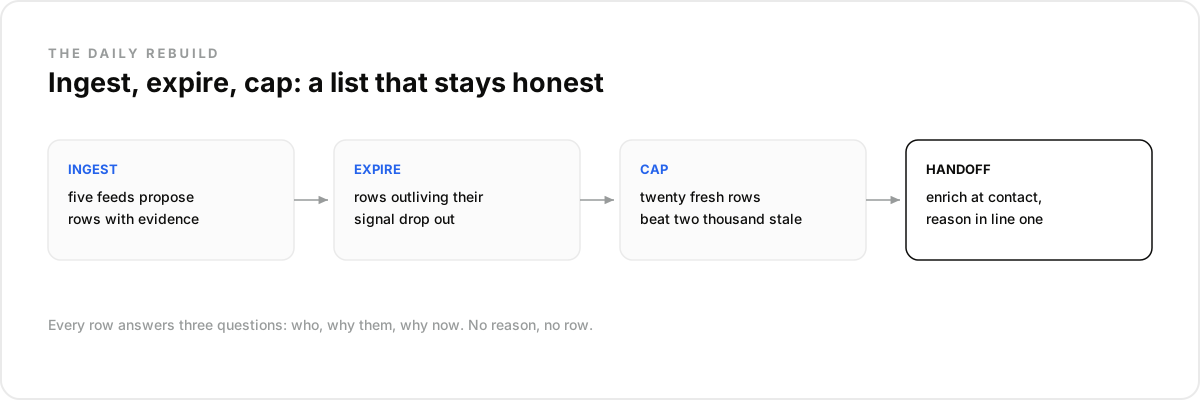
On a daily loop with three moves: ingest, expire, cap. The five feeds run each morning and propose rows. Rows whose signal aged past its window drop out automatically. And a hard cap keeps the queue at a size a human team can actually work, with the freshest reasons winning the seats.
Expiry is the step teams skip, and it is the one that keeps the list honest. A solution-seeker post from six weeks ago is not a reason anymore; a row that outlives its evidence is a static list growing back.
Best for: teams whose market emits observable events: posts, hires, rounds, moves. Not for: a two-hundred-account named-list motion where every target is already known; there, signals reorder the day rather than build the list.
The cap does the last piece of discipline. Twenty fresh rows a day beats two thousand stale ones, because the constraint was never list size; it was attention, the rep's and the prospect's.
Where Does the List End and Outreach Begin?#
The handoff is enrichment at contact time. A row leaves the list when someone decides to act on it; at that moment, and not before, the person gets enriched for a verified work email and a current-role check. The list stays cheap; the sends stay accurate.
This split also keeps roles clean. The list's job is to justify attention: who, why them, why now. Outreach's job is to deserve a reply, and it starts with the reason the row already carries, which is why signal-based lists convert: the first line writes itself from evidence, and every send inherits a recent, checkable reason.
A data layer like DataForB2B feeds all five signals and the enrichment from one key, over REST or MCP, so the daily loop is a schedule and a handful of calls. Wire it up during the free trial from the pricing page.
The Mistake Most Teams Make#
The mistake most teams make is hoarding: keeping every row ever admitted because deleting feels like losing pipeline. Within a quarter the queue is indistinguishable from the static export it replaced, except now the stale rows carry expired reasons that make the outreach actively worse.
In our experience the fix is emotional as much as technical: agree that rows are perishable, let the expiry rule delete without a meeting, and judge the list by reply rate per row, never by row count. What surprised us is how quickly reply quality recovers once the queue shrinks.
For the outreach side of the loop, see our guide to building a signal-driven AI SDR.
How Do You Run the Daily Rebuild in Claude or Any LLM Agent?#
The daily loop runs as a scheduled Claude conversation before it deserves a line of code. Connect the data tools over MCP, define the five feeds in plain language, and let the routine do the ingest-expire-cap cycle.
- Create an account at app.dataforb2b.ai/signup (free trial, 100 credits) and grab your API key.
- In Claude, open Settings, then Connectors, and add https://mcp.dataforb2b.ai/mcp. The same server plugs into Cursor, VS Code, ChatGPT, or any MCP-enabled agent.
- Paste the brief: "Build today's list: solution-seeker posts in our category plus companies hiring RevOps this week, capped at 20 rows with reasons."
- Turn the working chat into a scheduled routine so it runs every morning without you.
A list is a promise that every row deserves attention today. Build one that keeps it, starting on the pricing page.
Frequently asked questions
- What makes a prospecting list signal-based?
- Admission by event. Every row enters because something observable happened, a post, a move, a hiring burst, a round, and the row carries that evidence with a timestamp. Filters describe who fits; signals decide who enters and when. No reason, no row.
- How often should the list rebuild?
- Daily for ingestion and expiry, because the hottest signals, solution-seeker posts and fresh engagers, decay in days. The account-level feeds can run weekly without much loss. What should never happen is a rebuild cadence measured in quarters; that is the static list returning.
- How many signals should one row have?
- One strong reason admits a row; a second signal promotes it. A fit-account arrival plus a hiring burst, or an engager whose company just raised, outranks either alone. Stacked signals are the practical scoring system, and they read as evidence rather than arithmetic.
- How do you keep the list from going stale?
- Give every signal type an expiry and let it delete rows automatically: days for posts, weeks for engagement, months for funding and moves. Then enrich only at contact time, so emails are verified when used. Staleness is a process failure, not a data inevitability.
- Where does the list stop and outreach begin?
- At the moment of commitment. The list justifies attention with who, why them, why now; when a rep or agent acts, the row gets an enrichment pass and leaves the queue. Message-writing, sequencing, and channel choice belong to outreach, fed by the row's evidence.