How to Scale a Recruiting Agency With Claude in 2026
Learn how to scale a recruiting agency with Claude using per-client isolation and reusable filter structures, so costs never multiply per client served.
Most recruiting-agency tools charge per seat. That turns "we just signed a new client" into a software-budget conversation before it becomes a sourcing conversation.
Agency recruiters do not have one req. They have five, six, sometimes ten. Each belongs to a different client, with its own scope and rules.
Learning how to scale a recruiting agency with Claude means solving a problem in-house teams never face. Run parallel candidate searches without pools bleeding into each other. Do it without headcount climbing at the same rate as client count.
Most published advice on Claude for agencies covers generic sourcing and screening for one desk. It skips the part where a boutique agency juggles concurrent client mandates on one credit budget. This piece covers that part: connect the team to DataForB2B's MCP once, and that same connection scales talent sourcing and automates it across every client, not just one desk.
Key Takeaways#
- Run one MCP connector and credit pool, but keep a separate Claude conversation per client to stop context and notes from crossing over.
- Build filter structure once per role archetype, then swap client-specific values instead of rebuilding logic for every new req.
- Use Text to Filters to turn a raw job description into structured filters in minutes, not hours.
- Reserve costly enrichment for shortlisted finalists per client, not every profile you touch.
- The real ceiling on parallel reqs is your own review time, not how many candidates exist.
- Connect the whole team to DataForB2B's MCP once, and every recruiter runs the same scaled, automated sourcing workflow, client after client.
Why Does Client Count Break Most Sourcing Workflows?#
Client count breaks most sourcing workflows. Each new mandate adds a full search cycle, not a small increment. Tools priced per seat or per user turn growth into a budget fight instead of a delivery question.
An in-house talent team sources for one company. An agency recruiter sources for several. Each has its own hiring manager and its own definition of a good fit.
A workflow built for one req rarely survives being copy-pasted six times a week.
See how to source candidates with Claude for the single-search mechanic. This article builds the layer on top: running that mechanic across many clients at once.
How Do You Stop Candidate Pools From Bleeding Across Clients?#
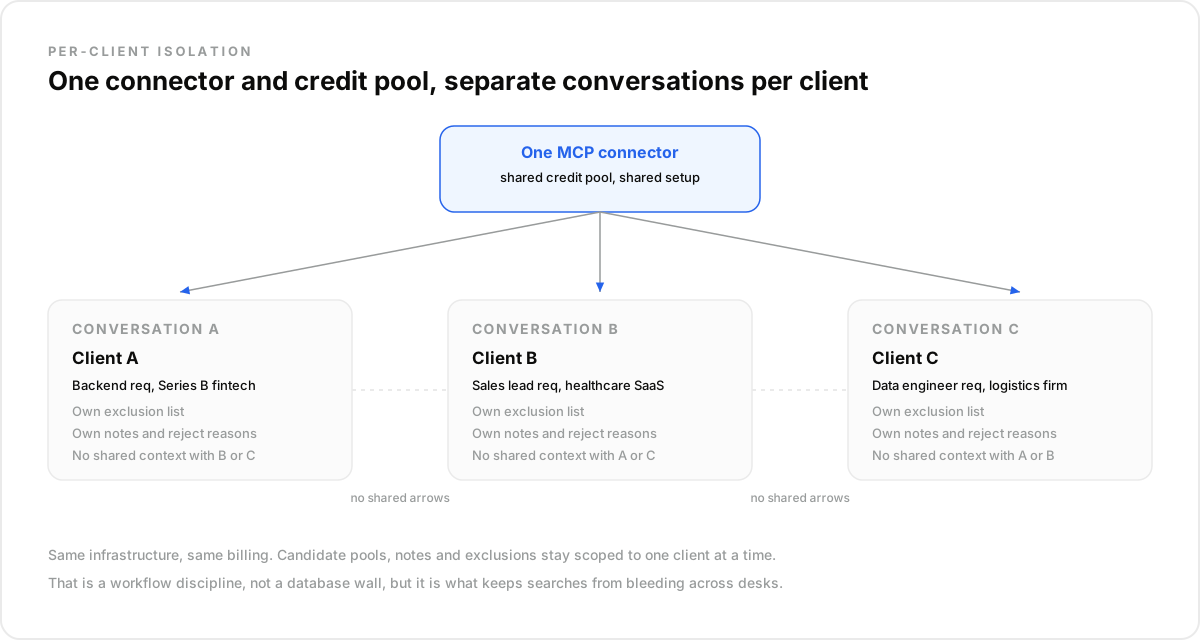
You stop cross-contamination with one habit. Give each client its own Claude conversation or project. Every conversation still points at the same MCP connector and the same credit pool. Context, exclusions, and notes stay scoped to that one thread.
This is a workflow discipline. Not a database wall. The connector and the underlying data layer are shared infrastructure.
The working memory is not shared. Client A's rejected candidates, search history, and reasoning stay inside Client A's conversation.
Open a fresh project per client. Name it after the client, not the role. One client often runs multiple open reqs at once.
Inside that project, every search, every note, and every "already pitched, passed" flag lives together. Switching clients means switching projects, never scrolling up in a shared thread hoping you remember which notes belong to whom.
Why Does This Matter Beyond Convenience?#
It matters because recruiting has real confidentiality norms. Not tidy-desk preferences. Agencies deliberately keep candidate pools scoped per client rather than pooled into one shared database.
Two clients competing for similar talent should not learn the other is hiring for the same skill set. A candidate excluded from one client's search should not quietly resurface in a competitor's shortlist.
Per-client isolation answers that norm naturally. It fits how agencies already think about client relationships.
What Happens When You Rebuild Search Logic for Every Req?#
Problem. Recruiters treat every new req as a blank page, rebuilding filter logic each time even when the shape of the role barely changed.
Proof. One mid-sized agency recruiter described teams burning credits on duplicate profile views. They re-ran near-identical searches four to six weeks apart for similar roles.
The reason: rejected profiles had vanished from anyone's tracking. Nobody remembered a name had already been surfaced and passed on, so the team paid again to rediscover the same people.
Payoff. A saved filter structure, reused with new values, cuts that rebuild time and stops paying twice for the same discovery work.
How Do You Reuse a Search Without Reusing the Candidate Pool?#
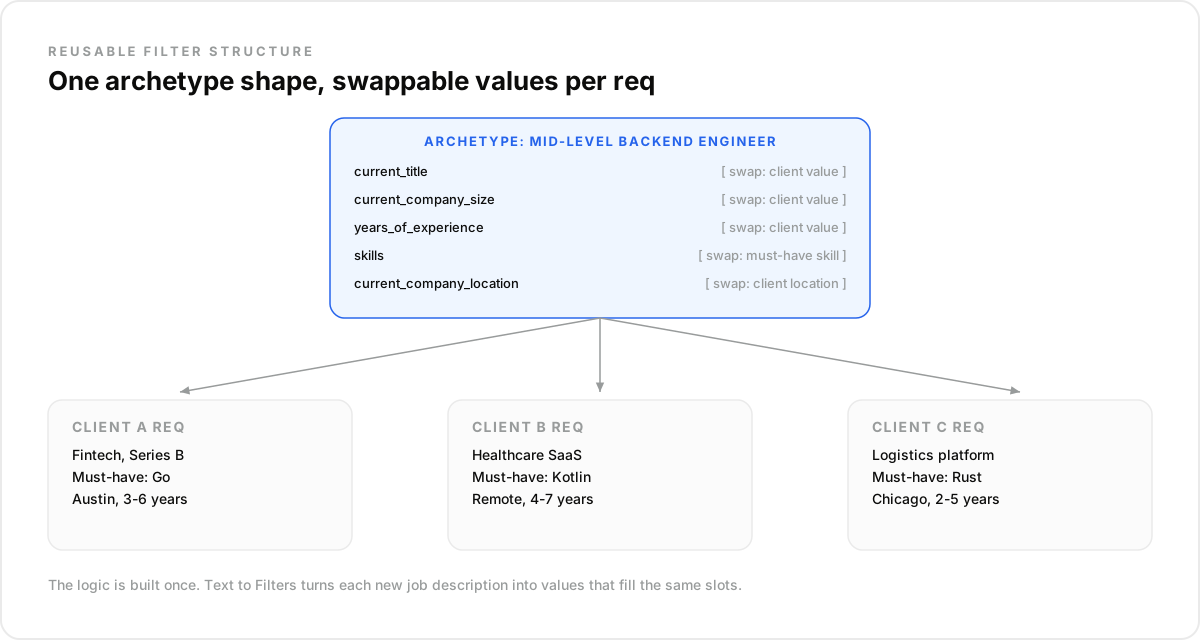
You reuse the structure, not the results. Build one filter shape per role archetype: title, company size, years of experience, skills. Then swap in client-specific values for each new req.
A "mid-level backend engineer" archetype might combine current_title, current_company_size, years_of_experience, and skills. That shape does not change from client to client.
What changes? The company, the location, and the one must-have skill a specific hiring manager cares about.
Feed each new client's raw job description into Text to Filters, or a reasoning search that reads the description directly. It maps loose language onto that same structured shape in one pass.
POST https://api.dataforb2b.ai/search/people
api_key: YOUR_api_key

{
  "current_title": "Backend Engineer",
  "current_company_size": "51-200",
  "years_of_experience": "3-6",
  "skills": ["Go"],
  "current_company_location": "Austin, TX"
}
Swap skills, location, and size for the next client's req. The filter shape and the reasoning behind it stay put.
Can One Recruiter Actually Run Several Client Reqs at Once?#
One recruiter reported filling three roles in nine working days on overflow work subcontracted from another agency. That kind of pace is real. It depends on not starting from zero on each req.
Reusable filter structure and per-client isolation are what make that pace repeatable instead of a one-time sprint.
Without them, every additional client adds full-time hours, not partial hours, and the agency ends up hiring recruiters just to keep pace with client count.
Per-Seat Pricing vs. Volume-Based Infrastructure#
Per-seat software prices growth as headcount. Take on another client, and someone approves another seat.
Volume-based infrastructure prices by what you query. Another client adds that client's searches to your monthly record quota, not a new license line.
Neither model removes the work of running the req well. The difference is whether growth triggers procurement, or just shows up as slightly higher usage.
Does Managing More Clients Mean More Infrastructure to Set Up?#
No. The connection is one MCP setup, done once, reused across every client project you create afterward. Adding a client means opening a new conversation, not standing up new infrastructure.
One person questioned the value of a costly, multi-month consulting engagement sold as "AI in recruiting," priced in the mid five-figures. Connecting a data source through MCP is closer to a settings change than a project.
Skip the consulting retainer. You need the connector, a clear filter structure per archetype, and a discipline around per-client conversations.
How Do You Run This Workflow in Claude?#
Start with the connector. In Claude, go to Settings, then Connectors, and add the DataForB2B MCP endpoint. This step happens once, regardless of how many clients you serve.
Next, create a project per active client. Give it a clear name and drop the client's intake notes, must-haves, and any existing exclusion list into that project's context.
For each new req inside that client's project, pull up the archetype filter structure closest to the role. Paste the raw job description and ask Claude to map it onto that structure using Text to Filters or reasoning search.
Run the search first. Review the shortlist. Enrich only the names you would actually reach out to.
Keep rejected candidates and reasons noted inside that same client project. Six weeks later, a similar req lands from a different client. Start a new project and a fresh filter. Stay informed by the old notes. Never re-run against the same pool.
What This Workflow Is Not#
- It is not a shared candidate database across clients. Pools stay scoped per client on purpose, to respect confidentiality norms in the industry.
- It is not a replacement for your judgment on fit. Filters surface a shortlist; you still decide who gets pitched.
- It is not free of usage just because there are no seats. Every search and every enrichment still counts toward the plan's monthly records.
For teams sourcing internally rather than across clients, the mechanics differ slightly. See how to build an AI recruiting agent for that single-team framing, and contrast it against the multi-client throughput pattern here.
The connector, the filter structures, and the search endpoint sit behind the candidate sourcing API, usable directly or through any MCP-compatible agent.
Running several client mandates without adding a recruiter for every new logo starts with the setup, not a hiring plan. Check current plans, including a free trial (100 credits) for testing the filter-structure approach on your next req. Or connect the MCP endpoint now and try a search scoped to one client.
Frequently asked questions
- How do you keep candidate searches separate across clients?
- Open a distinct Claude conversation or project per client, even on the same connector and credit pool. Context, notes, and exclusion lists live inside that project only. Switching clients means switching projects. It never means scrolling through one shared thread trying to guess whose notes are whose.
- Does enrichment cost scale with the number of clients you serve?
- Not proportionally, if you tier it. Run searches first and keep enrichment for shortlisted finalists per client. Work emails are included; personal emails are $0.03 and mobile numbers $0.15 a contact credit, only when found. Usage tracks shortlist size, not client count.
- Can you reuse a search across similar reqs from different clients?
- You reuse the filter structure, never the candidate pool. Build one archetype shape: title, company size, experience, skills. Run Text to Filters against each new client's job description. It fills that same shape with fresh, client-specific values and fresh results, every single time.
- How many client reqs can one recruiter realistically run in parallel this way?
- The ceiling is usually filter-building and shortlist-review time, not candidate availability. Reusing structure instead of rebuilding logic per req is what lets one recruiter carry several client mandates at once. Headcount stops rising at the same rate as client count, which is the whole point.
- Why not just build one shared candidate database across all clients?
- Agencies deliberately avoid that. Confidentiality and conflict-of-interest norms mean a candidate considered for one client should not silently surface for a competing client. Per-client scoped search, run on shared infrastructure but never a shared pool, respects that constraint by default rather than requiring extra rules.