How to Source Candidates With Claude (Step by Step)
How to source candidates with Claude, step by step: connect a candidate data layer over MCP, paste the job description, steer in plain language, and enrich the top ten.
Founders and recruiters keep posting the same discovery: they opened Claude to draft a job description and ended up running their whole sourcing pass in it. No seat license, no browser bot clicking through profiles, no CSV gymnastics.
The setup behind that discovery takes two minutes, and the rest is a conversation.
This is how to source candidates with Claude, step by step: what to connect, the prompts that turn a job description into a shortlist, how to steer in plain language, and how to make it rerun for every new req.
Key Takeaways#
- Claude sources through a connected candidate data layer over MCP; alone it has no profile pool.
- Paste the job description, and Claude drafts typed filters, previews the count, and pulls a ranked shortlist.
- Steering is plain language: "drop the agencies", "require the certification", "get emails for the top ten".
- No browser bots, no seat automation: every profile comes from a live structured query.
Can Claude Source Candidates on Its Own?#
No. Out of the box, Claude has no candidate pool, and any names it produces unassisted are unverifiable. Connected to a candidate data layer over MCP, it queries 850M+ professional profiles through typed filters, and every candidate in the shortlist traces to a live record.
The distinction matters because the failed experiments skip it. Asking a bare model to "find me five backend engineers in Berlin" tests its imagination. Giving it search and enrichment tools tests the market, and the market answers.
What You Need Before Starting#
Two things, both fast. An account on the data layer: create it free at app.dataforb2b.ai/signup. And the connector in Claude: Settings, then Connectors, then add https://mcp.dataforb2b.ai/mcp. The same server works in Cursor, VS Code, ChatGPT, or any MCP-enabled agent.
Once connected, Claude gains the tools that matter for sourcing: people search across the full filter families, skills, certifications, languages, education, tenure, past companies, plus live enrichment that returns a verified work email and GitHub activity for technical candidates. The free tier covers a full evaluation req, so the first session costs nothing but the afternoon.
What This Setup Is NOT#
It is not seat automation, not a resume screener, and not an ATS replacement. The distinction is worth thirty seconds, because the tools it replaces and the tools it complements are different lists, and mixing them up is how sourcing stacks get bloated.
Not a browser bot. Nothing here drives your account through profile pages. Queries hit a structured data layer directly, which is faster and does not put an account at risk.
Not a screener. It searches outward for people who never applied. Inbound resume filtering is a different job with different fairness stakes.
Not your ATS. Shortlists flow into Greenhouse or Lever as candidates; the system of record stays where it is.
How Do You Turn a job description Into a First Shortlist?#
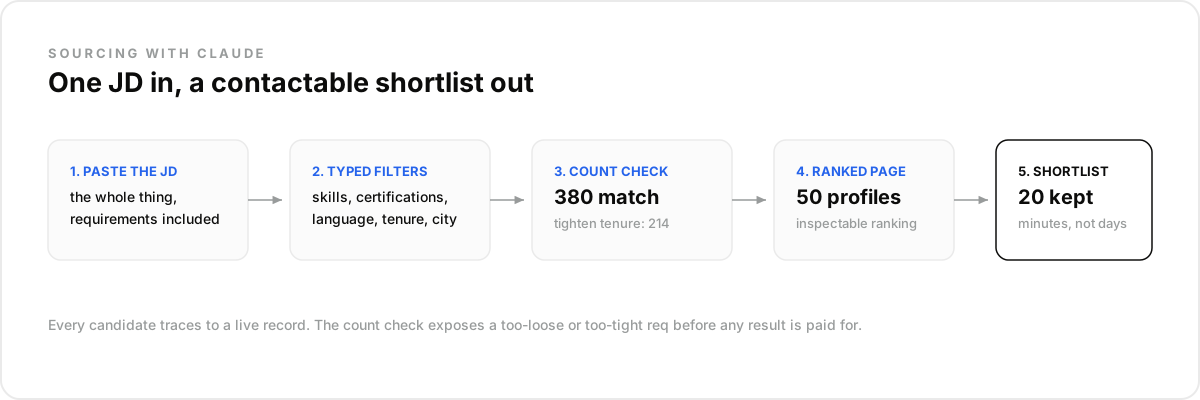
Paste the whole job description into the chat and ask Claude to source from it. It reads the job description as requirements, drafts typed filters, current title, skills, location, tenure, previews how many profiles match, and pulls a first ranked page. One message in, a working shortlist out.
A real first prompt: "Here is the job description. Source 25 matching candidates, current roles only, and tell me how many people matched before you picked." The count matters: four thousand means the req needs tightening, nine means one filter is strangling it, and Claude will say which.
Hard reqs are where the filter depth shows. A platform engineer in Berlin, certified on Kubernetes, working in German, five-plus years: that is five typed conditions, and exactly the query a keyword box cannot express.
How Do You Refine Without Redoing the Search?#
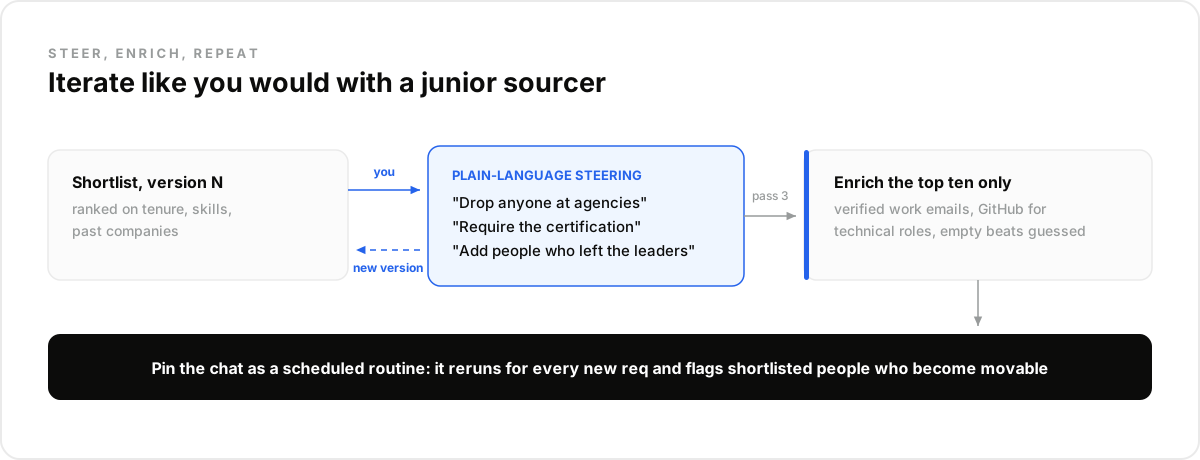
You steer in plain language, and each instruction becomes a tool call that adjusts the query. "Drop anyone at agencies." "Require the certification, not just the skill." "Add people who left the industry leaders in the last year." The shortlist updates in the same thread, with the reasoning visible.
This is the step that separates a sourcing session from a search box: iteration is free and conversational. In our experience the third pass of a steered search beats the first pass of a perfect one, and what surprised us is how quickly non-technical founders get good at the steering.
Treat it like briefing a sharp junior sourcer: give feedback on the list you got, not specifications you think the tool wants.
How Do You Get Emails for the Top Ten?#
Ask for them, on the keepers only: "Get verified work emails and GitHub for the top ten." Claude runs live enrichment on exactly those profiles. Emails come back verified or empty, never guessed, and GitHub activity grounds a technical ranking in shipped code rather than self-reported skills.
The discipline is the same one recruiting teams learn everywhere: enrich the shortlist, never the whole result set. Ten enrichments for ten conversations keeps the spend trivial, and running enrichment at contact time means nobody emails a candidate who changed jobs since the search.
The tools underneath are DataForB2B's candidate sourcing API; the conversation is just the friendliest way to drive them, and the same calls power a productized pipeline later.
How Do You Run It for Every New Req?#
Pin the working conversation as a template and turn it into a scheduled routine. Each new req is the same session with a new job description pasted in; each open req can also rerun weekly, catching profiles that changed since last time, new arrivals, new departures, new availability.
Add a watch on the shortlist for the long-running reqs: when a shortlisted engineer changes roles, that is the moment they became movable, and the routine flags it the week it happens. The deeper mechanics live in our guide to the AI candidate sourcing agent.
One founder pattern from the forums: a routine per open req, reviewed each Monday over coffee in fifteen minutes. Teams that later productize keep the architecture: the conversation becomes an automated pipeline, the tools become REST calls, and the data layer underneath does not change.
What Stays Human?#
Judgment, outreach, and every decision about people. Claude compresses the search from days to minutes, but whether a candidate fits the team, deserves the role, or should be approached at all remains a human call, and the setup should keep it that way structurally.
Two guardrails worth building in from day one: rank only on job-relevant, inspectable signals, and never let any automated step silently exclude people. The shortlist proposes; a recruiter disposes. That boundary is what keeps fast sourcing from becoming a compliance problem.
The Mistake Most Teams Make#
The mistake most teams make is stopping at the first shortlist. The first pass answers the job description as written; the third pass answers the role as it actually is, after the hiring manager reacted to real profiles and the filters absorbed the feedback. Teams that skip the iterations ship the rough draft.
The pattern shows up in every forum thread on the topic: the founders happiest with Claude sourcing are the ones treating the shortlist as a conversation starter with the hiring manager, not a deliverable. Ten minutes of steering, repeated twice, is the entire skill.
One job description, one conversation, one shortlist with verified emails. Connect the data layer and run your hardest req this afternoon, starting at the pricing page.
Frequently asked questions
- Can Claude source candidates by itself?
- No. Without a data connector, Claude has no candidate pool and any names are unverifiable. Connected over MCP to a candidate data layer, it searches live professional profiles with typed filters and enriches the shortlist, with every candidate traceable to a current record.
- Does this work without a recruiter seat?
- Yes. The setup queries a structured profile pool directly through an API, so there is no recruiter seat, no browser automation, and no per-seat license. Teams that keep a seat use it downstream for engagement while the search itself runs through the data layer.
- How do you give Claude access to candidate data?
- Through one MCP connector: create an account on the data layer, then add the server URL in Claude's Settings under Connectors. From that point the search and enrichment tools appear in every conversation, and a scheduled routine can use them unattended.
- Can Claude find candidate emails?
- Yes, through live enrichment on the profiles you keep: verified work emails where they exist, returned empty where they do not, never guessed. For technical roles the same call adds GitHub activity, which grounds ranking in real work instead of keywords.
- What should stay human in AI sourcing?
- Fit judgment, outreach tone, and every accept-or-reject decision. The agent owns coverage and speed: turning a job description into a shortlist and keeping it fresh. A recruiter reviews who surfaced and who did not, and no automated step should ever silently exclude anyone.