How to Source Candidates With Copilot (Copilot Studio)
How to source candidates with Copilot: pick the right Copilot, connect a data layer to a Copilot Studio agent over MCP, then source in chat.
Half the confusion about sourcing with Copilot is the name. "Copilot" is three different products, and only one of them can be turned into a candidate sourcer. So the first move is not a prompt. It is picking the right Copilot. Get that wrong and you spend an afternoon asking Microsoft 365 Copilot to find engineers it was never built to reach.
Once the right surface is chosen, the rest is familiar: a candidate data layer connected over MCP, and a conversation that turns a job description into a shortlist.
This is how to source candidates with Copilot: which Copilot to use, how to add the data layer to it, and why the governance story is the reason Microsoft shops reach for it.
Key Takeaways#
- "Copilot" is three products; only a Copilot Studio agent can be wired to source candidates.
- Alone it has no candidate pool; add a data layer over MCP and it searches 850M+ live profiles with typed filters.
- Connection is clicks, not config: Tools, Add a tool, Model Context Protocol, authorize, with generative orchestration on.
- MCP tools inherit tenant governance (DLP, virtual network), which is why Microsoft-standardized teams choose this path.
Which "Copilot" Are You Actually Using?#
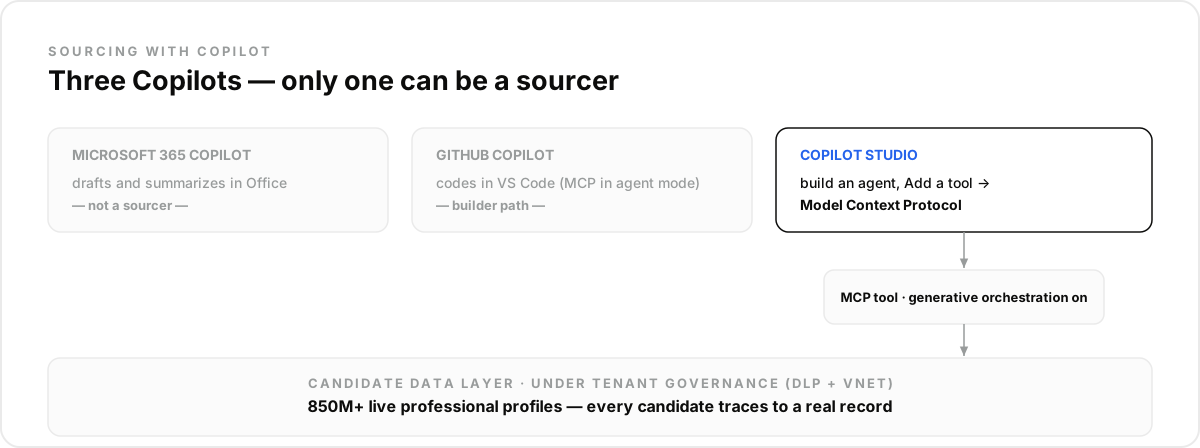
Three things share the name, and they are not interchangeable for sourcing:
- Microsoft 365 Copilot: the assistant inside Word, Outlook, and Teams. It drafts and summarizes over your Office content; it is not where you source.
- Copilot Studio: the builder where you create agents and give them tools. This is the surface that can hold a candidate data layer and source against it.
- GitHub Copilot: the coding assistant in VS Code. Its agent mode can call MCP servers too, but that is the builder's path, not a recruiter's.
For a recruiting team, the answer is Copilot Studio: you build an agent, add the data layer as a tool, and source in plain language. The rest of this guide assumes that surface.
Why Can't Copilot Source on Its Own?#
Because no Copilot surface ships with candidate data. Ask a bare agent to "find five platform engineers in Berlin" and it either declines or invents plausible names it cannot verify. The model reasons about recruiting; it cannot see the market.
Connected to a candidate data layer, a Copilot Studio agent crosses that line: it queries 850M+ professional profiles through typed filters, previews the match count before pulling, and enriches the people you keep. Every candidate traces to a live record instead of the model's memory.
How Do You Add Candidate Data to a Copilot Studio Agent?#
It is a short, click-driven flow, and Microsoft's Copilot Studio documentation lays it out: on your agent's Tools page, choose Add a tool, pick Model Context Protocol from the catalog, authorize the connection to the data layer, and add it. The server's search and enrichment tools then show up on the agent's Tools tab, and changes on the server are reflected automatically.
Two settings matter. Generative orchestration must be enabled: that is what lets the agent decide to call the tools during a conversation. And the data layer needs an account and key first: create one on the pricing page, where the free trial includes 100 credits to validate a first req (a trial, not a permanent free tier). For builders who prefer schema over the catalog, Copilot Studio also supports importing a custom connector from an OpenAPI definition.
What Does a Sourcing Pass Look Like?#
The same loop as any connected assistant, run inside the agent. Paste the role and it drafts the typed filters, checks the count, and returns a ranked page:
- "Senior backend engineers in Berlin, 5+ years, Python or Go, not at an agency." The agent builds the typed query and previews the count before pulling.
- Steer in plain language: "drop the agencies", "require the certification", "add people who left the industry leaders this year." Each instruction edits the query and re-counts.
- Enrich the keepers only: "verified work emails and GitHub for the top ten." Emails return verified or empty, never guessed.
The prompts carry over directly from our Claude sourcing walkthrough and the Gemini guide; the data layer is identical, only the client changes.
Why Do Microsoft Teams Pick This Route?#
Governance. Because an MCP tool runs on Copilot Studio's connector infrastructure, the candidate data layer inherits the same tenant controls as every other connector: Data Loss Prevention policies, virtual-network integration, and the admin visibility a security team expects. For a recruiting org already standardized on Microsoft, that is often the deciding factor over a standalone sourcing tool, the data layer lives inside the governance perimeter instead of beside it.
What Stays Human?#
Fit judgment, outreach tone, and every accept-or-reject call. The agent owns coverage and speed, turning a brief into a shortlist and keeping it fresh, but a recruiter reviews who surfaced and who did not, and no automated step should ever silently exclude a candidate.
The mistake most teams make with Copilot specifically is starting in the wrong product, asking Microsoft 365 Copilot to do what only a Copilot Studio agent can. Pick the right surface, add the data layer as a tool, and run your hardest req this afternoon, starting at the pricing page.
Frequently asked questions
- Which Copilot actually sources candidates?
- The one you build in Copilot Studio. Microsoft 365 Copilot is the assistant in Office, and GitHub Copilot is a coding tool; neither ships a candidate pool. A Copilot Studio agent can add a candidate data layer as an MCP tool and source against it, so that is the path this guide takes.
- Can Copilot source candidates without a connector?
- No. On its own any Copilot surface has no candidate data, so unassisted names are unverifiable. Added to a Copilot Studio agent over MCP, a data layer lets it search 850M+ live professional profiles with typed filters, with every candidate traceable to a current record.
- How do you add candidate data to a Copilot Studio agent?
- On the agent's Tools page choose Add a tool, pick Model Context Protocol, authorize the connection, and add it. The server's search and enrichment tools then appear on the agent's Tools tab. Generative orchestration must be enabled for the agent to call them.
- Is a Copilot Studio sourcing agent safe for enterprise data governance?
- MCP tools run on Copilot Studio's connector infrastructure, so tenant controls such as Data Loss Prevention policies and virtual-network integration apply to the candidate data layer like any other connector. That governance is the main reason recruiting teams on Microsoft pick this route.
- Can the agent find candidate emails?
- Yes, through live enrichment on the profiles you keep: a verified work email where one exists, returned empty where it does not, never guessed. For technical roles the same call adds GitHub activity, which grounds ranking in shipped work rather than keywords.