How to Source Candidates With ChatGPT (Beyond Prompts)
How to source candidates with ChatGPT for real: your natural query becomes ultra-precise JSON filters that GPT iterates on, with three sourcing plays inside.
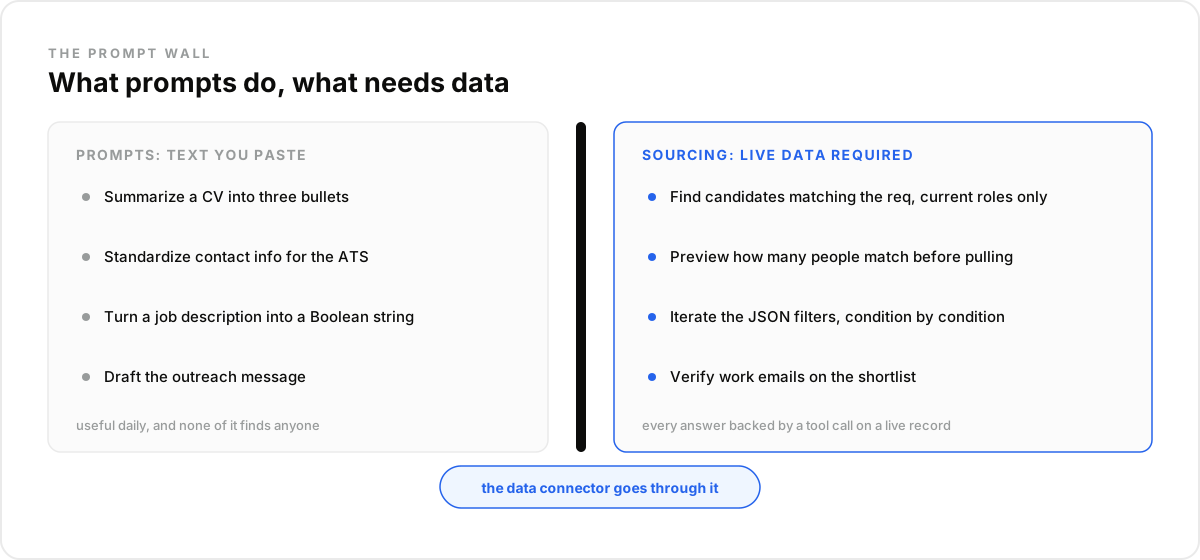
Ask recruiters how they use ChatGPT and you get an honest, modest list: summarize CVs into three bullets, standardize contact info for the ATS, turn a job description into a Boolean string, draft the outreach message. Useful, daily, real.
Then ask how they source candidates with it, and the same threads go quiet, except for one recurring complaint: ChatGPT says it cannot reach candidate data, and someone suggests bolting on a scraper stack.
This is the missing guide to how to source candidates with ChatGPT: what prompts genuinely do, where they hit the wall, and the connector that turns the chat into an actual sourcing tool.
Key Takeaways#
- Prompts operate on text you paste. Sourcing requires data ChatGPT does not have on its own.
- The unlock: your natural query becomes ultra-precise JSON filters that GPT edits and re-counts, turn by turn.
- Three plays cover most sourcing: job description to typed filters, Boolean upgraded to typed conditions, shortlist to verified emails.
- Names without a tool call behind them are fiction. Every real candidate traces to a real record.
What Can ChatGPT Prompts Actually Do for Sourcing?#
Prompts handle the text around sourcing brilliantly: condensing a CV into three scannable bullets, extracting contact details into ATS-ready fields, converting a job description into a Boolean string, drafting a first message. Recruiters who use ChatGPT daily describe exactly this list, and it saves real hours.
Notice what every item has in common: the recruiter supplies the material. The CV was already downloaded, the job description already written, the candidate already found. Prompts polish and transform what you paste; the finding happened somewhere else.
That is not a criticism, it is a boundary. The twenty-prompt listicles are genuinely useful for every stage except the one this article is about.
Why Do the Prompts Stop at the Data Wall?#
Because ChatGPT ships with no candidate pool. Ask it to find five platform engineers in Berlin and it either declines or invents plausible names it cannot verify. One recruiter described the experience precisely: the model kept answering that it cannot access profiles directly, and suggested building a scraper pipeline instead.
That scraper detour is the trap. Wiring crawlers and automation glue around a chat produces a fragile stack that breaks on every layout change, and the output still needs cleaning, deduplication, and verification before anyone can be contacted.
The wall is structural: a language model transforms text; sourcing queries a market. The fix is not a better prompt, it is giving the chat a data tool.
What Sourcing With ChatGPT Is NOT#
Three shortcuts wear the label and fail. Sourcing with ChatGPT is not a prompt pack, not a scraper pipeline glued to a chat, and not a list of names generated from the model's memory. Each fails differently, and the third one fails dangerously.
Not a prompt pack. Prompts transform supplied text. No phrasing conjures candidates the model cannot reach.
Not a scraper stack. Crawlers bolted to a chat trade one wall for a maintenance backlog, and the data arrives stale and unverified.
Not generated names. A model asked to list candidates without tools will produce convincing fiction. If no tool call sits behind a name, the name is not real sourcing.
What Unlocks Real Sourcing in ChatGPT?#
A data connector, and one specific superpower it hands the model: translating your natural-language query into ultra-precise JSON filters, then iterating on them. You speak in plain English; GPT writes typed conditions with exact enums, ranges, and ISO codes, against 850M+ professional profiles.
Say "platform engineers in Berlin, certified on Kubernetes, working in German, five-plus years" and this is what GPT actually builds and runs:
{
  "op": "and",
  "conditions": [
    {"column": "skill", "type": "in", "value": ["Kubernetes", "Terraform"]},
    {"column": "certification", "type": "like", "value": "Kubernetes"},
    {"column": "language", "type": "=", "value": "German"},
    {"column": "current_job_location", "type": "like", "value": "Berlin"},
    {"column": "years_of_experience", "type": ">=", "value": 5}
  ]
}
The iteration is the point. Every sentence you add, "drop the agencies", "make the certification mandatory", "six years, not five", edits that JSON precisely and re-counts the matches. Vague language in, exact query out, refined turn by turn: that is what a prompt alone can never do.
Connector availability in ChatGPT depends on your plan tier; check OpenAI's current documentation. And the same standard runs in Claude, Cursor, or a custom agent, covered in our step-by-step Claude sourcing tutorial.
Which Three Plays Turn ChatGPT Into a Sourcer?#
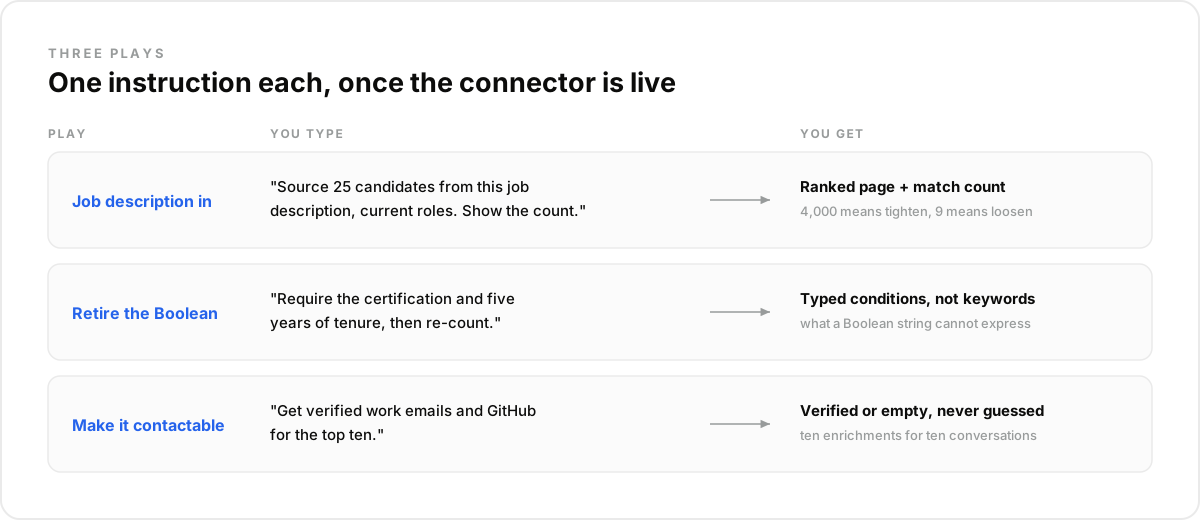
Three plays cover most recruiting weeks: turning the job description into typed filters, upgrading the Boolean habit into typed conditions, and converting a shortlist into contactable candidates. Each is one instruction in the chat once the connector is live, and each replaces hours of manual searching.
Play 1: Job description in, counted shortlist out#
Paste the job description and ask for candidates matching it, current roles only. The chat drafts the JSON filters, previews the match count, and pulls a ranked page. The count is the discipline: four thousand means tighten, nine means loosen, and either adjustment is one sentence.
Play 2: retire the Boolean string#
Recruiters already ask ChatGPT to write Boolean searches from job descriptions. Connected, the same request produces the JSON filters shown above instead of keyword algebra. A Boolean string cannot require a certification, a language proficiency, or five years of tenure; it can only match words.
The upgrade compounds with iteration: a Boolean gets rewritten from scratch each time, while the JSON gets edited condition by condition, with a fresh count after every change. The shortlist stops looking like a keyword accident.
Play 3: shortlist to verified emails#
"Get verified work emails and GitHub for the top ten." Enrichment runs on exactly those profiles: emails come back verified or empty, never guessed, and GitHub activity grounds technical ranking in shipped code. Ten enrichments for ten conversations keeps the spend proportional.
How Do You Run This in ChatGPT or Any LLM Agent?#
Setup is minutes, and the plays above become a repeatable routine. The connector is added once in your assistant's settings, the first job description validates the workflow, and a scheduled task reruns it for every open req without anyone reassembling the stack.
- Create an account at app.dataforb2b.ai/signup (free trial, 100 credits) and grab your API key.
- Add the connector https://mcp.dataforb2b.ai/mcp in your assistant's connector settings: ChatGPT on plans that support custom connectors, and Claude, Cursor, or VS Code out of the box.
- Paste the brief: "Here is the job description. Source 25 matching candidates, current roles only, and get verified work emails for the top 10."
- Turn the working chat into a scheduled task so it reruns for every new req without you.
The Mistake Most Teams Make#
The mistake most teams make is collecting prompts when the gap was data. Another prompt pack refines the wording of requests the model still cannot fulfill, which is why the twenty-prompt guides all cluster around writing tasks and go silent on finding people.
The second mistake is worse: acting on names the model produced without tools. In our experience one rule prevents it completely: facts about people come from tool calls, prose comes from the model. What surprised us is how quickly recruiters internalize it once the first real, counted, verified shortlist lands in the chat.
The tools underneath are DataForB2B's candidate sourcing API: 60+ typed filters across skills, certifications, languages, education and tenure, with enrichment in the same stack.
The prompt era polished the text around sourcing; the connector era does the sourcing. Plug the data layer into your assistant and run your hardest req today, starting at the pricing page.
Frequently asked questions
- Why can't ChatGPT find real candidates by itself?
- Because it has no candidate database and no data access. Its memory is training data, frozen and unverifiable, so unassisted candidate lists are invented. Connected to a candidate data layer, it queries structured profiles through typed filters, and every name traces to a current record.
- What are the best ChatGPT prompts for sourcing?
- Once a connector is live, three earn their keep: "source 25 candidates from this job description, current roles only, and show the match count", "tighten to people with the certification, then re-count", and "get verified work emails for the top ten". Without a connector, no prompt sources.
- Can ChatGPT write Boolean search strings?
- Yes, and it does it well, which is exactly why the habit persists. But a Boolean string can only match words. Typed filters express what reqs actually require, certifications, language proficiency, tenure, current role, and a connected chat builds those directly from the same job description.
- Do you need a scraper to source with ChatGPT?
- No. The scraper detour appears when people hit the data wall, and it trades that wall for maintenance, stale records, and cleanup. A data connector removes the wall: the chat queries structured profiles directly, with counts, filters, and verification built into the calls.
- Is candidate data from ChatGPT reliable?
- Only when it comes from tool calls. Names, titles, and emails generated from the model's memory are unverifiable and often invented. Data returned by a connected search or enrichment call is current and traceable, with verified-or-empty emails. The rule: no tool call, no trust.