How to Source Candidates With Gemini (CLI and API)
How to source candidates with Gemini: its MCP support is developer-first, so connect a data layer via the Gemini CLI or API, then source in chat.
Recruiting teams standardized on Google long before they thought about AI sourcing: Workspace, Meet, the whole stack. So when sourcing moves into a model, Gemini is the natural reach. Then the same wall every assistant hits: asked to "find five backend engineers in Berlin", Gemini reasons well about the role and invents the people.
The fix is not a sharper prompt. It is a candidate data layer Gemini can query over MCP. And with Gemini there is a twist worth knowing before you start: its MCP support is developer-first, so the dependable doors are the CLI and the API, not a toggle in the consumer app.
This is how to source candidates with Gemini, honestly: where the data actually connects, the one config that wires it in, and the sourcing loop that follows.
Key Takeaways#
- Alone, Gemini has no candidate pool; connected over MCP to a data layer, it searches 850M+ live profiles with typed filters.
- Gemini's MCP support is developer-first: connect through the Gemini CLI (
settings.json) or the Gemini API, not the consumer app's connector menu. - Once wired in, sourcing is a conversation: describe the role, refine in plain language, enrich only the shortlist.
- Every candidate traces to a live structured query, no browser bots, no per-seat license.
Can Gemini Source Candidates on Its Own?#
No, and the reason is the same for every model. Out of the box Gemini writes a job description, rewrites outreach, and turns a messy brief into a clean filter list. All of that operates on text you supply; none of it reaches a single real candidate.
Connected over MCP to a candidate data layer, it crosses from writing to doing: it queries 850M+ professional profiles through typed filters, previews the match count before pulling, and enriches the people you keep. The failed experiments all skip this step and test the model's memory instead of the market.
Where Does Gemini Actually Get Candidate Data?#
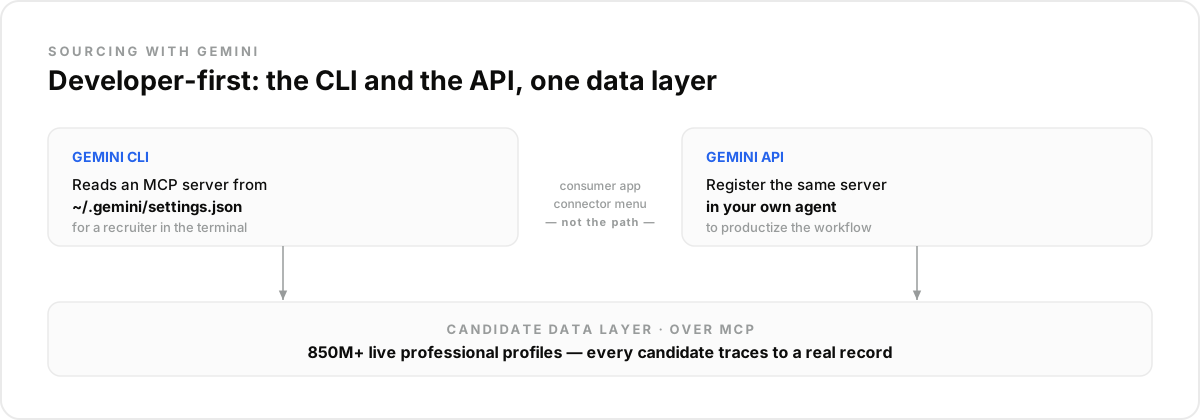
Through MCP, but Gemini's support for it is developer-first, which is the honest difference from a surface like Claude Desktop that exposes a one-click Connectors menu. For Gemini the dependable entry points sit closer to code than to a settings toggle, and two of them are worth knowing before you start:
The Gemini CLI. The terminal client reads MCP servers from a settings file, launches or calls them, and surfaces their tools in every session. This is the fastest path for a technical recruiter or a founder who is comfortable in a terminal.
The Gemini API. When you are building your own recruiting agent, you register the same MCP server in your app code and Gemini calls its tools during a run. This is the path that productizes the workflow.
The consumer Gemini app's connector menu is built around Google's own extensions, so it is not the reliable route for an external candidate data layer today. Treat the CLI and the API as the real entry points.
How Do You Wire the Data Layer Into the Gemini CLI?#
One block in ~/.gemini/settings.json is the whole setup. Create a free-trial account on the data layer, grab your API key, add the server under mcpServers with its URL and an Authorization header, and restart the CLI so it picks up the change:
{
  "mcpServers": {
    "dataforb2b": {
      "httpUrl": "https://mcp.dataforb2b.ai/mcp",
      "headers": { "Authorization": "Bearer YOUR_API_KEY" }
    }
  }
}
After the restart, the people search and enrichment tools appear in every Gemini CLI session. The free trial includes 100 credits, enough to run a first real req before committing, no permanent free tier, just enough to prove it on your own hardest role.
What Does a Sourcing Pass Look Like?#
The same loop as any connected assistant, only run from the terminal instead of a chat window. Paste the role and Gemini drafts the typed filters, checks the match count before pulling anything, and returns a ranked first page of candidates:
- "Senior backend engineers in Berlin, 5+ years, Python or Go, not at an agency." Gemini builds the typed query and previews the count before pulling.
- Steer in plain language: "drop the agencies", "require the certification", "add people who left the industry leaders this year". Each sentence edits the query and re-counts.
- Enrich the keepers only: "verified work emails and GitHub for the top ten." Emails come back verified or empty, never guessed.
The step-by-step prompts transfer cleanly from our Claude sourcing walkthrough and the ChatGPT sourcing guide, the data layer is identical, only the client changes.
What This Setup Is NOT#
It is not a browser bot driving a logged-in session, not a resume screener, and not an ATS replacement. Queries hit a structured data layer directly, which is faster and never puts an account at risk. The search looks outward for people who never applied; inbound filtering is a different job with different fairness stakes, and your system of record stays where it is.
How Do You Productize It With the Gemini API?#
When the terminal workflow proves out, the API path turns it into a feature. You register the same MCP server in your agent, and Gemini calls search and enrichment during a run, or you skip MCP and call the candidate sourcing API over REST directly. Either way the data layer underneath does not change, so the behavior a recruiter validated in the CLI is the behavior your product ships. Long-running reqs can rerun on a schedule and surface job-change signals the week a shortlisted candidate becomes movable.
What Stays Human?#
Fit judgment, outreach tone, and every accept-or-reject call. Gemini owns coverage and speed, turning a brief into a shortlist and keeping it fresh, but a recruiter reviews who surfaced and who did not, and no automated step should ever silently exclude a candidate.
The mistake most teams make with Gemini specifically is hunting for a connector toggle in the consumer app, concluding it "can't source", and giving up. The capability was always in the CLI and the API. Wire one of those to the data layer and run your hardest req this afternoon, starting at the pricing page.
Frequently asked questions
- Can Gemini source candidates on its own?
- No. Gemini has no candidate pool, and names it produces unassisted are unverifiable. Connected over MCP to a candidate data layer, it searches 850M+ live professional profiles with typed filters and enriches the shortlist, so every candidate traces to a current record.
- Does the consumer Gemini app support MCP connectors?
- Gemini's MCP support is developer-first. The reliable paths are the Gemini CLI, which reads MCP servers from its settings file, and the Gemini API, where you register the same server in your own agent. A connector toggle in the consumer app is not the dependable route today, so this guide uses the CLI and the API.
- How do you connect candidate data to the Gemini CLI?
- Add the server under mcpServers in ~/.gemini/settings.json with its URL and an Authorization header carrying your key, then restart the CLI. From that point the search and enrichment tools appear in every session, and a scheduled job can call them unattended.
- Gemini, ChatGPT, or Claude for sourcing?
- The same data layer sits behind all three over MCP, so the shortlist quality is identical; the choice is which stack you already live in. Pick Gemini if your team is on Google and comfortable in a terminal, since its MCP story is strongest in the CLI and the API.
- Can Gemini find candidate emails?
- Yes, through live enrichment on the profiles you keep: a verified work email where one exists, returned empty where it does not, never guessed. For technical roles the same call adds GitHub activity, which grounds ranking in shipped work rather than keywords.