Greenhouse Candidate Enrichment via API: 2026 Guide
Greenhouse candidate enrichment via API: read applicants from Harvest v3, add verified career data, flag fake candidates and keep past candidates current.
Recruiters keep posting the same story. A candidate clears the screen, then shows up to the video call as someone else. Or the resume falls apart at the second technical question.
Greenhouse stored exactly what the candidate typed. Nothing more.
That gap is what Greenhouse candidate enrichment closes. You read the new record through the Harvest API, add the public career data the candidate did not type, and write a short verdict back. This guide covers three jobs: enrichment at intake, a fake-candidate check, and keeping past candidates current.
Key Takeaways#
- Greenhouse stores what candidates submit; enrichment adds verified career history, skills and a work email from outside.
- Build on Harvest v3 with OAuth 2.0. Harvest v1 and v2 are being retired.
- Compare resume claims to the public work history at intake, and route mismatches to a human.
- Re-enrich silver medalists every 30 days and tag the ones who moved.
What Is Greenhouse Candidate Enrichment?#
Greenhouse candidate enrichment is a pipeline that reads candidates from Greenhouse, matches each one to a public professional profile, and writes verified career data back into the record. It runs next to your ATS, not inside it. Greenhouse stays the system of record; a people data API supplies what the application form never asked.
A bare application carries a name, an email, a phone number, a PDF and sometimes a LinkedIn URL. An enriched record adds dated work history, skills, education, a verified work email and, for engineers, GitHub.
Before: Jordan Lee, "Senior Engineer", resume attached. After: Jordan Lee, Staff Engineer at Ramp since 2024, four years at Stripe before that, Go and Kafka, verified work email.
What Greenhouse Candidate Enrichment Is Not#
Three neighbouring tools get confused with enrichment.
- Not resume parsing. Greenhouse already parses resumes into fields. Parsing restructures what the candidate wrote. Enrichment brings in data the candidate did not write.
- Not a sourcing platform. Gem and SeekOut give recruiters a UI to find and engage people. Enrichment is a data call inside your own pipeline, with no seat and no screen.
- Not a background check. Checkr and HireRight confirm employment with past employers, with the candidate's consent, late in the process. Enrichment reads public professional data, early, to inform a screen.
Which Greenhouse API Do You Build On?#
Build on Harvest v3. It reads and writes candidates, applications, tags and custom fields, and it authenticates with OAuth 2.0 tokens instead of the old permanent keys. Greenhouse is retiring Harvest v1 and v2 by organization-specific cutoff dates, and its v1 reference names August 31, 2026. Any new build should start on v3.
A few v3 details shape the design:
- List endpoints use cursor-based pagination. Store the cursor, not a page number.
- Rate limits run on a fixed 30-second window, counted separately for custom and partner integrations.
- Employment and education entries have no update endpoint. A correction means delete, then create.
- A tag must exist in the organization's tag dictionary before you apply it to a candidate.
The Ingestion API is different: it lets sourcing partners push new prospects in. For enriching records that already exist, use Harvest v3.
How Does Enrichment at Intake Work?#
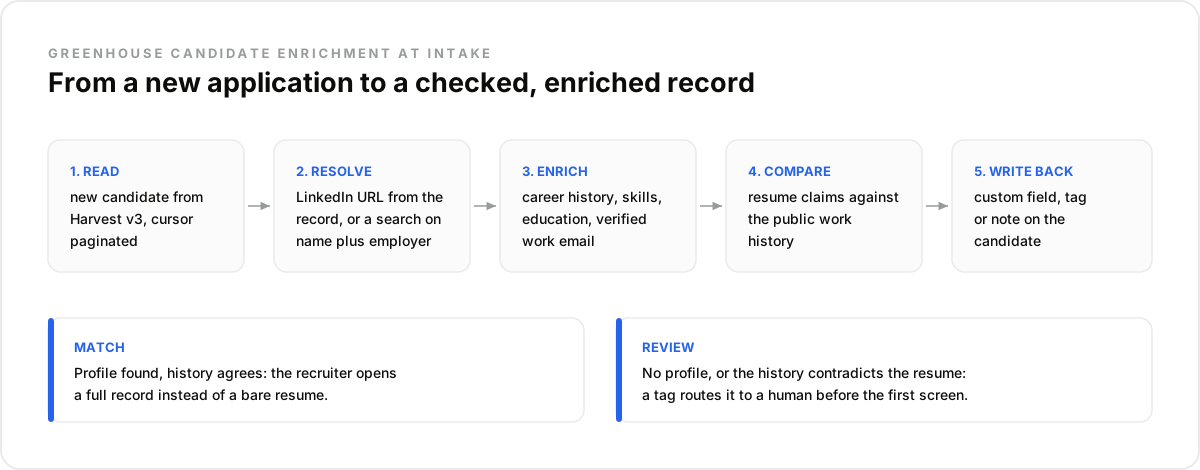
Enrichment at intake runs once per new candidate, in five steps: read the record from Harvest v3, resolve a profile identifier, enrich it, compare it with the resume, and write the result back. The recruiter then opens a full record instead of a bare PDF, and records that need a closer look carry a tag.
Resolution is the step most builds get wrong. A LinkedIn URL in the record is the clean path. Without one, search by first_name, last_name and current_company from the resume, and accept a match only when the employer agrees.
With DataForB2B, the enrichment itself is one request:
curl -X POST https://api.dataforb2b.ai/enrich/profile \
  -H "api_key: YOUR_api_key" \
  -H "Content-Type: application/json" \
  -d '{
    "profile_identifier": "https://www.linkedin.com/in/jane-doe",
    "enrich_profile": true,
    "enrich_work_email": true,
    "company_domain": "ramp.com"
  }'
The company_domain field takes the employer the resume claims. The work email gets looked up on that domain first. Add enrich_github for engineering roles.
Picture a recruiting ops lead at a 60-person fintech. Her scope: enrich every candidate who reaches Application Review on remote engineering roles. Write "Verified title" and "Last enriched on" to two custom fields. Tag anything that fails the comparison. The goal fits in one line: "I don't want a score. I want to know which records a human should open first."
The mistake most teams make is enriching every applicant. A remote backend role can draw 900 applications. Recruiters review 120. Enrich the 120, not the 780 nobody opens.
The data side of this lives on the people enrichment API. You can test it against a few of your own Greenhouse records on the pricing page free trial.
Can Enrichment Catch Fake Candidates?#
Enrichment flags fake candidates; it does not convict them. When no public profile matches the name and claimed employer, or when the public history contradicts the resume, the record gets a review tag before the first call. A human then decides. That removes most fabricated profiles from the interview loop without auto-rejecting real people.
One recruiter described interviewing fake candidates every week while Greenhouse saw nothing wrong. The fix the thread landed on was simple: match each new applicant on phone, email and LinkedIn URL at intake, because repeat applicants reuse at least one of the three.
Enrichment extends that check outward. Useful mismatch signals:
- No profile matches the name plus the employer on the resume.
- The resume says Staff Engineer at Stripe until 2026; the public history ends there in 2022.
- The same LinkedIn URL shows up on two candidates with different names.
Best for: remote roles with high application volume, where fabricated profiles cluster. Not for: replacing identity verification. A check like this reads public professional data, not government records. Keep the final call human, and keep a note of why a record was flagged.
How Do You Keep Old Candidates Current?#
Re-enrich the candidates you might contact again, every 30 days, and act only on what changed. Silver medalists and tagged prospects are the pool worth refreshing. A new title, a new employer or a tenure crossing two years turns a stale record into a reason to call. Everything unchanged waits for the next pass.
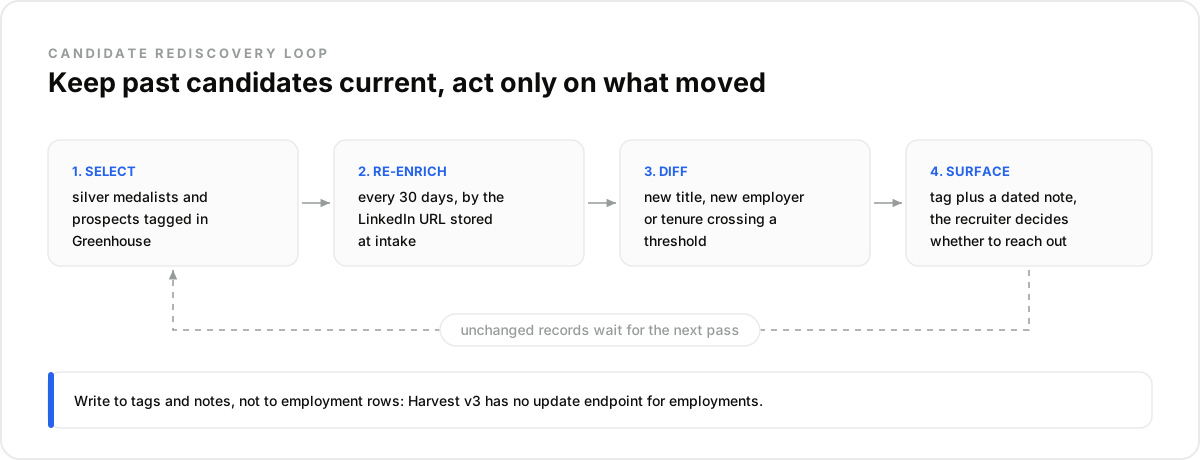
Picture an agency recruiter with 400 past finalists for platform engineering roles in Greenhouse. The monthly pass re-enriches all 400 by the LinkedIn URL stored at intake. Eleven changed employer. Three of them just hit two years at a company that announced layoffs. Those three get a tag and a dated note. The other 389 stay quiet.
Write the result to tags and notes, not to employment rows, which Harvest v3 can only delete and recreate.
What to Check Before You Build It#
Five checks decide whether the pipeline holds up in production: identifier coverage, write-back targets, rate limits, AI opt-outs and refresh cost. Run them against a sample of your real Greenhouse data before you write the integration. Each one has broken a build that looked fine on a demo account.
- Identifier coverage. Count how many records carry a LinkedIn URL. That share decides how much name-plus-employer resolution you need.
- Write-back targets. Create dedicated custom fields and tags. Never overwrite fields recruiters edit.
- Rate limits. Batch reads per 30-second window and back off on HTTP 429.
- AI opt-outs. Harvest v3 exposes candidates who opted out of AI-assisted review for a job. Check them before you run any AI scoring on enriched profiles.
- Refresh cost. Pick a provider that charges work emails only when found, so monthly passes on old records stay cheap.
You trade a plug-and-play marketplace app for a pipeline you own, and you decide what gets enriched and what triggers a review.
How Do You Run This Workflow in Claude?#
You can test the whole check before writing the integration. Export candidates from Greenhouse, connect a people data layer to Claude over MCP, and ask Claude to enrich and compare. You will see what share of your records resolve before you commit to the build.
- Create an account on app.dataforb2b.ai/signup.
- In Claude, open Settings, then Connectors, and add https://mcp.dataforb2b.ai/mcp. The same server works with Cursor, VS Code, ChatGPT and any MCP-compatible agent.
- Paste your export and a prompt like: "Here are 25 candidates for our Senior Backend Engineer role, with LinkedIn URLs and resume titles. Enrich each one, compare current title and employer with the resume, and list every mismatch with the reason."
- Turn it into a scheduled routine that re-checks your silver-medalist list every 30 days.
For the recruiting side of the same data layer, see the candidate sourcing API and how to source candidates with Claude.
Greenhouse holds the application. The career data around it is one API call away. Try it on your own candidate records from the pricing page.
Frequently asked questions
- Does Greenhouse have a built-in candidate enrichment feature?
- Not for external career data. Greenhouse parses resumes, stores what candidates submit, and runs AI features such as Talent Matching on its own records. Adding a verified work history or work email from outside sources goes through a partner integration or a custom build on Harvest v3 plus a people data API.
- Which Greenhouse API should I use to enrich candidates?
- Harvest v3. It reads and writes candidates, applications, tags and custom fields, with OAuth 2.0 authentication. The Ingestion API serves sourcing partners that push new prospects into a customer's Greenhouse. Harvest v1 and v2 are being retired, so any new enrichment build should start on v3.
- How do I write enriched data back into Greenhouse without breaking custom fields?
- Create dedicated fields such as "Verified title" and "Last enriched on" instead of overwriting fields recruiters edit. Create tags in the tag dictionary before applying them. Leave employment rows alone: Harvest v3 has no update endpoint for them, so every correction would mean deleting and recreating hand-edited history.
- How often should Greenhouse candidate data be refreshed?
- Enrich once at intake, then refresh only candidates you might contact again, such as silver medalists and tagged prospects. Every 30 days matches how often a well-maintained profile source refreshes. Refreshing applicants you will never contact again adds cost and stores data you have no use for.
- Is enriching candidate profiles GDPR-compliant?
- It can be, when you treat it as processing with a purpose. Document your legitimate interest, mention enrichment in your candidate privacy notice, keep only what the hiring decision needs, and honour deletion in both systems. Greenhouse offers a candidate anonymize endpoint; your data provider should offer a DPA and opt-out handling.