How to Enrich Signups With Claude in 2026
Learn how to enrich signups with Claude: turn a bare signup email into a full person profile and company record using Reverse Email and Enrich Company today.
A signup form asks for one thing: a work email. Sales wants a name, a title, a company, and a reason to call. That gap stalls most PLG motions before they start.
This is an inbound problem, not an outbound one. A signup hands you one email. You work outward from there.
That's the reverse of an outbound list you already built. Our guide on how to enrich a lead list with Claude covers that case.
Learning how to enrich signups with Claude starts from one email. Not a full list. Everything after that depends on two API calls, not guesswork.
Key Takeaways#
- A signup email is inbound. You enrich outward from it, the opposite of an outbound list you already sourced.
- Reverse Email resolves a full person profile from just a professional email address.
- Extract the domain from that email, then call Enrich Company for firmographics, funding, and growth signals.
- Personal domains like gmail.com won't resolve a company. Reverse Email coverage thins there too.
- This pair of calls feeds PQL scoring, ahead of tools that see behavior but not identity.
Inbound vs. Outbound: Why a Signup Needs a Different Enrichment Path#
A signup gives you an email and nothing else, so enrichment has to work outward from that single point. An outbound list starts the other way: you already picked the people, and enrichment just fills a gap, like a missing email. Same data source, opposite starting point, different job entirely.
Best for: a PLG signup flow where the only input is a work email. The next step is deciding who gets a demo, a score bump, or a sales touch.
Not for: a list you sourced from search or an event. That's an outbound job. See how to enrich a lead list with Claude for that piece.
For the wider set of mechanisms beyond these two calls, see data enrichment techniques. It maps out what else this kind of API can do.
The two calls below are the ones worth wiring up first. Confusing the two wastes calls and produces messy records.
What Can Claude Do With Nothing But a Work Email?#
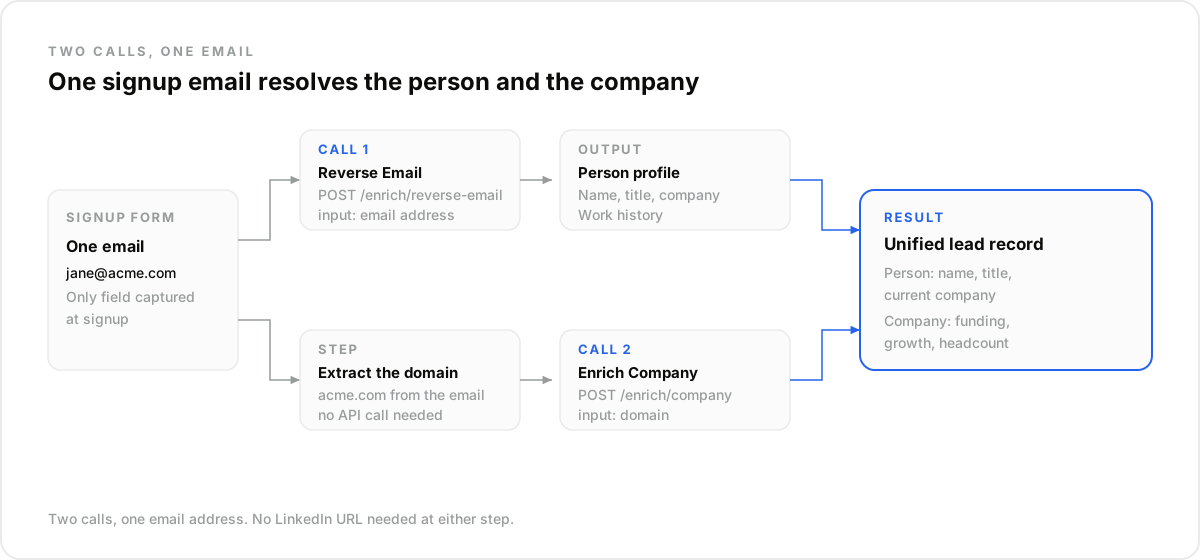
Claude, connected through DataForB2B's MCP server, can take one work email and return two things: who the person is, and who they work for. It runs a person lookup first, then a company lookup off that same domain, with no LinkedIn URL required at any point.
That's a shift from most enrichment tooling. Most tools assume a name or profile URL already exists.
Here, the email is the whole input. That single difference removes an entire research step from most sales workflows.
This pair of calls sits inside the broader lead enrichment API. Combine it with profile and company lookups however the workflow needs.
How Does Reverse Email Turn an Email Into a Full Profile?#
Reverse Email takes one input: a professional email address, nothing else needed. It returns a full person profile, matching Enrich Profile's output exactly: current title, current company, work history, and more. The difference is only the entry point, never the output itself.
One starts from a LinkedIn URL. The other starts from an email. Same shape, different door.
The problem: a trial signup lands with only [email protected] typed into the trial request form, nothing else.
The proof: Reverse Email resolves that address to a full profile.
- Jane Ferro, VP of Revenue Operations.
- Prior stops at two mid-market SaaS companies.
- A job history that fits a RevOps track.
The payoff: one call turns a bare email into a name and a title. That's enough context to route the signup correctly.
How Do You Turn That Same Email Into a Company Record?#
Take the part after the @ sign in that email and run it through Enrich Company: [email protected] becomes northbeamcloud.com. That domain returns firmographics, funding history, and growth signals for the company behind the signup, the same detail sales usually has to ask for by hand.
For Jane's signup, that call surfaces a Series B company with headcount growing in go-to-market roles.
A funding round closed in the last two quarters. Paired with her title, that's enough to flag the signup for sales, instead of a generic welcome email. None of that required a manual search.
POST https://api.dataforb2b.ai/enrich/reverse-email
api_key: YOUR_api_key
{
  "email": "[email protected]"
}

POST https://api.dataforb2b.ai/enrich/company
api_key: YOUR_api_key
{
  "domain": "northbeamcloud.com"
}
What Happens When a Signup Uses a Personal Email Domain?#
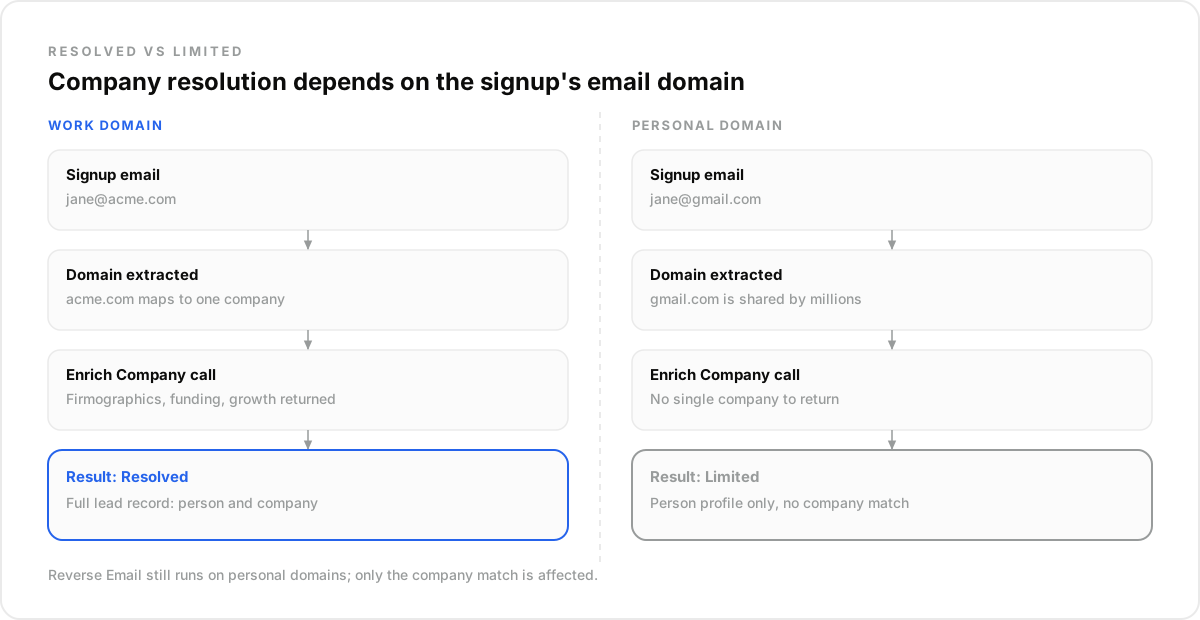
A signup from gmail.com or outlook.com breaks the domain trick right away, since those domains belong to millions of unrelated people rather than one company. Extracting the domain just returns Google or Microsoft, not a real employer, which makes the company lookup useless on its own.
Reverse Email still runs. But coverage on shared personal domains is thinner too, since confirming who owns one address gets harder. That's just how shared domains work.
The honest trade-off: personal-domain signups are a real edge case, not a rounding error. If your signup form skews consumer or freelance, expect some emails this pair can't fully resolve.
Plan a fallback, like a company field later in onboarding. Don't assume every signup resolves cleanly.
PQL Scoring Runs on Signup Data, Not Just Usage Events#
Most PQL scoring leans on usage events: seats filled, features touched, a plan limit hit. None of those events say who the person is, or what company they work for, and they only show what happened inside the product, not who caused it.
Adding identity is what makes a score worth acting on. Identity comes first, and everything else builds on it.
The problem: one team described wiring seat-threshold and feature-gate triggers into a PQL score. They used Segment and Amplitude for usage tracking, and Stripe for billing signals.
The proof: none of those three tools resolve a bare email to a company. They track what a known account does, not who a new signup is.
The payoff: the email-to-person and email-to-company calls give that score a name and a firmographic profile. That happens before any usage data even accumulates.
The same discussion called PLG the cheapest-CAC motion at scale. But it also said the full stack takes months to instrument.
The two calls here are the fast part. They work on day one, off the first signup. Before any usage data exists at all.
What This Workflow Is Not#
This isn't a guarantee that every signup resolves cleanly, especially not on personal domains, and it isn't a usage-tracking tool either. Segment and Amplitude tell you what an account did. This tells you who the account is, a different job entirely.
It also isn't a replacement for outbound enrichment. That's covered separately in how to enrich a lead list with Claude.
How Do You Run This Workflow in Claude?#
Connect DataForB2B's MCP server in Claude, under Settings, then Connectors, pointing it at the endpoint https://mcp.dataforb2b.ai/mcp. Once connected, ask Claude to resolve a signup by email, then have it pull firmographics on the resulting domain. The same connection works with any MCP-compatible agent, not just Claude.
Nothing here requires switching tools mid-workflow.
- Capture the signup email from your form or database.
- Ask Claude to run Reverse Email on that address to get a person profile.
- Extract the domain and have Claude call Enrich Company on it.
- Route the combined record into your CRM or PQL scoring logic.
The free trial (100 credits) covers enough volume to test both calls on real signups. Check pricing for the details.
A signup email is a small input with a lot buried in it. A name, a title, a company, a funding stage.
Reverse Email and Enrich Company pull all of that out in two calls. No LinkedIn URL required. Just an email.
Start with the free trial to test both calls on real signups. If volume grows past that, pricing scales with usage, not with how the workflow gets built.
Frequently asked questions
- What's the difference between enriching a signup and enriching a lead list?
- Enriching a signup is inbound. You start with one email a person gave you and work outward to a full profile and company. Enriching a lead list is outbound: you already sourced the people, and enrichment fills gaps like a missing email. See how to enrich a lead list with Claude for that direction.
- Can Claude turn a signup's work email into a full profile without a LinkedIn URL?
- Yes. Reverse Email takes just the email address as input. It returns the same profile shape as a LinkedIn-based lookup: current title, current company, and work history. No profile URL or name is needed to start. The output looks identical either way. Same fields, same shape.
- How does Claude figure out which company a signup belongs to?
- It extracts the domain from the signup email. [email protected] becomes acme.com. Then it passes that domain to Enrich Company. That call returns firmographics, funding history, and growth signals for the real company behind the domain, not a guess based on the name.
- What happens if someone signs up with a gmail.com or outlook.com address?
- The domain trick won't resolve a company here. Those domains belong to millions of unrelated people, not one employer. Reverse Email coverage is thinner too on shared personal domains. Confirming who owns a single address is harder there. It's a real edge case, not a hidden gap.
- Is this the same as what Clearbit does for PLG signups?
- It's the same use case Clearbit is known for: turning a signup email into company data. The difference here is scope. This pair of calls resolves the person and the company from one email. A lot of email-lookup tools return company data only.