How to Keep Your CRM Data Fresh With Claude in 2026
Learn how to keep your CRM data fresh with Claude: a scheduled re-check loop that catches job changes, dead emails, and company renames before reps do.
A rep almost skipped an account last quarter. The CRM had tagged it cold thirty days earlier. Nothing about the company had changed. The buyer was still there. Still holding budget. Still reachable by phone.
What had changed was simpler. Nobody had rechecked the record since that first cold note went in.
One GTM operator later pulled a full quarter of closed deals. Close to a fifth of that pipeline had come from accounts marked cold a month earlier. Learning how to keep your CRM data fresh with Claude starts with that number. Treat the recheck as routine, not a one-time favor.
People switch jobs. Companies get bought. Work emails stop resolving. A scheduled loop catches all three before a rep wastes a call on a dead lead.
Key Takeaways#
- CRM records decay on their own: job changes, company renames, and dead emails don't wait for you to notice.
- A scheduled Claude routine re-runs Enrich Profile and Enrich Company on records you already have, not new leads.
- Flag high-risk fields like title and company for human review instead of overwriting them right away.
- Re-check your highest-value accounts more often. A slower batch covers the rest of the base.
Why Does CRM Data Go Stale Even When No One Touches It?#
CRM data goes stale because the world outside it keeps moving. A contact takes a new role. A company gets bought and drops its old domain. None of that shows up as an edit inside your CRM. Nothing warns you.
The record just sits there afterward. It looks current to anyone glancing at it. It isn't, and nothing in the CRM says so.
This is different from a list you never enriched. A never-touched lead is missing data by default. A CRM record already has data. The problem is that the data was true once, and might not be true now.
Most teams only find out the hard way. A rep calls a number that used to work. An email bounces on a sequence that used to land. The deal has already slipped.
What Does a Recurring Re-Check Loop Actually Look Like?#
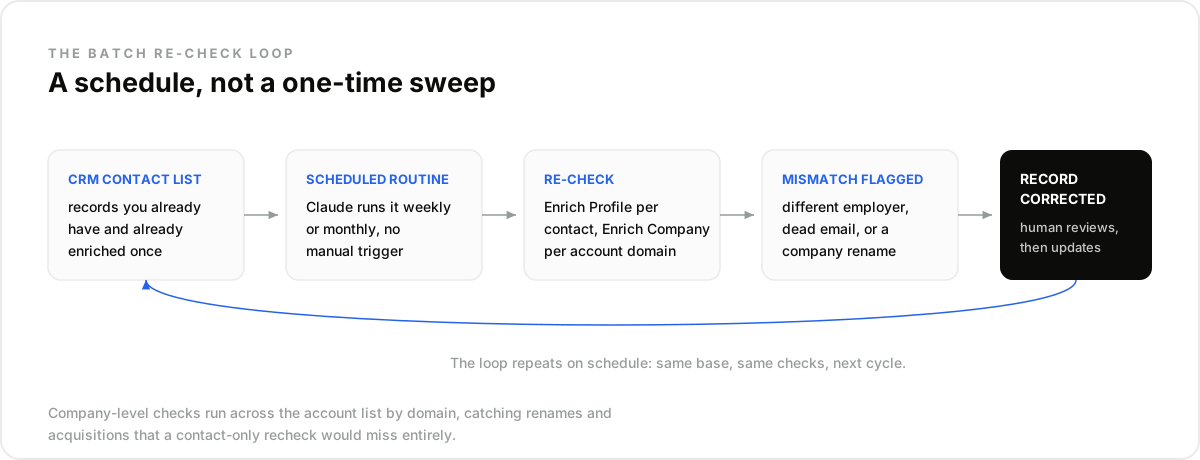
A re-check loop pulls a batch of existing contacts on a schedule. Claude re-runs enrichment on each one, compares the result to what's stored, and flags anything that changed. No new leads enter the picture.
The loop has five moving parts. Your CRM contact list, a scheduled routine, an enrichment re-check, a mismatch flag, and a corrected record. Then it repeats.
Staleness rarely announces itself. One persistent-memory AI system reportedly stopped syncing for about a day after a platform update. Nothing inside it raised a flag. Someone only noticed when expected data was missing during a routine look.
That's the failure mode this loop is built to catch. Not a record that's obviously wrong. One that looks fine, and quietly isn't.
How Do You Batch Re-Check Contacts With Enrich Profile?#
You take each contact's LinkedIn URL, public ID, or handle and send it back through Enrich Profile. Compare the returned company and title to what's stored. A mismatch means the record moved. The CRM didn't.
Pair that with enrich_work_email to check the email is still live, not just formatted correctly. A dead inbox is a different problem than a wrong title. It still needs the same recheck.
This is not the same job as filling a blank field on a new list. That's what enriching a lead list with Claude covers: one-time enrichment on records that have never been touched. Here, every record already has data. You're asking if it still holds.
On a routine sweep, most teams stick to enrich_profile and enrich_work_email. Nothing more. Personal emails are $0.03 and mobile numbers $0.15 a contact credit, billed only when found. Save those for a contact that's already been flagged, not for the whole base every week.
POST https://api.dataforb2b.ai/enrich/profile
api_key: YOUR_api_key

{
  "profile_identifier": "linkedin.com/in/j-alvarez-ridgeline",
  "enrich_profile": true,
  "enrich_work_email": true
}
Why Company-Level Checks Catch What Contact-Level Checks Miss#
A contact recheck tells you if a person moved. Nothing more. It won't tell you if their company changed shape underneath them. For that you need Enrich Company run across your account list, by domain.
A rename, an acquisition, or a sudden headcount jump can all sit invisible at the contact level. The person's title might not change at all. The company they work for did.
Run Enrich Company on a domain list pulled from your CRM's account table, not just the people table. It's the same firmographic layer covered in data enrichment techniques. Here it runs on a schedule instead of once.
A domain that stops resolving is its own signal. So is a company that now routes to a parent brand's site. Either one is worth a flag. The contacts underneath can still look untouched.
Flagging vs. Auto-Updating: Where Should the Line Sit?#
High-risk fields like title, employer, and email should get flagged for a human glance, not overwritten on sight. Low-risk fields, like a normalized company name format, can update automatically without much downside.
- Auto-update: formatting fixes, confirmed-unchanged fields, low-stakes metadata.
- Flag for review: a different employer, a different title, a bounced or newly invalid email.
- Never silently overwrite: anything that would change how a rep frames the next call.
Someone will ask if flagging just builds another queue nobody clears. It might, if flags go nowhere. Route them into the account owner's task list, not a shared spreadsheet. The queue gets worked because it's already where reps look.
Full Batch vs. Priority Re-Check: Which Fits Your CRM?#
A batch re-check runs on a schedule and covers your whole base. A priority re-check runs the same routine on a short list of top accounts, on a tighter cadence. Neither replaces the other.
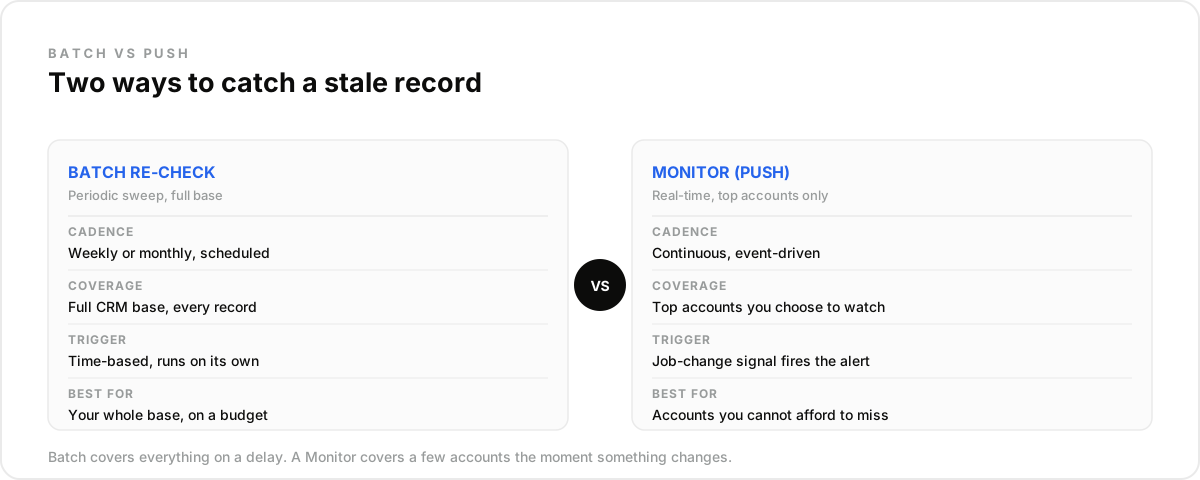
- Best for batch: your entire contact and account base, checked weekly or monthly.
- Best for a priority re-check: the handful of accounts you can't afford to miss between sweeps.
- Not a fit for either: a one-off list you're enriching for the first time. That's a different job entirely.
A weekly job-change check on your top accounts' contacts flags a move soon after it shows up in the data (profiles refresh every 30 days). Here, the point is hygiene. The alert exists to fix the record, not to time an outreach touch.
That's the opposite framing from tracking job changes for outreach timing. That sibling workflow uses the same signal to act on a window, not to correct a field.
What This Workflow Is Not#
- Not a CRM. It reads and proposes fixes to records that live in your actual CRM, whether that's HubSpot or Salesforce.
- Not a dedup or formatting tool. It won't merge duplicate rows or fix a phone number's format. That's a separate cleanup job.
- Not a guarantee. A flagged mismatch still needs a human glance before it overwrites anything a rep will rely on.
How Do You Run This Workflow in Claude?#
Connect a B2B data API to Claude through Claude Settings, under Connectors, pointed at https://mcp.dataforb2b.ai/mcp. The same connector works in any MCP-compatible agent, including Cursor, VS Code, ChatGPT, or a custom build.
Export a batch of existing contacts and accounts from your CRM, on whatever cadence you pick. Weekly for your top segment, monthly for the rest is a reasonable split.
Ask Claude to re-run Enrich Profile and enrich_work_email per contact, and Enrich Company per account domain. Have it compare each result against the stored value and list only the mismatches.
Route that list to the account owner for a quick review, then update. Repeat next cycle.
DataForB2B's free trial is enough to test the loop on a small segment first. Once it proves out, the pricing page lists each plan's monthly record quota.
Stale records cost pipeline quietly, one skipped call at a time. Start small before you trust the loop with everything.
Run a first re-check batch on the lead enrichment API this week. Or compare plans on the pricing page before you scale the loop to your full CRM.
Frequently asked questions
- How is checking for CRM decay different from enriching a new lead list?
- Re-checking asks whether a record that already has data is still accurate. One-time enrichment fills gaps in a record that was never touched in the first place. The trigger differs too: a schedule for decay checks, a list import for a fresh enrichment run.
- How often should you re-check existing CRM records for staleness?
- Run a periodic batch pass across the full base, weekly or monthly depending on volume. Re-check your top accounts more often. Record usage rises with frequency, so match cadence to how much a stale record would actually cost you.
- What signals indicate a CRM record has gone stale?
- A job-change mismatch from Enrich Profile is the clearest one. An invalid or changed result from enrich_work_email is another. A company rename, acquisition, or domain change from Enrich Company rounds out the list. It's the one thing contact checks alone will miss.
- Should a decayed record update automatically, or get flagged for review?
- Flag high-risk fields, like title and company, for a human glance before anything overwrites them. Low-risk fields, like formatting fixes, can update automatically without much risk. The real goal is avoiding a silent overwrite that a rep never sees coming until it's too late.
- Does re-checking your whole CRM use more records than a one-time enrichment pass?
- A full batch re-check recurs and touches records you already enriched once, so it adds up over time. A tighter cadence on a short priority list is a lighter way to watch high-value accounts than sweeping the whole base as often.