How to Enrich Leads with Claude (2026 Guide)
Learn how to enrich leads with Claude: turn raw lists, post engagers, and qualified accounts into verified work emails via a simple, no-code MCP setup.
A list of 400 LinkedIn profiles is not 400 leads. It is 400 names with a blank where the email should be. Blanks, not leads.
Every sales rep knows the next part. A promising export from an event, a search, or a form. Then the slow grind of guessing at [email protected].
Claude, connected to a data API through MCP, closes that gap. It calls an enrichment endpoint, matches the identifier against public sources, and returns a work email, or nothing at all. Nothing invented.
This is exactly how to enrich leads with Claude. Three concrete workflows, the real tool-call shape, and the discipline that stops you spending credits on people you'll never reach.
Key Takeaways#
- Claude calls an enrichment endpoint for a work email. It never invents one.
- Raw lists, post engagers, and qualified accounts all feed the same enrich call.
- Score accounts before you enrich them to avoid wasting credits on bad fits.
- Batch large lists and spot-check results before a big outreach send.
What Happens When Claude Enriches a Lead List?#
Enriching leads with Claude is a workflow that takes an identifier, queries a data API, and returns a verified work email. Claude does not read minds. It does not scrape a page live. It sends a structured request to an enrichment endpoint and reports back whatever that endpoint finds.
The identifier is usually a LinkedIn URL. A short URL or a public ID works too.
Claude passes that identifier to Enrich Profile with a flag like enrich_work_email. DataForB2B, the data layer used throughout this piece, checks 20+ public sources and matches a professional address to that specific person.
No guessing. No pattern-matching on a domain. Just a lookup against aggregated data, or an honest empty result.
A companion piece, how to find B2B leads with Claude, covers the step before this one: building the list itself. This piece assumes the list exists.
For the broader concepts, data enrichment techniques covers the picture without tying it to one tool. This piece is the hands-on version, done inside Claude.
Three workflows below cover the paths most sales and GTM teams walk. A raw list, a set of post engagers, a filtered account list. All three end at the same call.
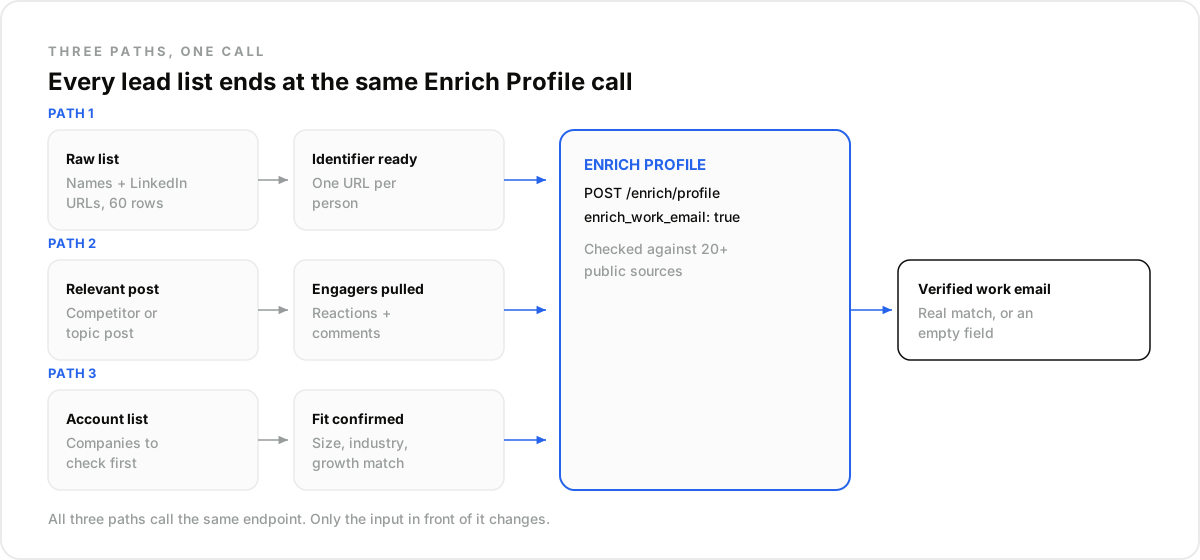
How Do You Turn a Raw List into Verified Work Emails?#
Turning a raw list into verified work emails means feeding Claude one identifier per person and requesting enrich_work_email on each. No scoring step here, no filtering. Just a list you already trust and a missing column you need filled. This is the simplest of the three paths.
Say a rep exports 60 names and LinkedIn URLs from a conference attendee list. Each row has a name and a profile link, nothing else.
Paste a batch of those URLs into Claude, connected through MCP, and ask it to enrich each one with a work email. Claude calls the endpoint once per identifier. A single request looks like this:
{
  "profile_identifier": "https://www.linkedin.com/in/maria-ionescu",
  "enrich_work_email": true
}
Send that to POST /enrich/profile on api.dataforb2b.ai with an api_key header. The response carries a matched work email, or an empty field if none exists.
Under the hood, this batch process runs through a lead enrichment API built for exactly this kind of lookup. The caller might be Claude, Cursor, or a custom script.
A second flag, enrich_personal_email, exists for the rare case a work address never surfaces. Work email stays the default for cold outbound.
A free trial covers a first batch of calls. See pricing for each plan's monthly record quota before scaling up.
How Do You Enrich the People Already Engaging with a Post?#
Enriching post engagers means pulling the people who reacted to or commented on a relevant post, then running each through the same enrich_profile call. Engagement is a warm-intent signal a cold list simply does not carry. It rewards attention already shown, not a cold guess.
Search Social Posts finds the post itself. A competitor announcement, an industry survey, a widely-shared opinion piece.
Add include: ["reactions","comments"] and the result carries the engagers themselves: name, headline, profile URL. That output slots directly into Enrich Profile with no reformatting.
Practitioners describe replacing a manual, multi-step enrichment stack with exactly this pattern. One search call, one enrichment call. A warm list ready in minutes, not a spreadsheet built by hand.
Post-engager enrichment works best when the post itself is a strong filter. A competitor's product launch. A niche technical topic with a focused audience.
Best for: a post with a few hundred reactions from a specific industry. Not for: a generic viral post with tens of thousands of reactions and no topical filter at all. Most engagers there have nothing to do with your market.
Should Claude Enrich Every Lead, or Only the Ones Worth It?#
Enriching every lead on a list wastes credits on accounts that will never buy. Not worth it. Claude can run Enrich Company or Search Company filters first, checking size, industry, and growth signals, then enrich only the people at accounts that pass.
Picture an SDR at a mid-market security vendor holding a list of 300 contacts pulled from a trade show.
Running Enrich Company against each domain first, filtered to 50-500 employees, cybersecurity as the industry tag, and 6-month growth above 10 percent, does the trick. That narrows the list to 40 qualifying accounts.
Only those 40 get an enrich_work_email call. The rest never touch the enrichment endpoint. Not one.
The trade-off is simple math. Enriching all 300 contacts uses around 300 records of your monthly quota. Enriching only the 40 qualified accounts uses closer to 40.
Filtering first is not just cleaner data. It is a direct cut in spend on contacts you were never going to reach anyway.
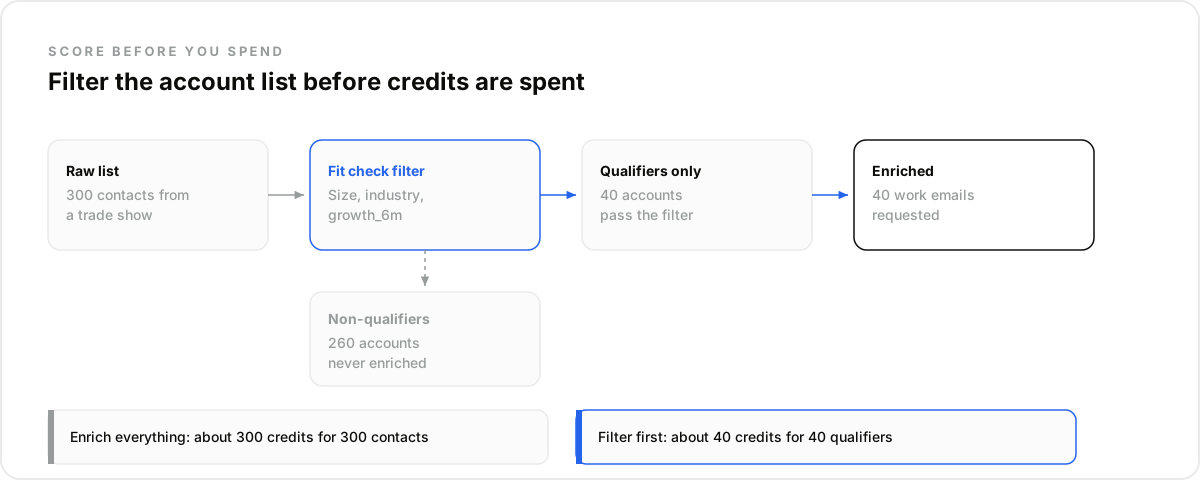
Filtering first keeps spend proportional to what matters. Pricing breaks down the cost of each enrichment type.
What Bad Enrichment Actually Costs You#
Bad enrichment does not fail loudly. It fails quietly, as bounces that erode your sending reputation over weeks. Teams that switch enrichment sources often notice the difference fast, and the cost shows up in deliverability long before anyone questions the data itself.
Several outbound teams describe running a legacy list-buying vendor against a 2,000-contact push and seeing bounce rates near 8 percent.
After switching to an aggregated enrichment endpoint pulling from 20+ public sources, the same teams report bounce rates dropping close to zero on comparable lists.
The email address was never the hard part. Knowing which source to trust for it was. That's the real cost.
What This Workflow Is Not#
Claude-based enrichment is not a finished platform, and it is not magic. It is a lookup layer you call through a connector. Real limits apply, worth naming before you build a process around it. Knowing them upfront saves a wasted afternoon later.
- Not a data-cleansing tool: it will not dedupe or standardize a messy CRM export on its own.
- Not a guess: a missing result means no match was found, not a fabricated address.
- Not an all-in-one platform like Clay, which bundles its own interface and waterfall logic across many vendors.
How Do You Run This Workflow in Claude?#
Running this workflow in Claude takes no engineering. Open Settings, then Connectors, and add the data layer's MCP endpoint. Every workflow above becomes a plain-language request inside a normal chat, typed the way you would brief a colleague. No code, no CLI, no pipeline to maintain.
Most public tutorials on this topic assume a Claude Code CLI and a multi-step pipeline in code. That setup suits an engineer building a repeatable job.
A sales or GTM person without that background can skip it. Entirely.
Add DataForB2B's connector at mcp.dataforb2b.ai/mcp, and it works the same way inside Cursor, VS Code, or any other MCP-compatible agent, not only Claude.
Add it once. Then ask for an enrichment, a search, or a company check in plain language.
One technical limit matters here. Tools that load every record into a chat window tend to degrade past a few dozen to a hundred or so records in one turn.
Batch a big list into smaller chunks and run them one after another.
Claude will not build the list for you. It will not guess an email that does not exist. It will turn an identifier into a verified match, batch by batch, at your own pace. Start with a small list, check the results, then scale. Pricing has the details on what each workflow costs to run.
Frequently asked questions
- How does Claude actually fill in a missing work email?
- Claude does not invent an email. It calls an enrichment endpoint that aggregates a person's professional email from 20+ public sources, given their LinkedIn URL or another identifier. The result is a real match pulled from that data, or nothing at all if no address surfaces.
- What do I need to give Claude before it can enrich a lead list?
- At minimum, a resolvable identifier per person: a LinkedIn URL, a short URL, or a public_id. A name alone will not resolve reliably without a profile reference attached to it. Most workflows start with a quick search step to gather those identifiers first.
- Should Claude enrich every lead on a list, or just some?
- Score or filter first: company size, industry, a growth signal, then enrich only the accounts that qualify. Enriching an entire unfiltered list burns credits on contacts you were never going to contact anyway. A filtered list puts that spend where it actually counts.
- How many leads can Claude enrich in one session?
- Loop the enrichment calls in batches rather than pasting a huge list inline. Large in-context lists tend to degrade past a few dozen to a hundred or so records in a single turn. Batch the list and continue across turns instead of one giant request.
- Is a Claude-enriched list ready for outreach, or does it need a check first?
- Found is not the same as deliverable. Spot-check a sample of the returned emails before a big send. Any aggregated data source can occasionally return a stale or bounced address, so a quick manual check protects your sending reputation before the full list goes out.