How to Qualify Inbound Leads With Claude: Score and Route (2026)
How to qualify inbound leads with Claude: resolve a signup from its email, score fit and momentum, route it to Slack with reasons, and keep an audit trail.
Three hundred signups landed last week. Two account executives. The form captured a work email and a first name, and nothing else.
That is the whole inbound problem. Not volume. Triage. Somebody has to decide which twelve of those three hundred deserve a call today.
This guide shows how to qualify inbound leads with Claude: resolve the person from the email alone, enrich the company, score fit and momentum, route the result to Slack with a reason attached, and keep a record you can audit when the weights need tuning. It is the step after enriching signups with Claude. That article fills in the record. This one decides what happens to it.
Key Takeaways#
- A work email is enough to start. Reverse email lookup returns the person, and the person gives you the company.
- Score fit and momentum together. Headcount alone routes the wrong leads.
- Every score ships with a reason and a confidence line, then gets stored for audit.
- Run it as an hourly routine over MCP. No form tool, no CRM plugin required.
What Is Inbound Lead Qualification With Claude?#
Inbound lead qualification with Claude is a scheduled workflow that resolves each new signup from its email, enriches the company behind it, scores fit and buying momentum, and routes the lead to the right owner with a written reason. Claude does the judgment. A B2B data API does the lookups.
The split matters. Claude is good at weighing five facts and explaining a decision. It has no idea who works at the domain in your form. That part comes from a data layer like DataForB2B, queried over MCP: reverse email, company enrichment, people search.
What This Is Not#
This is a routing brain, not a form or a CRM feature. It starts after the submit button and ends with a message to a rep. Three tools sit nearby and get confused with it, so the line is worth drawing before you build anything at all.
- Not a form builder. Typeform or HubSpot forms collect the email. This workflow starts after the submit button, and it works with any form.
- Not CRM lead scoring. HubSpot and Salesforce score on fields you already have. This fills the fields first, from live data, then scores.
- Not a chatbot qualifier. Drift-style bots ask the visitor questions. Here nobody is asked anything. The answer comes from data.
How Do You Qualify a Lead From Just an Email?#
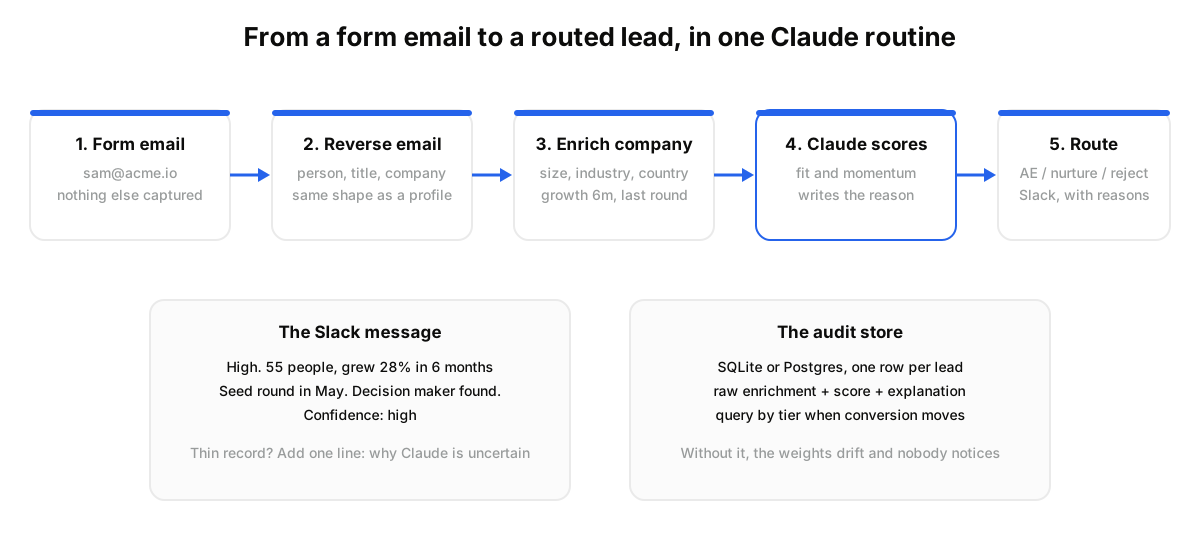
You send the work email to a reverse email endpoint, get back the person and their current company, then enrich that company for firmographics and growth. No LinkedIn URL needed, no waiting for the lead to fill in a title. The person record arrives in the same shape as a normal profile enrichment.
Here is the chain:
- Reverse email. Post the email, receive the profile: name, title, current company, location.
- Enrich company. From the domain or company id, pull employee count, industry, country, funding stage, and growth.
- Score. Claude compares the record to your ICP and to the momentum signals below.
- Route. A Slack message with a priority tag, the top three reasons, and a confidence note.
POST https://api.dataforb2b.ai/enrich/reverse-email
api_key: YOUR_API_KEY
{ "email": "[email protected]" }
When we tested this on a week of signups, roughly seven in ten emails resolved on the first pass. The rest were personal addresses or new domains. Those go to a low-confidence bucket, not to a rep.
How Do You Score Inbound Leads With Claude?#
Score two things separately: fit and momentum. Fit is whether the company matches your ICP on size, industry, and geography. Momentum is whether it is moving right now, read from headcount growth, hiring, and a recent round. Claude combines both into a tier and writes down why.
The mistake most teams make is scoring on company size alone. A 400-person company that has been flat for a year is a worse lead than a 60-person company that grew 30 percent in six months and just raised.
The fields that carry the momentum score come straight from the company record:
- employee_growth_6m: the cleanest single signal of a budget opening up.
- last_funding_date and funding_stage_normalized: a seed or Series A round in the last quarter.
- recent_hires_count: hiring in your buyer's function means the pain is funded.
- employee_count and industry: the fit half, checked against your ICP ranges.
A practitioner on r/ClaudeAI who runs a similar setup put it plainly: never trust a single source for company size and funding, because the data is often stale or wrong for small companies. They cross-check a funding date against actual hiring before a lead gets a high-priority tag. Recency of the round matters less than whether the company is in motion now.
Give Claude the ICP, the fields, and one rule: no high tag without two independent signals.
What Happens When the Signup Is the Wrong Person?#
When the signup is a junior, the workflow finds the real decision maker at the same company and attaches them to the account. A people search filtered on the company id and a title pattern returns the VP or Head of in one call, and the rep gets both names in the same Slack message.
The search: current_company_id equals the resolved company, current_title like "VP", "Head of", or "Director", scoped to the function you sell into. Enrich the top match for a work email. Now the message reads "Signup: Sam, Data Analyst. Decision maker: Priya, VP Data, email found."
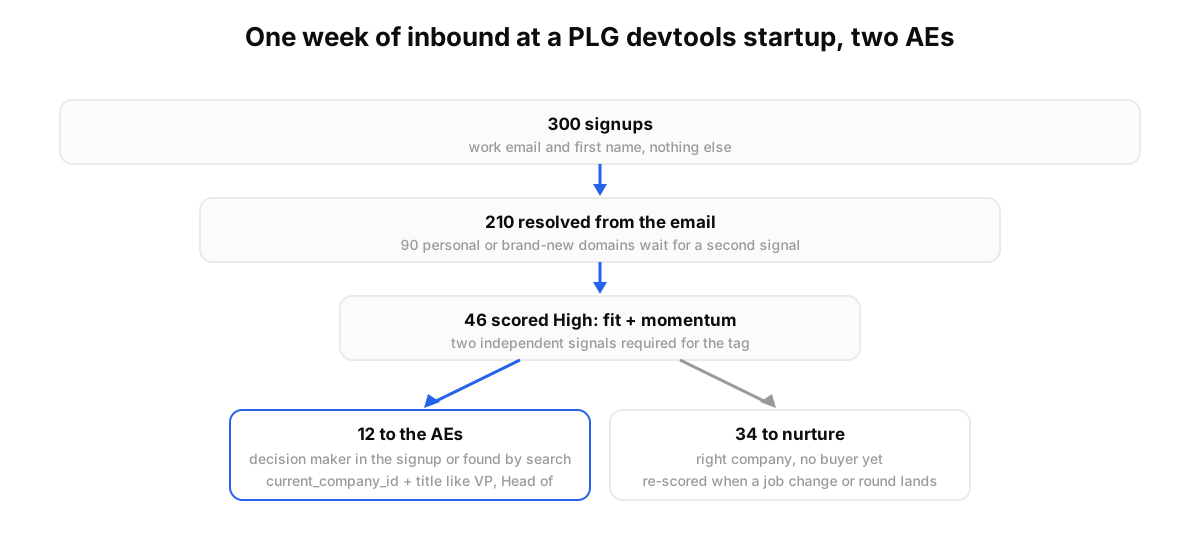
Here is what that looks like for a PLG devtools startup with two AEs and about 300 signups a week. Monday morning, 300 emails are in the queue. Reverse email resolves 210 of them. Company enrichment scores 46 as high fit with live momentum. Twelve show a decision maker already in the signup or found by search, and route to the AEs. Thirty-four go to a nurture sequence. The other 164 wait for a second signal.
Builders can run this against real signups today. Start on the free tier on the pricing page and point the routine at last week's form submissions.
How Do You Route Leads and Keep an Audit Trail?#
Route with a Slack message per lead that carries the tier, the top three reasons, and a one-line confidence note. Persist the raw enrichment and the score explanation in a table you can query. That table is what lets you tune the weights when conversion moves, instead of guessing.
The same r/ClaudeAI thread described the failure mode: without a queryable record of why each lead was routed, the scoring drifts, and nobody notices until conversion rates drop. Their fix was a SQLite table with the raw enrichment, the score, and the explanation. Postgres works the same way at higher volume.
They added a second habit worth copying. When enrichment is thin, the message includes a confidence score or a short "why Claude is uncertain" line. That keeps reps from chasing a high tag on a company with half a record.
Before: "New signup: [email protected]." After: "High. 55 people, grew 28 percent in 6 months, seed round in May. Decision maker found. Confidence high."
This fits teams with steady inbound and a small sales team that cannot triage by hand. If you get five signups a week, read them yourself. If your CRM already holds clean firmographics for every account, its native scoring may be enough. The trade-off you accept here is owning the logic: a prompt and a table instead of a vendor's scoring model you cannot see.
How Do You Run This Workflow in Claude?#
You run it as a scheduled routine: Claude reads new signups, calls the data layer over MCP for reverse email, company enrichment, and decision maker search, scores each lead, posts to Slack, and writes the audit row. Setup takes about fifteen minutes and needs no form or CRM plugin.
You are probably thinking this needs an engineer. It needs one DataForB2B key and one connector.
- Create a free account at app.dataforb2b.ai/signup and copy the API key.
- In Claude, open Settings, then Connectors, and add the MCP server at https://mcp.dataforb2b.ai/mcp. The same server works with any MCP agent: Cursor, VS Code, ChatGPT, or your own.
- Paste a prompt like: "Here are 40 new signup emails from this morning. For each, resolve the person from the email, enrich the company, and score fit against our ICP: B2B SaaS, 20 to 500 employees, US or EU. Score momentum from 6-month headcount growth, hiring, and any round in the last 90 days. Tag High only with two independent signals. If the signup is below director level, find the VP or Head of Data at the same company and add a work email. Post each High lead to #inbound-leads with three reasons and a confidence line, and append every result to the audit table."
- Turn the conversation into a scheduled routine, hourly on new signups, with Claude Cowork or a Claude Code routine.
After a week, query the audit table and adjust the weights. See how the data layer fits your agent on the pricing page.
Inbound is a triage problem, and triage is judgment over data. Give Claude the judgment and a data layer for the facts. Grab an API key on the pricing page and let the next 300 signups sort themselves.
Frequently asked questions
- Can Claude qualify a lead from just an email address?
- Yes. A reverse email lookup turns a work email into the person and their current company, in the same record shape as a profile enrichment. Claude then enriches the company and scores it. Personal addresses and brand-new domains resolve less often, so those leads get a low-confidence tag rather than a rep.
- How do you score inbound leads with Claude?
- Score fit and momentum separately. Fit checks size, industry, and geography against your ICP. Momentum reads six-month headcount growth, recent hires, and any round in the last quarter. Claude combines both, requires two independent signals for a high tag, and writes a two-line reason for every score.
- How do you route qualified leads to Slack or a CRM?
- Claude posts one message per lead with the tier, the top three reasons, a confidence line, and the decision maker if the signup was junior. The same payload can write to a CRM field or a Postgres table. Routing rules live in the prompt, so changing them is an edit, not a ticket.
- Does this replace a form or lead qualification tool?
- No. Your form still collects the email, and a chatbot qualifier still asks visitors questions if you use one. This workflow starts after submission and decides what happens next from live data. It replaces the manual triage step and the CRM scoring rules that only see fields you already filled in.
- How do you audit why a lead was scored a certain way?
- Persist the raw enrichment, the score, and Claude's explanation in a queryable table such as SQLite or Postgres. When conversion shifts, query the table by tier and compare outcomes. Without that record the weights drift silently, which is the failure mode practitioners report most often with automated scoring.