How to Build a RevOps Agent with Claude (2026 Guide)
Learn how to build a RevOps agent with Claude: job-change webhooks, company matching before every write, dedupe and routing, and quarterly account re-tiering.
Only 11% of RevOps professionals rate their customer and prospect data as excellent, according to the 2025 State of RevOps Survey by Openprise and RevOps Co-op. 71% say bad data hurts go-to-market execution. Everyone knows the CRM is wrong. The cleanup never makes it off the backlog.
That is the job a RevOps agent takes. Not a smarter dashboard. A worker that hears a job change the day it happens, resolves the company before it writes anything, merges the duplicate, and re-tiers the account when the growth numbers move.
This guide shows how to build a RevOps agent with Claude: the data layer it needs, the three loops it runs, and the guardrails that keep it from pushing bad rows into HubSpot.
Key Takeaways#
- A RevOps agent reacts to events (job changes, funding) instead of running a quarterly refresh.
- Resolve company name to domain to id before any write. Matching first, AI second.
- Three loops cover most of the work: event to CRM update, dedupe and routing, quarterly re-tiering.
- Every write is a draft with a source and a confidence note until you trust it.
What Is a RevOps Agent?#
A RevOps agent is a Claude routine, wired to a B2B data layer such as DataForB2B, that watches your CRM contacts for real-world events, enriches and matches each record against a B2B data layer, and updates, merges, or re-scores the record without a human opening the CRM. It runs on a schedule and on webhooks.
It is different from the refresh workflow in how to keep your CRM data fresh with Claude. That one re-checks records on a cadence. This one listens for events, resolves identity, and routes.
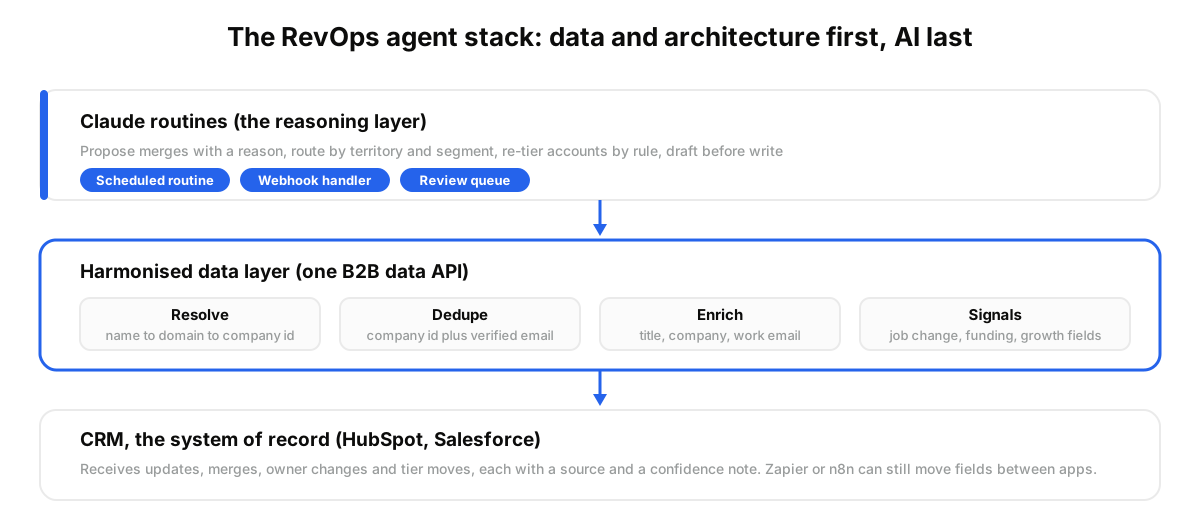
One r/revops practitioner put it plainly, paraphrased: a good RevOps AI system has very little to do with AI. It is almost all data and architecture. Build the harmonised data layer first, then cheap models handle the last-mile reasoning.
What a RevOps Agent Is Not#
A RevOps agent is not a CRM, not a workflow tool, and not an enrichment waterfall. It sits between those three and does the judgment work they leave to a human. Naming them up front keeps the scope honest and stops the build from turning into a second CRM nobody asked for.
- Not a CRM. HubSpot or Salesforce stays the system of record. The agent writes to it, never around it.
- Not a workflow tool. Zapier or n8n moves fields between apps on a trigger. The agent decides what a field should be, then explains why.
- Not an enrichment waterfall. Clay chains providers in a table. The agent calls one data layer directly and keeps the reasoning in the routine.
Why Does Matching Come Before Anything Else?#
Matching comes first because every downstream write inherits its errors. Resolve the company name to a domain and a stable id, find the person by that id, then enrich. Skip this and the agent updates the wrong account with confident, well-formatted data.
Names lie. The CRM holds "Acme Industrial", the team says "Acme Water", the site says acmewater.com. A literal search misses two of three.
The fix is boring. Search Company by domain or universal_name first, keep the id, and use current_company_id on every Search People call after that. The id does not drift. The name does.
The mistake most teams make is pointing the agent at the CRM and asking it to clean. Cleaning without a resolution step turns 400 duplicates into 400 confidently merged wrong pairs.
How Does the Agent Handle a Job Change the Same Day?#
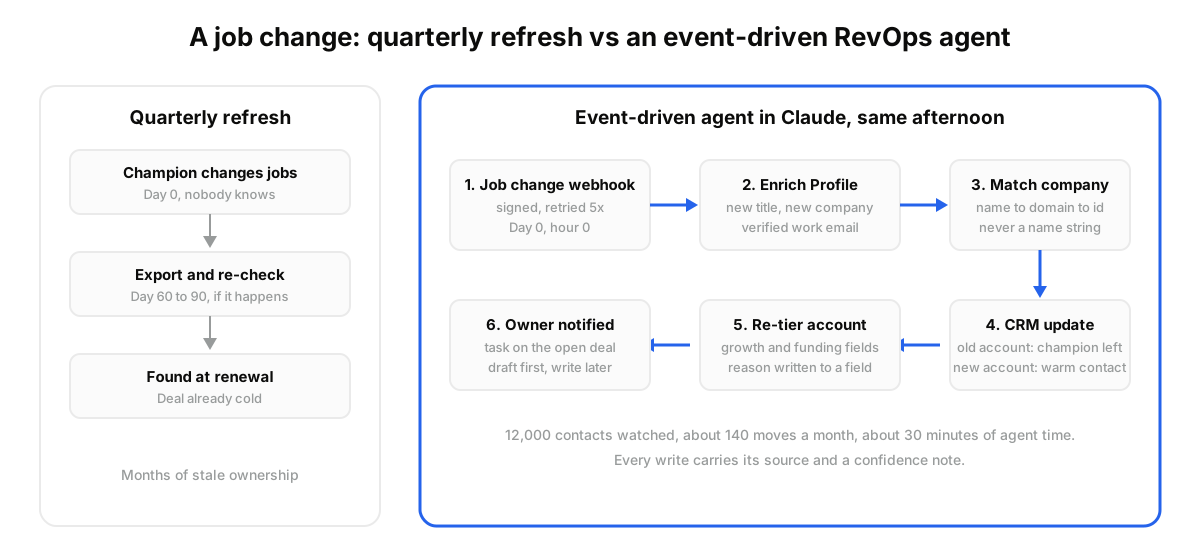
The agent subscribes to a job-change monitor on the contacts you care about. When a decision-maker moves, a webhook arrives, the routine re-enriches the profile, resolves the new company, updates the CRM, and flags the open opportunity. No polling, no quarterly export.
A monitor is three fields: the signal, what to watch, and where to send the event. The catalog at GET /signals lists job change alongside founder moves, funding, and post engagement.
POST https://api.dataforb2b.ai/monitors
api_key: YOUR_api_key
{
  "signal": "job_change",
  "watch": ["https://linkedin.com/in/jane-doe", "https://linkedin.com/in/raj-patel"],
  "url": "https://ops.yourcompany.com/webhooks/job-change"
}
Each event carries the signal, event type, target, and data. The payload is signed with an HMAC header and retried five times with backoff, so a flaky endpoint does not lose the move.
Proof: a three-person RevOps team at a 300-seat SaaS in Austin watches 12,000 HubSpot contacts. Around 140 change jobs each month. For each one the routine calls Enrich Profile on the public id, resolves the new employer to a company id, writes the new title and company, and adds a task on the account if a deal is open. About 30 minutes of agent time a month.
Before, they found the moves at renewal. Now the old account gets a "champion left" tag the same afternoon, and the new one gets a warm contact.
Want to see the monitor fire on your own contacts? Start on the free tier via the pricing page and watch a list of 50.
How Do You Dedupe and Route Without Breaking Ownership?#
Dedupe on the resolved company id and a verified work email, never on the name string. Then route by the fields the id unlocks: country, employee_count, and segment. The agent proposes the merge and the owner change together, with the evidence attached, and a human approves the first hundred.
The job-change routine feeds this loop. Every move creates a potential duplicate: the person exists at the old company and now appears at the new one.
A practical order for the routine:
- Resolve every contact to a company id and a work email through profile and email enrichment.
- Group by id plus email. Two records, one key: merge candidate.
- Keep the record with the most recent activity, carry over notes.
- Route by country_iso_code and employee_count band to the right owner.
How Does Quarterly Re-Tiering Work?#
Re-tiering pulls fresh growth and funding signals for every account and moves it between tiers by rule. Search Company returns employee_growth_6m, last_funding_date, and funding_stage_normalized in one call, so the routine scores 5,000 accounts in an afternoon instead of an analyst week.
The rule set stays small. Growth above 20% in six months plus a raise in the last 180 days: tier up. Two quarters of shrinking headcount: tier down, with the reason.
Proof: a RevOps lead at a 120-person fintech in Berlin runs this the first Monday of each quarter. Count Results sizes the query first, so a bad filter never burns a full run. Around 4,800 accounts scored, 310 moved, each with the two numbers that moved it written into a custom field.
A cached company lookup costs a fraction of a credit, which is what makes a full-book quarterly pass cheap enough to schedule.
Who Should Build This and Who Should Not?#
This fits a RevOps team with a CRM above 10,000 contacts, at least one person comfortable reading a JSON response, and a real cost from stale champions. It does not fit a 30-contact CRM or a team that wants a vendor to own the logic.
Best for: teams tracking job changes by hand, two CRMs after an acquisition, or AI outbound that keeps emailing people who left. Not for: a founder-led motion with 200 accounts, where a monthly manual review beats the build.
You are probably thinking this needs an engineer. The matching step is one Search Company call, and the MCP path removes even that. What it needs is someone who will read the first 100 proposed merges.
When we tested the first version, the agent was right about the company on most merges and wrong on the ones with a shared parent brand. Two rules fixed it: never merge across different domains, and never merge when either record has an open deal.
How Do You Run This Workflow in Claude?#
You run it as a scheduled Claude routine connected to a B2B data layer over MCP, with one job-change monitor pointing at a webhook. Setup is a signup, one connector, one prompt, and one schedule. The first run should propose changes, not write them.
- Create a free account at app.dataforb2b.ai/signup and copy the API key.
- In Claude, open Settings, then Connectors, and add https://mcp.dataforb2b.ai/mcp. The same server works with any MCP agent: Cursor, VS Code, ChatGPT, or a custom agent.
- Paste a prompt like: "Take these 500 HubSpot contacts. Resolve each company to a domain and id, find a verified work email, flag duplicates by id and email, and draft the merge list with a one-line reason for each. Do not write to the CRM yet."
- Turn the conversation into a scheduled routine (Claude Cowork for a non-technical team, Claude Code routines for developers), then add a job-change monitor on the same contact list so moves arrive between runs.
Once the drafts look right for two cycles, let the routine write. Point it at your messiest segment first.
The CRM will not fix itself, and the quarterly cleanup will not happen. A RevOps agent that hears the event, matches first, and explains its writes is the version that ships. Start on the free tier from the pricing page and let it draft the first merge list this week.
Frequently asked questions
- What is a RevOps agent?
- A RevOps agent is an automated routine, often built in Claude, that keeps CRM records accurate by reacting to events. It listens for job changes and funding, resolves each contact to a stable company id, enriches missing fields, merges duplicates, routes ownership, and re-tiers accounts on a schedule, writing a reason for every change.
- Can Claude update my CRM directly?
- Yes, through your CRM's API or an MCP connector, but start in draft mode. Have the routine produce the proposed updates and merges with evidence, review the first hundred, then allow writes. Direct writes without a review pass are how a matching error becomes a thousand wrong records.
- How does the agent detect job changes?
- Through a monitor: you register the signal, a watch list of profiles, and a webhook URL. When someone on the list changes roles, an event arrives with the new data, signed with an HMAC header and retried on failure. The routine then re-enriches the profile and resolves the new employer before updating the CRM.
- Does a RevOps agent replace a RevOps tool?
- No. It replaces the manual parts of the work: the export, the lookup, the merge decision, the re-tier spreadsheet. Your CRM stays the system of record, and a workflow tool can still move fields between apps. The agent adds judgment and evidence, not another place to store data.
- How do you stop the agent from writing bad data into the CRM?
- Four guardrails: resolve the company id before any write, never merge across different domains, never merge a record with an open deal, and store the source plus a confidence note with every change. Run in draft mode until two cycles pass clean, then allow writes on one segment at a time.