How to Build an Outbound List With Claude That Stays Clean (2026)
Learn how to build an outbound list with Claude: size the ICP with a count first, chain company, people and email enrichment, then refresh and suppress weekly.
Most outbound lists die the week they are born. Someone exports 5,000 names, the sequencer fires, and three weeks later half the titles are wrong and two customers got a cold pitch.
The list was never the asset. The process that keeps it right is. This guide shows how to build an outbound list with Claude that sizes itself to your team, enriches only the people you will contact, and refreshes every week without a human touching a spreadsheet.
It is a different job from finding B2B leads with Claude once, and from a signal-based prospecting list that starts from events. Here the starting point is your ICP, and the end point is a list that stays clean.
Key Takeaways#
- Size the ICP before you search: describe it in plain English, count the matches, tighten until the number fits your reps.
- Chain three calls: companies, then decision makers, then a verified work email for the slice you will actually contact.
- Maintenance is the product: dedupe by id, suppress customers and competitors, refresh weekly, drop people who changed jobs.
What Is an Outbound List Built With Claude?#
An outbound list built with Claude is a maintained set of target accounts and decision makers that Claude sizes from your ICP, fills from a B2B data API, enriches only where a rep will act, and refreshes on a schedule. The agent owns the process. The sequencer only receives the output.
The mechanics are three chained calls. Search Company turns the ICP into accounts. Search People finds the titles you sell to inside them. Enrich Profile adds a verified work email to the people who make the cut. Claude drives all three through MCP and writes the result to your CRM or sequencer.
What This Is Not#
This is a process, not a file. Three tools get confused with it, and each solves a narrower problem: a purchased export is a snapshot, a sequencer only sends what it is given, and a spreadsheet tool orchestrates columns but does not own the refresh. The list here lives in your own database.
- Not a purchased list. A vendor export does not know who your customers are.
- Not a sequencer. Instantly, Smartlead, and lemlist send and track. This is the part that hands them a clean list.
- Not a Clay table. Clay orchestrates enrichment in a spreadsheet UI. Here the agent runs the columns.
How Do You Size the ICP Before You Spend?#
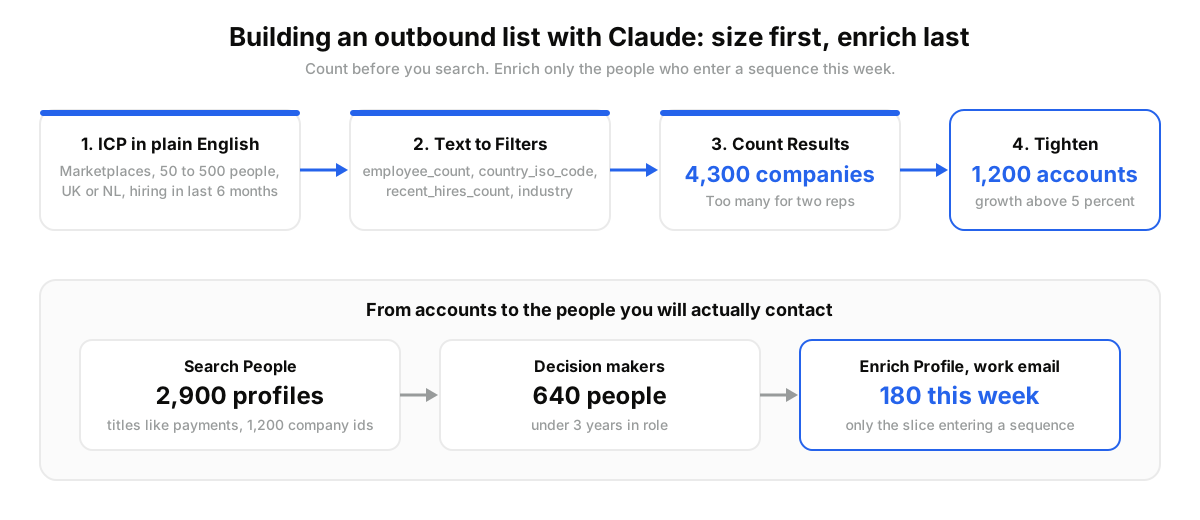
You size the ICP by turning a plain-English description into structured filters, counting the matches, and tightening until the total fits your team's capacity. Text to Filters does the translation. Count Results returns the number without running the search. Two reps cannot work 4,300 accounts, so you cut before you pay.
One GTM newsletter names the first failure of outbound bluntly: you emailed the wrong people, because the list was just big. Sizing fixes that.
Here is how a two-rep team at a Series A fintech infrastructure startup in London did it. Their ICP: marketplaces with 50 to 500 employees, headquartered in the UK or the Netherlands, hiring in the last six months.
Text to Filters produced the columns: industry like "marketplace", employee_count in the 51-200 and 201-500 ranges, country_iso_code in GB and NL, recent_hires_count above 3. Count Results came back at 4,300 companies.
Too many. They added employee_growth_6m above 5 percent and founded_year after 2015. The count dropped to 1,200. That is a quarter of work for two reps, so they ran it.
As one of the reps put it: "I would rather have 1,200 companies we actually fit than 5,000 we hope we fit."
How Do You Go From Accounts to Decision Makers?#
You go from accounts to decision makers with one Search People call per batch, filtered on current_company_id from the account list and current_title on the titles you sell to. Seniority and tenure filters cut the noise. The result is a person list that inherits the account logic instead of guessing at it.
The London team fed their 1,200 company ids into Search People, with current_title in Head of Payments, VP Payments, Director of Payments, plus current_title like "payments" for the odd titles. At 1,000 results per request, the pass took three calls.
That returned 2,900 people. A tenure filter, years_in_current_position under 3, kept the ones still settling into a role. That left 640 decision makers.
The mistake most teams make sits right here. They enrich all 2,900. A search returns 500 people, you act on 40, so you enrich the 40. Enrich Profile with enrich_work_email runs only on the people entering a sequence this week. For the London team that was 180.
That discipline is what keeps cost flat: you pay for the 180 emails, never the 2,720 you did not touch.
POST https://api.dataforb2b.ai/search/people
api_key: YOUR_API_KEY
{ "filters": { "op": "and", "conditions": [
  { "column": "current_company_id", "type": "in", "value": ["cmp_1", "cmp_2"] },
  { "column": "current_title", "type": "like", "value": "payments" },
  { "column": "years_in_current_position", "type": "<", "value": 3 }
] }, "count": 1000 }
Builders can run this against live data today. Start on the free tier on the pricing page.
Why Does the List Go Stale, and How Do You Stop It?#
The list goes stale because people change jobs, companies get acquired, and your own pipeline moves. Every week without a refresh adds wrong titles, bounced emails, and customers still marked as targets. A weekly routine that re-runs the filters and applies the suppression list catches that before a rep does.
The routine has five moves, and Claude runs them in order.
- Re-run the account and people filters. Only new matches enter the list. Existing ids are skipped.
- Dedupe on company id and person id, not on names. "Acme Water" and "Acme Industrial" resolve to one id or two, and the id decides.
- Apply the suppression list: current customers, competitors, and accounts with an open opportunity in the CRM.
- Remove anyone whose current_company_id no longer matches their account. A job change monitor can push this the same day instead of waiting for the weekly pass.
- Export the delta to the sequencer and CRM. New people in, departed people out, nothing re-sent.
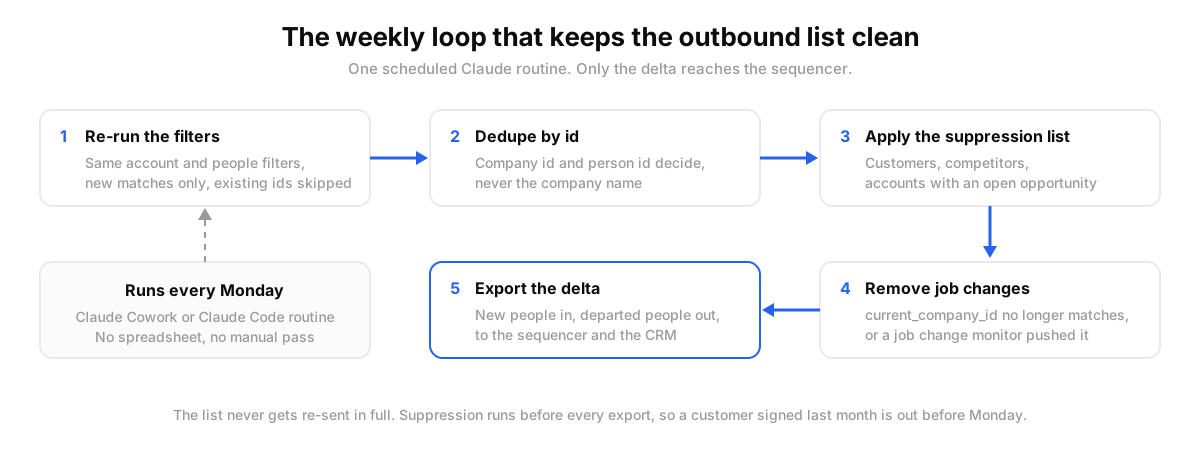
When we tested this loop, suppression caught the worst mistake: a customer who signed last month was still in the target list. The weekly pass removed them before the Monday send.
Who Should Build Their List This Way?#
This fits teams that run outbound every week and already have a CRM and a sequencer in place. It fits GTM engineers who would rather own the list in Postgres than in a vendor's UI. It is overkill for a founder sending ten hand-written emails a month.
The trade-off is honest. You give up the drag-and-drop comfort of a spreadsheet tool for a process the agent controls directly. That control is what makes the refresh, the suppression, and the audit trail possible.
You are probably thinking this needs an engineer. It needs one API key and the MCP connection. A search is a single request, and Claude writes the filter groups for you from the plain-English ICP.
In one r/gtmengineering thread, a practitioner noted that most Clay agencies now use Claude Code more than any other tool for GTM work. The list is where that shows first, and a data layer like DataForB2B is what the agent queries underneath.
See how the data layer fits your stack. Grab an API key on the pricing page.
How Do You Run This Workflow in Claude?#
You run it by connecting the B2B data MCP server to Claude, describing the ICP once in plain English, and letting Claude size, search, enrich, and export. Then you turn that conversation into a weekly routine. Setup is a few minutes. The first list lands the same session.
- Create a free account at app.dataforb2b.ai/signup and copy your API key.
- In Claude, open Settings, then Connectors, and add https://mcp.dataforb2b.ai/mcp. The same server works with any MCP-compatible agent: Cursor, VS Code, ChatGPT, or a custom agent.
- Paste a prompt like: "Build my outbound list. ICP: marketplaces, 50 to 500 employees, UK or Netherlands, hiring in the last 6 months. Count first and tighten until under 1,200 accounts. Then find Heads of Payments, VP Payments, and Directors of Payments with under 3 years in role. Enrich work emails for the first 180 only. Exclude every domain in my customers.csv."
- Save it as a weekly scheduled routine in Claude Cowork, or a Claude Code routine for technical teams, that refreshes the filters, dedupes by id, applies the suppression list, and exports the delta to the sequencer.
A list that maintains itself is worth more than a list twice the size. Build the first one this week. Start on the free tier on the pricing page and let Claude run the Monday refresh from then on.
Frequently asked questions
- How many accounts should an outbound list have?
- As many as your reps can work in a quarter, not as many as the filters return. A common rule is 300 to 600 accounts per rep for a personalised motion. Count the matches first, then tighten the ICP filters until the number lands in that range before running the search.
- How do you keep an outbound list fresh with Claude?
- Schedule a weekly routine that re-runs the account and people filters, adds only new matches, dedupes by company and person id, applies the suppression list, and removes anyone whose current company changed. A job change monitor can push those departures the same day instead of waiting a week.
- How do you avoid contacting existing customers or competitors?
- Keep a suppression list of customer domains, competitor domains, and accounts with open opportunities, and apply it on every refresh before the export. Match on company id or domain rather than company name, because names vary and ids do not. Claude reads the CRM export and drops the matches automatically.
- Can Claude find verified work emails for the list?
- Yes. Claude calls Enrich Profile with the work email option for each person entering a sequence, and the email is returned when it exists. Enrich only the people you will contact this week, not the whole list. That keeps the cost proportional to the outreach you actually send.
- Do you need Clay to build an outbound list with Claude?
- No. Clay is an orchestration table with a marketplace of providers. Claude with an MCP data server queries the same kind of data directly and writes the result to your database or sequencer. Clay remains useful if your team lives in tables and wants many providers in one waterfall.