How to Automate GTM Workflows With Claude: 4 Routines (2026)
Learn how to automate GTM workflows with Claude: four scheduled routines for signals, outbound lists, inbound scoring and CRM hygiene on one B2B data layer.
Most go-to-market (GTM) workflows are four jobs on a loop. Find who to talk to. Notice when they are ready. Sort what comes inbound. Keep the CRM honest.
Claude can run all four as scheduled routines on one data layer. No table tool in the middle. This guide shows how to automate GTM workflows with Claude: the four routines, the endpoint chain behind each, the cadence, and where a terminal agent honestly falls short. Searches for "gtm engineer" are up 409% on Google Trends over the last 12 months. Those people are building this.
Key Takeaways#
- Four routines cover most GTM work: signal triage daily, list refresh weekly, inbound scoring hourly, CRM re-tiering quarterly.
- Each routine is one chain of data endpoints plus one scheduled Claude task. No spreadsheet hand-offs.
- Scheduling and live data come from routines, MCP, and webhooks. CRM write-back still needs your CRM's own API.
- Start on the free tier, test one routine by hand, then schedule it.
What Does Automating GTM Workflows With Claude Mean?#
Automating GTM workflows with Claude means giving a scheduled Claude routine a B2B data layer over MCP, so it can search companies and people, enrich contacts, listen for signals, and hand results to your CRM or Slack without a person clicking through a table. The routine decides. The data layer answers.
Claude Cowork runs scheduled tasks for people who never open a terminal. Claude Code runs routines for developers who want files and git in the loop. Both connect to the same MCP server.
The data side is DataForB2B: 800M+ profiles and 75M+ companies over REST, MCP, and webhooks. Search, enrich, monitor. That is the whole vocabulary a GTM routine needs.
What This Setup Is Not#
This is a set of routines on a data API, not a product you log into. Three categories of tools sit next to it and get confused with it, and each one still has a job. The routines decide and the data layer answers. These tools send, store, or chain.
- Not a GTM platform. Clay and SyncGTM give you tables, waterfalls, and a UI. Here Claude holds the logic and your database holds the rows. See the architecture without a table tool.
- Not a sequencer. Instantly and Smartlead send the emails. The routines here decide who goes into the sequence and why.
- Not a workflow builder. n8n and Zapier chain triggers. A Claude routine reasons over the data before it acts.
How Does the Daily Signal Routine Work?#
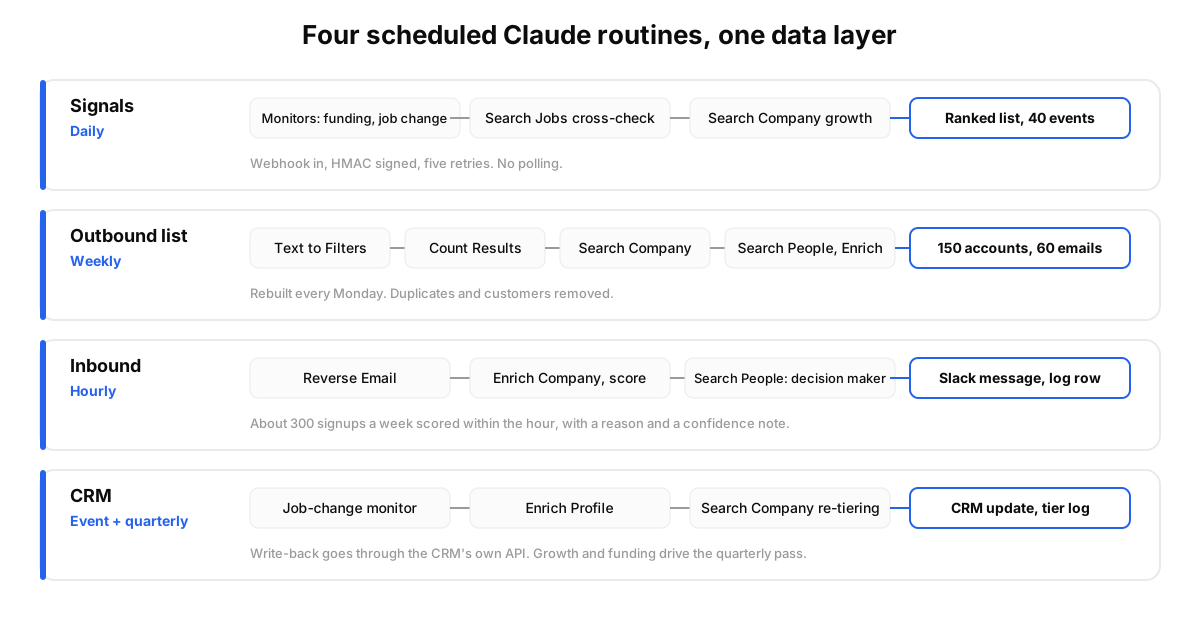
The signal routine listens for funding rounds, job changes, and post engagement through monitors, cross-checks each event against hiring velocity, and posts a ranked list every morning. Monitors deliver events by webhook with an HMAC signature and five retries, so nothing depends on Claude polling.
The chain: one monitor per signal, a watch list, a webhook URL. On each event the routine calls Search Jobs for open roles and Search Company for six-month growth. A raise with no hiring is noise. A raise with 12 open roles is a call.
Cadence: daily. Output: accounts, the signal, the evidence, a suggested opener.
Full build: how to detect buying signals with Claude.
How Does the Weekly Outbound List Routine Work?#
The outbound list routine turns a plain-English ICP into filters, sizes the market before spending anything, pulls matching companies and their decision makers, enriches a verified work email, and rewrites the list every Monday with duplicates and existing customers removed. The list stays fresh because it is rebuilt, not patched.
The chain: Text to Filters turns "Series A fintechs in New York, 20 to 200 people, hiring in sales" into conditions. Count Results sizes the pool. Search Company returns accounts, Search People the VP Sales at each. Enrich Profile adds an email only for people a rep will contact.
Cadence: weekly. Output: an import-ready file and a diff of what entered and left.
Details: how to build an outbound list with Claude.
How Does the Hourly Inbound Routine Work?#
The inbound routine takes the one field a signup form reliably captures, a work email, resolves it to a person and a company, scores fit from size, growth, and funding, and routes the lead to Slack with a reason. It runs hourly, so a signup at 9:12 is scored by 10:00.
The chain: Reverse Email resolves the person. Enrich Company adds firmographics and growth. Search People finds the real decision maker when the signup is an intern. The routine writes a score, one line of reasoning, and a confidence note when data is thin.
One practitioner on Reddit who built this flow added a rule worth copying: never trust one source for size or funding stage on small companies. Cross-check a recent round against actual hiring before a lead gets a high-priority tag.
Cadence: hourly. Output: a Slack message per qualified lead and an auditable log row.
Walkthrough: how to qualify inbound leads with Claude.
How Does the Quarterly CRM Routine Work?#
The CRM routine keeps records true in two rhythms: a job-change monitor fires the day a decision maker moves, and a quarterly pass re-tiers every account on headcount growth and last funding date. The first catches individual changes. The second catches drift across the whole book.
The chain: a job-change monitor on your contact list. On an event, Enrich Profile pulls the new role, and the routine writes it through your CRM's own API. Quarterly, Search Company reads employee_growth_6m and last_funding_date for every account, and tiers move.
A RevOps lead on Reddit put it plainly: a good RevOps AI system has little to do with the model and almost everything to do with the data layer underneath. Get that right and a cheap model handles the last mile.
Cadence: event-driven plus quarterly. Output: CRM fields that match reality, plus a tier log.
Build notes: how to build a RevOps agent with Claude.
What Do These Routines Look Like by Team?#
The same four routines change shape by vertical, and the endpoints never do. What changes is the filter set, the signal you watch, and where the output lands. A sales team wants a sequencer, a recruiting team wants a shortlist, an investment team wants a pipeline view.
- Sales tooling. A two-rep team at a Series A dev-tools company runs all four: Monday refresh over 1,200 accounts, hourly scoring of about 300 signups a week, daily triage of 40 signal events, quarterly re-tiering of 900 CRM accounts.
- Recruiting tooling. The signal routine watches engineers who just changed roles; the list routine rebuilds a candidate pool by skill each week.
- Investment tooling. The signal routine listens for funding and founder moves; the quarterly pass re-scores pipeline companies on headcount growth.
One builder on r/gtmengineering wired enrichment and signal-based personalisation into a single Claude Code agent, calls it once, and reckons it "saves about ten hours a week." Another noted that most Clay agencies now use Claude Code more than anything else for GTM work.
Where Does Claude Alone Fall Short?#
A terminal agent by itself has no persistent scheduling, no built-in CRM connectors, no waterfall enrichment, and no team collaboration. That list comes from SyncGTM's own guide, and it is accurate for bare Claude Code. The fix is not a platform. It is three additions.
Scheduling: Cowork tasks or Claude Code routines. Live data: the MCP data layer and monitors, no cron job of your own. Storage: Postgres or your CRM holds the rows.
Two limits stay real. CRM write-back needs the CRM's own MCP or API. Waterfall enrichment is a design choice: one live source per field instead of five cached ones stacked. When we tested both, the live path had fewer stale employers to reconcile.
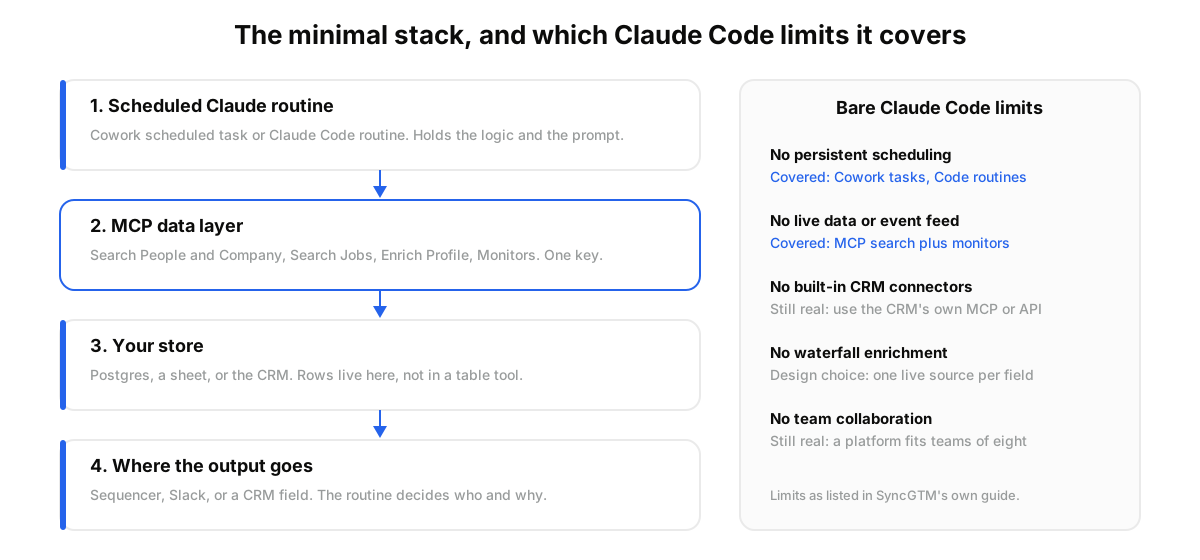
This fits teams that already run GTM logic in prompts and want it on a clock. It does not fit a team of eight living in shared tables with viewer roles and per-column budgets. A platform is simpler there. The trade-off: you give up the UI and take control of the logic and the data.
You are probably thinking this needs an engineer to maintain. It needs one API key, one MCP connection, and four prompts you have read twice. Grab a DataForB2B key on the pricing page and start with the routine that hurts most.
How Do You Run These Workflows in Claude?#
You run the four routines by connecting the data layer to Claude once, testing each workflow as a conversation, then saving the working prompt as a scheduled task on its own cadence. The first routine takes an afternoon. The fourth is usually done by the end of the week.
- Create a free account at app.dataforb2b.ai/signup and copy your API key.
- In Claude, open Settings, then Connectors, and add https://mcp.dataforb2b.ai/mcp. The same server works with any MCP agent: Cursor, VS Code, ChatGPT, or a custom one.
- Paste a prompt for one routine: "Rebuild my outbound list: Series A fintechs in New York, 20 to 200 employees, that posted a sales role in the last 30 days. Count the pool first. Return the top 150 accounts, the VP Sales at each, and a verified work email for the 60 highest-growth ones. Skip anyone on my suppression list."
- Once the output looks right, save it as a scheduled routine, one per cadence: weekly list, hourly inbound, daily signals, quarterly CRM pass. Cowork does this without a terminal; Claude Code routines do the same for developers.
The mistake most teams make is scheduling all four on day one. Run one by hand for a week, fix the filters, then put it on the clock.
Four routines, one data layer, no Friday CSV shuffle. Start on the free tier from the pricing page, run the signal routine by hand tomorrow, and schedule it once it earns its place.
Frequently asked questions
- Which GTM workflows can Claude automate?
- Four cover most of the work: buying signal triage, outbound list building and refresh, inbound lead qualification and routing, and CRM hygiene with account re-tiering. Each is a chain of search, enrich, and monitor calls plus one scheduled Claude routine. Competitor monitoring and candidate sourcing use the same pattern with different filters.
- Do you need Claude Code or is Claude Cowork enough?
- Cowork is enough for all four routines if the output goes to Slack, a file, or a connected app. Its scheduled tasks run without a terminal. Choose Claude Code when you want scripts, a local database, git history, or a custom write-back into your CRM. Both connect to the same MCP data layer.
- Can Claude run GTM workflows on a schedule?
- Yes. Claude Cowork scheduled tasks and Claude Code routines run a saved prompt on a cadence, hourly, daily, weekly, or quarterly. Event-driven work comes from monitors: a webhook fires on a job change or funding round, signed with HMAC and retried five times, so the routine reacts instead of polling.
- Does this need a CRM?
- No. The routines write to whatever store you point them at: a Postgres table, a Google Sheet, Slack, or a CRM. A CRM helps for the quarterly re-tiering routine because tiers live there. If you use one, write-back goes through the CRM's own API or MCP server, not through the data layer.
- How much data does an automated GTM workflow consume?
- Less than a table tool, because the routine enriches only people it will contact. A weekly list of 150 accounts with 60 enriched contacts, hourly scoring of 300 signups, and daily triage of 40 events fits comfortably in a starter plan, and the free tier is enough to test all four routines by hand first.