How to Track Job Changes With Claude (2026)
Learn how to track job changes with Claude using a scheduled search and a simple diff, no infrastructure required to catch the mover before your CRM does.
Ask Claude for help with a job change and it assumes you're job hunting. Resume feedback. Interview prep. Salary scripts. That's nearly every result for this exact phrase today.
None of those results explain how to track job changes with Claude when the person moving is someone else, not you.
So here's the real question. What does your pipeline do the day a champion switches companies? Most CRMs do nothing for weeks.
You don't need new infrastructure to fix that. A search you rerun on a schedule, compared against the last run, does the job inside Claude itself. No infrastructure required.
Key Takeaways#
- A scheduled routine that reruns a years_in_current_position filter catches recent movers with no infrastructure.
- Diff each new run against the last one to surface who just moved.
- Profiles are refreshed every 30 days, so a weekly cadence is plenty.
- Stack the job-change filter with a funding check so a real buying window outranks a lateral move.
What Actually Counts as a Job Change Signal?#
A job change signal is a data point that flags a new employer, marks a new title, or shows short tenure at the company. It marks the moment a decision maker's authority and budget reset. Often before their own team knows.
The most useful column for this is years_in_current_position. Filter it under 0.25. That's roughly three months or less in the role.
Pair it with current_company_size or current_company_industry. That keeps the list relevant to accounts you actually sell into. All three sit in the same Current Job filter family, alongside current_title and current_employment_type.
For the broader case on why this signal matters at all, the job change signals for AI agents piece covers that ground. This one is the practical setup, not the pitch.
Building a Watch List From Closed Deals#
A watch list starts with people already in your pipeline, not a fresh slice of the market. Not cold names. Pull every closed-won champion, every closed-lost decision maker, and every current customer with a renewal coming up. That list is what the scheduled search runs against.
Best for: a defined account list, a champion-tracking motion, or a renewal book with named contacts.
Not for: cold, unqualified lists where you don't know the person yet. Find new leads first with the guide to finding B2B leads with Claude. Then decide who earns a spot on the watch list.
The full signal catalog behind this lives in the buying signals API. Job change is one entry among several, alongside funding, founder moves, and post engagement.
Why Use a Scheduled Search?#
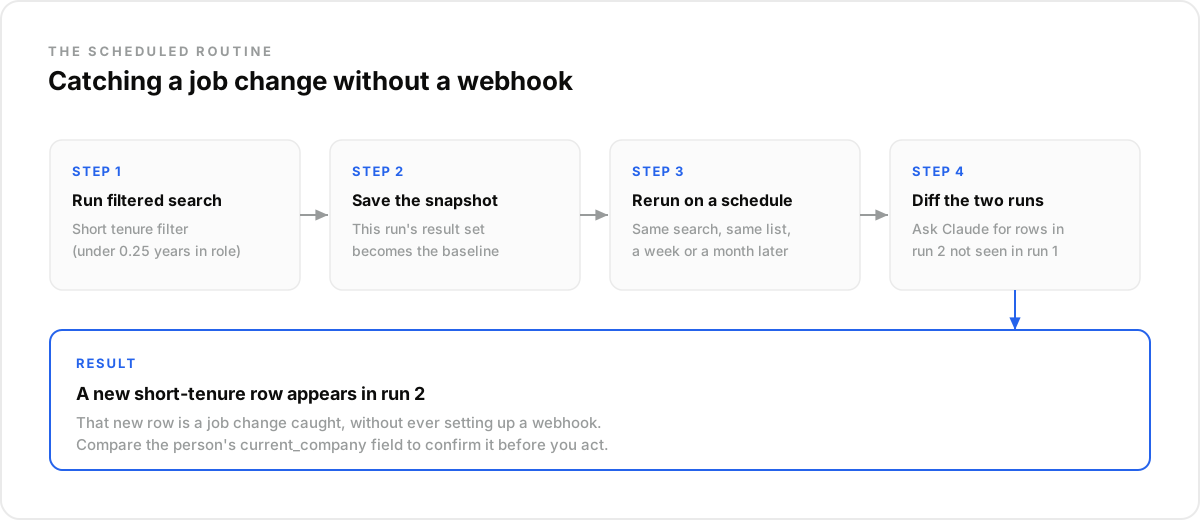
A scheduled routine needs no server, no endpoint, and no signing secret. Claude reruns a saved search on your cadence. You compare each new set to the last one.
Problem: a sales team tracks 80 named accounts by memory and the occasional profile check. A champion moves. Nobody notices for a month.
Proof: connect the data source in Claude, and save a Search People query filtered by current_company_id for those 80 accounts and years_in_current_position under 0.25. Turn it into a scheduled task that reruns every Monday. Week one returns 340 matches as a baseline. Week three returns 344: four new short-tenure profiles that weren't there before. One of them is a VP at the account your rep has been chasing for two quarters.
Payoff: the rep gets a warm reason to reach out within weeks of the move, not at renewal. No infrastructure required.
Want to see the full signal set beyond job change? Check plans and limits before you scale this routine past one team's accounts.
What This Workflow Is Not#
This workflow answers one narrow question: has this specific person's role changed recently? It isn't a full picture of an account. It isn't a finished decision on its own. Treat the result as a lead into further research, not a verdict. One data point, not a strategy.
- Not a CRM replacement: it feeds a signal into whatever system already owns the account.
- Not a guess from Claude's training data: every match comes from a search against profiles refreshed every 30 days.
- Not the same as a notification you might miss in a feed. It's a query you control and rerun on your own schedule.
How Do You Avoid Acting on a Stale Alert?#
The biggest objection to any job change signal is trust. Is this current, or just a data artifact dressed up as news? The fix is cheap. Cross-check the new current_company value against the last run, then re-enrich before you let anyone draft outreach off it.
Problem: Priya runs sales ops at a 40-person outbound tooling startup. Her weekly routine flags a contact whose current_company field switched from Acme to Globex overnight.
Proof: before looping in the rep, Priya calls /enrich/profile on that one record and reads the full experience history. The profile still shows Acme. Same title. Same three-year tenure. The Globex value was a sync artifact from a data refresh, not a real move.
Payoff: the rep never sends a congratulations note to someone who didn't go anywhere. No wasted send. The watch list stays clean. Trust in the alert holds.
Stacking Job Change With Funding Signals#
A job change alone doesn't tell you if the move matters. Run the tenure filter alongside a funding check on the same account list. That way, a lateral move ranks below a move into a company that just raised. Both checks run against the same watch list. No extra tooling.
The same data layer exposes current_company_has_funding and current_company_funding_stage filters. That second check happens without leaving the search you're already running. One query, two questions answered.
How Do You Run This Workflow in Claude?#
Running this in Claude takes three things: a connected data source, a saved search, and a schedule. Open Claude's settings and add the MCP connector at mcp.dataforb2b.ai. Save your filtered Search People query. Turn it into a scheduled task on the cadence you pick.
The connector works with any MCP-compatible agent, not just Claude. Cursor, VS Code, ChatGPT, and custom agents can all point at the same endpoint. Not a big lift, and not a one-tool commitment.
{
  "endpoint": "POST https://api.dataforb2b.ai/search/people",
  "filters": {
    "current_company_id": { "in": ["acct_1", "acct_2", "acct_3"] },
    "years_in_current_position": { "<": 0.25 }
  }
}
Ask Claude to compare each run's results against the last one. List only the new rows. That single instruction is the whole diff.
Set up the routine on your own watch list. Start the free trial and point it at a small list before you scale it across the whole pipeline. Full details are on pricing.
Frequently asked questions
- Does Claude check for job changes automatically, or do I have to keep asking it?
- With the scheduled-routine approach, a Claude task reruns the filtered search on a cadence you pick. It compares results to the last run automatically. Your part is the setup, and reacting when a new row shows up.
- How many contacts or accounts can I put on one watch list?
- Your saved filter can hold a full pipeline or an org-wide champion list. There's no hard cap on names. Usage depends on the searches and enrichments the routine runs against your plan's monthly record quota, not on the size of the list itself.
- What happens when several tracked contacts change jobs at once?
- A diff against several people just returns multiple new rows in the same pass. Have Claude triage the batch instead of acting on the first hit.
- Can I combine the job-change signal with other signals to prioritize which alerts matter?
- Yes. Run the tenure filter alongside a funding check on the same account list. That way a lateral move ranks lower than a move into a newly-funded buyer. It takes one extra filter on a search you're already running.
- How do you make sure a job-change alert is real and not stale data?
- Cross-check current_company against the previous run. Re-enrich the profile before drafting outreach off a change that might just be a data refresh, not a real move.