Parallel FindAll Review (2026): Cost, Limits, and Fit
A hands-on Parallel FindAll review: the published cost formula, where web-generated lists beat a database, where structured B2B filters win, and how to test.
Ask Parallel FindAll for "every dental practice in Ohio with a 4+ star Google rating" and it comes back with a list, a citation per field, and a confidence score. No database has that column. FindAll builds it from the web.
Ask it for "Series A fintech companies in New York that grew headcount 20% in six months" and the story changes. That query has columns. A structured B2B API answers it in one request, at a price you know up front.
This Parallel FindAll review covers what FindAll does, what it costs, where it beats any database, and where a structured filter beats it. Parallel is up 241% on Google Trends in a year. The question is what to point it at.
Key Takeaways#
- FindAll is web-generated, not database-backed. It generates candidates from web data, evaluates each against your match conditions, and enriches matches with citations.
- Pricing is fixed plus per match. Base $0.25 + $0.03 a match, core $2 + $0.15, pro $10 + $1. Enrichments add per-match cost.
- It is asynchronous. Runs take 10 seconds to 2 hours, capped at 300 runs an hour.
- Structured criteria are cheaper elsewhere. Funding stage, headcount growth, and people data live in columns a B2B API filters synchronously.
What Is Parallel FindAll?#
Parallel FindAll is a web-scale entity discovery API that turns a natural language query into a structured dataset of companies, people, or other entities, validates each candidate against explicit match conditions, and enriches the matches with cited fields. It launched in November 2025 as part of Parallel's Web Agent APIs.
The entity can be almost anything: companies, people, locations, dental practices. Parallel, founded by Parag Agrawal, also runs the Search API that topped the Artificial Analysis Search Index in August 2026. That ranking measures Search, not FindAll, but the same web index sits underneath.
What FindAll Is Not#
FindAll sits between three categories builders already know, and it is none of them: not a search API, not a curated database, not a GTM app. Placing it correctly before the first run saves wasted spend, because each category answers a different question.
- Not a search API. Exa or Parallel's own Search return pages and excerpts. FindAll returns entities that passed a test, with the reasoning attached.
- Not a curated database. Crunchbase and PitchBook maintain records. FindAll generates candidates fresh each run, so coverage depends on what the web says today.
- Not a CRM or a GTM app. No table, no sequencer, no UI beyond the developer platform. You build the workflow around it.
How Does FindAll Work?#
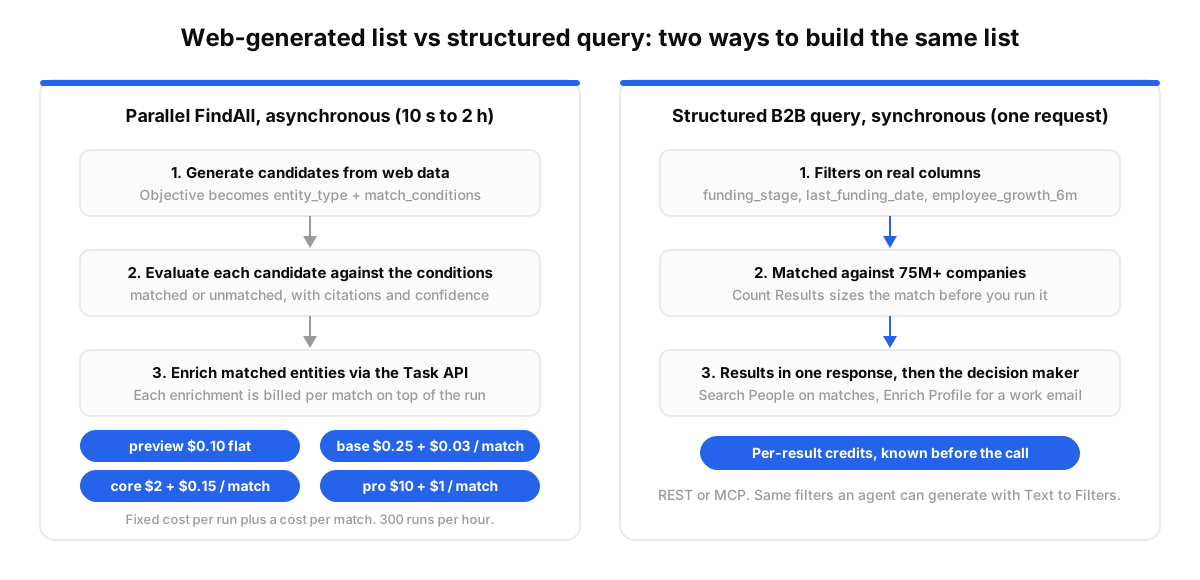
FindAll runs a three-stage pipeline: it generates candidates from web data, evaluates each one against your match conditions, then extracts enrichments for the matched set through Parallel's Task API. Every evaluated field can carry a basis: citations, reasoning, and a confidence score. The whole run is asynchronous.
The API is four calls. Ingest turns your sentence into a schema with an entity_type and match_conditions. Run starts the job. Poll checks status. Fetch pulls the snapshot, where each candidate is generated, matched, or unmatched.
The generator sets the depth. Preview evaluates 5 to 10 candidates. Base searches broadly, core goes deeper for 20 to 50 matches, pro digs for rare entities. One warning from the docs: "founded after 2023" can be read as "within the last year". Write explicit ranges and run preview first.
How Much Does FindAll Cost?#
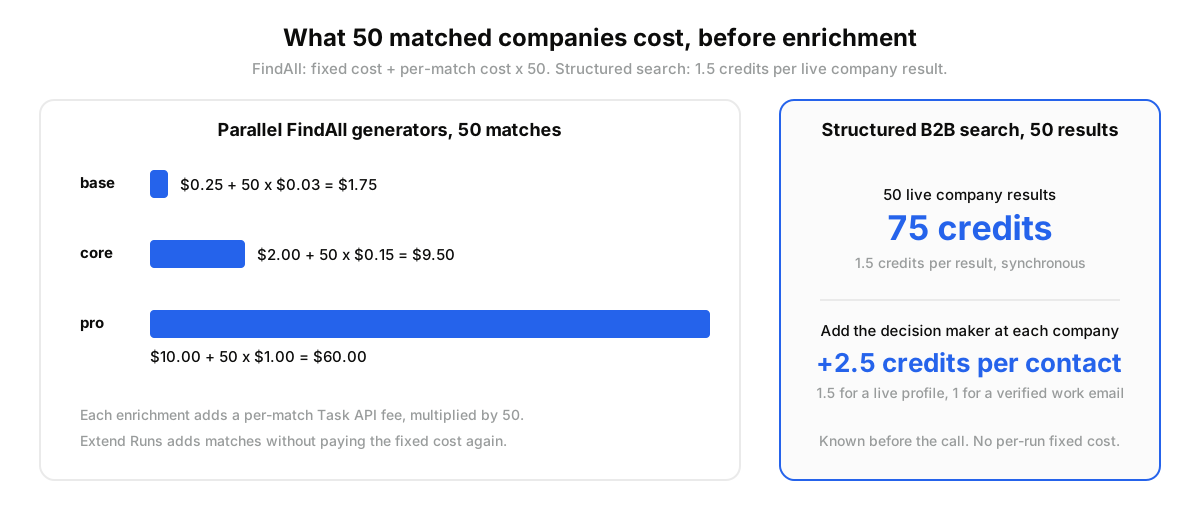
FindAll charges a fixed cost per run plus a cost per match, set by the generator: preview is $0.10 flat, base is $0.25 plus $0.03 a match, core is $2.00 plus $0.15, and pro is $10.00 plus $1.00. Enrichments add a per-match fee at Task API processor rates.
Total = fixed cost + (per-match cost × matches). Fifty matches on core is $2 + $7.50 = $9.50 before enrichments. The same fifty on pro is $60. Extend Runs adds matches later without the fixed cost again.
The catch is variance. Enrichments run on every match, and you can stack several, so a high-match query with three enriched fields costs several times the bare run.
Where Does FindAll Shine?#
FindAll is at its best on criteria no database stores as a column: review ratings, certifications, product claims, portfolio membership. When we tested the pattern, a two-person GTM team at a Series A dev-tools company used it for exactly that kind of list, and it did the job.
Their query: mid-market SaaS companies with a public SOC2 Type II trust center that mention Kubernetes on their careers page. Nobody sells that filter. They ran preview, tightened one condition, then core with a match limit of 50. Total: $9.50, with a citation on every SOC2 claim their SDR could quote.
Parallel's own 40-query benchmark puts FindAll Pro at 61% recall. Treat that as a vendor number. The mechanism is real though: multi-hop reasoning, one candidate at a time, finds the long tail.
Where Does FindAll Struggle?#
FindAll struggles when the criteria are already structured, when you need people data, and when latency or cost predictability matter. Those are the three jobs a B2B data API was built for, and the gap shows fast once your query contains funding stages and headcount.
Take a seed fund analyst who wants every US company that raised a series_a in the last 90 days, with 11 to 50 employees and 20% headcount growth in six months. That is four columns: funding_stage_normalized, last_funding_date, employee_count, employee_growth_6m. One structured query returns it. FindAll has to rediscover each company from the web.
People are the second gap. FindAll's people output is name, URL, and description. The VP Sales at each company, plus a verified work email, is a separate enrichment on a separate meter.
Then timing. Ten seconds to two hours suits a nightly list, not a live agent request.
The mistake most teams make is pointing FindAll at columns. As one r/gtmengineering builder asked, does anyone actually use these web APIs for prospecting? Only on the criteria your database lacks.
FindAll vs the Crunchbase API for Company Search#
FindAll generates company candidates from the web with citations; the Crunchbase API returns curated funding records from a maintained database; a structured B2B data API filters 75M+ companies on funding, growth, and location columns in one call. Which is better depends on whether your criteria are unstructured, financial, or firmographic.
Dozens of searches for this comparison already land on our Crunchbase API review. The short version:
- Pick FindAll when the condition lives on a website: a product claim, a certification, a review score, a hiring page.
- Pick Crunchbase when you need investor and round history as a curated source of truth.
- Pick a structured B2B API when the list is defined by funding stage, employee growth, industry, and country, and you also need the decision makers behind it.
Monitoring splits the same way. Parallel's Monitor API watches web pages. B2B signal monitors watch people and companies, pushing job changes, founder moves, and funding events to your webhook.
When Should You Pair FindAll With a Structured B2B API?#
Pair them when FindAll finds the accounts and a structured API has to find the people. FindAll hands you company names and URLs. DataForB2B turns each into the right decision maker with a verified work email, or answers the structured half outright, synchronously, from 75M+ companies and 800M+ profiles.
Before: 50 matched companies, each a name, a URL, and a cited claim. After: each carries its VP Sales, their tenure, and a work email the sequencer can use tonight.
This fits products whose agent answers at request time from firmographics and signals. It is the wrong fit if your entities are not companies or people. Ohio dental practices stay with FindAll. Start on the free tier on the pricing page.
Integration is one POST with a filter group; see the company data API and the funding signals guide. The MCP path skips even that.
How Do You Run a Side-by-Side Test?#
Run the same list twice: once through FindAll with core and a 50-match limit, once through structured filters in Claude over MCP. Compare coverage, latency, and cost on the identical query. The test takes an afternoon and costs about ten dollars on the FindAll side.
- Create a free account at app.dataforb2b.ai/signup and grab an API key.
- Connect the MCP server in Claude: Settings, then Connectors, then add https://mcp.dataforb2b.ai/mcp. The same server works with any MCP-compatible agent, including Cursor, VS Code, ChatGPT, and custom agents.
- Paste a prompt that mirrors your FindAll run: "Find 50 AI companies in the US that raised a Series A since January 2026 with 11 to 50 employees and at least 20% headcount growth in six months. For each, return the VP Sales and a verified work email."
- Diff the two lists, then turn the winning half into a scheduled routine so it rebuilds every Monday.
Grab an API key on the pricing page and run it against your own ICP. The MCP servers roundup lists the other connectors worth testing.
FindAll is a real step forward for lists only the web can build. The part with columns and people in it is faster in a structured layer. Start on the free tier on the pricing page and run both on the same query this week.
Frequently asked questions
- What is the Parallel FindAll API?
- Parallel FindAll is a web-scale entity discovery API. You describe a list in natural language, it generates candidates from web data, evaluates each against explicit match conditions, and enriches the matches with cited fields. It runs asynchronously and returns companies, people, or any other entity type.
- How much does Parallel FindAll cost?
- A fixed cost per run plus a per-match cost, set by the generator. Preview is $0.10, base is $0.25 plus $0.03 a match, core is $2 plus $0.15, and pro is $10 plus $1. Enrichments add per-match fees. Fifty core matches cost $9.50 before enrichment.
- What is the difference between Entity Search and FindAll?
- Entity Search is the synchronous counterpart, in public beta. It returns a ranked list of names, URLs, and descriptions in one to three seconds, optimized for recall, at $5 per 1,000 requests. FindAll is asynchronous, verifies every candidate, and adds enrichments and citations.
- FindAll or the Crunchbase API: which is better for finding companies?
- FindAll wins on criteria that only exist on websites: certifications, claims, reviews, hiring pages. The Crunchbase API wins on curated round and investor history. For lists defined by funding stage, headcount growth, and geography, plus the people inside those companies, a structured B2B data API answers faster at a fixed per-result price.
- When should you use DataForB2B instead of FindAll?
- When the query is already structured, when you need people and verified emails, or when the answer has to come back inside a live agent request. DataForB2B filters 75M+ companies and 800M+ profiles synchronously over REST or MCP and pushes job change, funding, and founder signals to your webhook.